Best Bookmark App for Designers & Creatives (2026 Guide)
Written by LinkVault Team
Designers and creatives collect endless inspiration — color palettes, typography examples, design systems, competitor sites, tutorials, tools. Browser tabs and Pinterest boards become overwhelming, and the usual problems follow: inspiration scattered across too many tools, no notes explaining what inspired you, no way to find that perfect reference during a project, client resources mixed with personal work, tool links buried in bookmarks, and no system for organizing by project or style.
This guide shows how designers can organize visual references properly.
Why Designers Need a Dedicated Inspiration Manager
Inspiration is the raw material of design work. You see a beautiful hero section on Dribbble, a clever micro-interaction on a product site, a perfect color combination on Pinterest, and a typographic treatment on a portfolio. You save them all — but where? Browser bookmarks dump everything into one folder. Platform saves lock your inspiration inside each tool with no cross-referencing. Your notes app has fragments with no links. When you start a new project and need that one reference from three weeks ago, you end up scrolling through five different platforms hoping you recognize the thumbnail.
A dedicated design inspiration library solves this by bringing every reference into one searchable place with context. Instead of just saving a URL, you save the link alongside a note about what specifically caught your eye — the way negative space frames the content, the warm earth-tone palette with a teal accent, the bold display font paired with a quiet body face. When you start a new branding project, you search "branding" or "logo" or the client name and instantly see every relevant reference you have collected, with your own notes explaining why each one matters. This transforms scattered saves into an actual working library that compounds in value with every project.
What Designers Need
Based on common creative workflows, these are the essential features for managing design inspiration that browser bookmarks and platform-specific saves cannot provide:
- Save inspiration with context notes
- Organize by project, client, or style
- Tag by design element (color, typography, layout)
- Quick reference library during work
- Tool and resource library
- Client-specific reference boards
- Access references from any device during client meetings
- Build mood boards with mixed-source references
Step-by-Step: Design Vault Setup in LinkVault
Follow these steps to build your design inspiration library. The initial setup takes about 10 minutes, and saving a new reference takes less than 30 seconds once it becomes a habit.
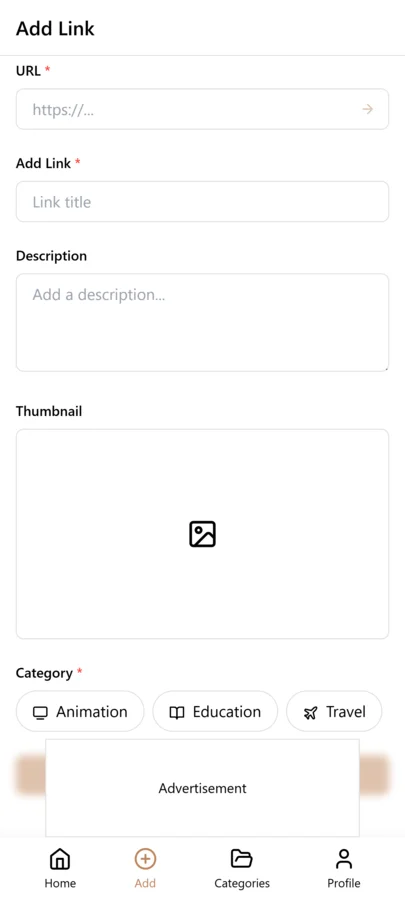
- Create categories: Inspiration, Clients, Tools, Tutorials, Competitors
- When you find inspiring design, copy the link
- Open LinkVault
- Tap + (Add Link)
- Paste the link
- Add notes: "Love the color gradient - landing page hero" or "Clean typography hierarchy - reference for Client X"
- Tag by style, element type, or project
- Save
Organizing by Project vs. General Inspiration
One of the biggest organizational decisions for designers is whether to organize by project or keep a general pool of inspiration. The answer is to do both, and tags make this effortless.
When you save a reference, tag it with both a style descriptor and a project name if applicable. A reference saved while working on the Acme branding project gets tags like "logo" and "acme" alongside "minimal" and "geometric." Later, when you search "acme" you see everything collected for that project. When you search "minimal logo" you see references across all projects that share that style. This dual-tagging approach means you never have to choose between project-specific organization and a general inspiration library — both views are always available through search, and a single reference can serve multiple purposes across different projects over time.
Tips for Designer Organization
These best practices come from designers who have used LinkVault to build working inspiration libraries across branding, web, product, and print projects:
- Always note what specifically inspired you
- Tag by design element for quick filtering
- Create project-specific tags for client work
- Separate active projects from general inspiration
- Save tool tutorials with use-case notes
- Build mood boards by filtering tags
- Archive completed project references
- Tag by medium: web, print, motion, 3D, packaging
- Save competitor references separately from inspiration
Building Client-Specific Mood Boards
Mood boards are a critical part of the design process, but most designers build them in isolation using screenshots or downloads. The problem is that when the client asks "where did you find this reference?" you cannot remember the original source.
LinkVault solves this by making every mood board reference a saved link with context. When you present a mood board, each reference has its original URL, your notes about why you chose it, and tags that connect it to the project. If the client wants to explore a direction further, you can pull up related references instantly. If they want to see more options in a similar style, you search the style tag and see everything you have collected. This turns the mood board from a static collage into a live, expandable collection that the client can understand and engage with. It also means that when you start a similar project months later, you can search the old project tag and instantly rebuild a starting mood board from proven references.
Building a Reusable Color and Typography Reference Library
Color and typography are two of the most reused elements in design work, yet most designers rebuild their references from scratch every project. You find a perfect color combination on a website, think you will remember it, and then three weeks later cannot recall the hex values or where you saw it. The same happens with typography pairings — you see a beautiful headline and body text combination, but by the time you need it for a project, the source is lost.
With LinkVault, you can build a permanent color and typography library that grows with every project. When you find a color palette worth keeping, save the page link and add notes with the actual hex values: "Warm earth tones: #C4A484, #8B7355, #2F2F2F with teal accent #2E8B8B." Tag it with "color" and a style descriptor like "warm" or "earth-tones." For typography, save the page and note the specific fonts: "Headline: Söhne Breit, Body: Inter at 16px, line-height 1.6." Tag with "typography" and descriptors like "editorial" or "clean-sans." Over months, you accumulate a curated library of proven palettes and pairings that you can search instantly. When a new project calls for a warm, editorial aesthetic, you search those tags and immediately have a starting point with exact values and original sources, saving hours of trial and error.
Saving Design System and Component References for Reuse
Design systems and component libraries are among the most valuable references a designer can collect, but they are also the hardest to keep organized. You come across a beautifully documented button component, a clever card layout pattern, or an entire design system documentation page from a company like Shopify or Atlassian. You save the link, but months later when you are designing a similar component, you cannot find it because it is buried in a generic bookmarks folder with no context.
The solution is to treat each design system reference as a structured entry in your library. When you save a component or design system page, add notes describing the specific pattern you want to reference: "Button component with three states, uses 8px border radius and 12px horizontal padding — good reference for SaaS dashboards." Tag it with "design-system" and the component type like "buttons" or "cards" or "navigation." You can also save entire design system documentation pages and tag them by the company, so searching "shopify-polaris" or "atlassian-design" surfaces the full system instantly. When starting a new project, search your component tags to see real-world examples of patterns you already know are well-executed. This approach turns scattered design system references into a practical pattern library that makes your component design faster and more consistent, because you are building on proven solutions rather than reinventing every element from scratch.
Common Design Organization Mistakes and How to Avoid Them
Designers collect a lot of references, but poor organization can make that collection useless when it matters most. These are the most common mistakes designers make when managing inspiration and references, along with practical ways to prevent each one:
- Saving inspiration without notes about what specifically caught your eye — always describe the exact element that inspired you so future-you knows why it was saved
- Using only one tag per reference, which makes cross-referencing impossible — add both style and project tags so references surface in multiple useful contexts
- Mixing competitor references with general inspiration in the same view — tag competitors separately so you do not accidentally present them as mood board material
- Never archiving completed project references — tag finished projects as "archive" so active work stays clean while old references remain searchable
- Saving only the homepage of a site without noting which section inspired you — add the specific page or section in your notes so you do not have to hunt for it later
- Not recording hex values or font names in the notes — capture the exact values at save time because you will not remember them later
- Creating too many narrow tags instead of a few versatile ones — keep tags broad enough to be reusable across projects
- Forgetting to save the original source for mood board references — always preserve the URL so you can credit the designer if the client asks where a reference came from
Frequently Asked Questions
Can I organize by design style?
Yes. Use tags for styles like minimalist, bold, organic, brutalist, and more. A single reference can carry multiple style tags, so searching "minimalist" surfaces every reference matching that aesthetic across all projects and categories.
How do I separate client work from personal inspiration?
Use categories for each client and a separate "Inspiration" category for general references. Tags provide an additional layer — tag client references with the project name so you can search across categories when needed.
Can I save Dribbble and Behance links?
Yes. Save any design portfolio or inspiration link with notes about what you liked. The original URL is preserved so you can always credit the source or return to the full portfolio for more context.
How do mood boards work in LinkVault?
Save each reference as a link with project tags and notes about why you chose it. When presenting, search the project tag to see your full mood board with original sources. If the client wants more options, search related style tags to surface additional references you have collected over time.
What happens to references after a project ends?
Do not delete them. Tag completed project references as "archive" and keep them searchable. Months later, a new project with similar requirements can reuse those references instantly — your inspiration library compounds in value with every project you complete.
How do I build a reusable color palette library?
When you find a color combination worth keeping, save the page link and add the actual hex values to your notes. Tag with "color" and a style descriptor like "warm" or "minimal." Over time, you accumulate a curated library of proven palettes with exact values and original sources that you can search instantly when a new project starts.
What is the best way to save design system references?
Save each component or design system page with notes describing the specific pattern you want to reference, such as the border radius, padding, or interaction states. Tag with "design-system" and the component type like "buttons" or "navigation." Also tag by company for full systems, so searching a name like the product instantly surfaces the complete documentation.
Should I save the original source URL for every inspiration reference?
Yes, always. The original URL lets you credit the designer if a client asks where a reference came from, return to the full portfolio for additional context, and verify the reference if your notes are incomplete. Saving the link takes the same amount of time as a screenshot but preserves far more useful information.