Best Bookmark App for Developers (2026 Guide)
Written by LinkVault Team
Developers save countless resources — documentation, Stack Overflow answers, GitHub repos, tutorials, tools, and API references. Browser bookmarks quickly become cluttered and impossible to search, and the usual problems follow: docs and repos scattered everywhere, no notes explaining why you saved a link, no way to find that one Stack Overflow answer, tool links mixed with learning resources, no way to organize by tech stack or project, and no way to retrieve anything during coding.
This guide shows how developers can organize technical resources properly.
Why Developers Need a Dedicated Resource Manager
Development is fundamentally a knowledge retrieval problem. You encounter an error, search for the solution, find it on Stack Overflow, fix the bug, and move on. Three months later the same error appears on a different project and you cannot remember which search terms you used or which answer actually worked. Your browser bookmarks have 200 entries with titles like "javascript - How to fix CORS error - Stack Overflow" and no indication of which solution you actually applied.
Browser bookmarks fail for developers because they store only titles and URLs. They cannot capture the context that makes a resource useful: which specific answer in a 50-answer thread solved your problem, which configuration change you made, which version of the library was involved, or which project you were working on when you needed it. A dedicated developer resource manager like LinkVault adds this context layer. When you save a Stack Overflow answer, you add a note like "CORS fix: set Access-Control-Allow-Origin in Express middleware, not in the frontend" and tag it "express" and "cors." When the same error surfaces months later, you search "cors" and instantly find the exact solution you used before, with your own notes explaining what worked. This turns one-time research into a permanent, searchable knowledge base that makes you faster with every bug you solve.
What Developers Need
Based on common development workflows, these are the essential features for organizing technical resources that browser bookmarks cannot provide:
- Save with context notes explaining the solution
- Organize by language, framework, or project
- Tag by tech stack and problem type
- Quick search during development
- Separate docs from tools from tutorials
- Track useful repos and packages
- Access resources from any device during pair programming
- Build a quick-reference system for frequent lookups
Step-by-Step: Dev Vault Setup in LinkVault
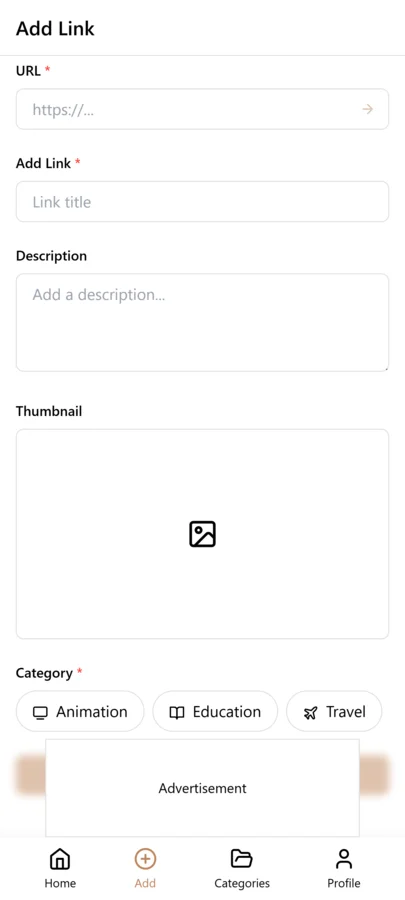
Follow these steps to build your developer resource vault. The initial setup takes about 10 minutes, and saving a new resource takes less than 30 seconds once it becomes a habit.
- Create categories: Docs, Tools, Repos, Tutorials, Snippets
- When you find a helpful resource, copy the link
- Open LinkVault
- Tap + (Add Link)
- Paste the link
- Add notes: "React hook for form validation - works great" or "Fix for CORS error in Express"
- Tag by language, framework, and problem type
- Save
Separating Docs from Tools from Learning Resources
Developers save three fundamentally different types of resources, and mixing them together creates confusion. Documentation pages are reference material you return to repeatedly during active development. Tool links are services or utilities you use periodically — deployment dashboards, database browsers, API testing tools. Learning resources are tutorials and courses you consume once to learn a new concept and rarely revisit.
The key is to create separate categories for each type. A "Docs" category holds API references, framework guides, and language documentation. A "Tools" category holds links to deployment platforms, monitoring dashboards, and development utilities. A "Tutorials" category holds courses, blog tutorials, and video walkthroughs. Within each category, tags provide cross-cutting organization — a React docs page and a React tutorial both carry the "react" tag, so searching "react" shows everything related to that technology regardless of which category it lives in. This separation keeps your active development references clean and fast to search while keeping learning materials available but out of the way.
Tips for Developer Organization
These best practices come from developers who have used LinkVault to build searchable resource libraries across multiple languages, frameworks, and project types:
- Explain the problem it solves in notes
- Tag by language and framework
- Add "quick-ref" tag for frequently accessed docs
- Save error solutions with the exact error message
- Organize tooling by purpose (testing, deployment, debugging)
- Tag learning resources by skill level
- Create project-specific tags for active work
- Note the library version that the solution applies to
- Save CLI commands with explanations in the text save feature
Building a Quick-Reference System for Frequent Lookups
Every developer has a set of resources they look up constantly — the regex cheat sheet, the Git rebase command syntax, the CSS flexbox properties, the Docker compose reference. These are not resources you learn once and remember. They are references you need to check dozens of times across your career. Yet most developers re-search for them every time because browser bookmarks provide no way to distinguish frequently needed references from one-time saves.
LinkVault solves this with a "quick-ref" tag. When you save a resource you know you will need repeatedly, tag it "quick-ref" alongside its technology tag. Searching "quick-ref" instantly shows your personal quick-reference library — every cheat sheet, command reference, and frequently needed doc in one place. This is faster than Googling because the results are already filtered to resources you have personally verified as useful, and your notes remind you of any quirks or modifications you discovered. Over time, this quick-reference collection becomes one of the most valuable parts of your development workflow, saving minutes of searching every single day.
Building a Code Snippet Library With Context
Code snippets are one of the most valuable things a developer can save, yet most snippet collections are useless within weeks of creation. The problem is that snippets saved without context are impossible to apply later. You save a clever JavaScript function, but three months later when you need it, you cannot remember what it does, what inputs it expects, or what project you originally used it in. The snippet becomes dead code that you are afraid to delete but cannot actually use.
The fix is to treat every snippet as a structured entry with context. When you save a snippet, whether as a GitHub gist link or through the text save feature, add notes that answer three questions: what does this code do, when should you use it, and what are the inputs and outputs. For example, instead of just saving a debounce function, your notes should say: "Debounce function for search input — use when you need to delay API calls until the user stops typing. Accepts a function and delay in milliseconds, returns a debounced version." Tag it with the language, the purpose, and any framework it relates to. Over months, this builds a snippet library that is actually searchable and reusable. When you need a debounce function for a new project, you search "debounce" and find the exact implementation with notes explaining how to use it, rather than re-searching the web and evaluating unfamiliar code. The context you add at save time is what transforms a collection of links into a practical development tool.
Managing API Documentation Across Multiple Projects
Modern developers rarely work with a single API. A typical project might involve a payment provider like Stripe, a database like Supabase, an authentication service like Auth0, and a hosting platform like Vercel — each with its own documentation site, its own structure, and its own quirks. Keeping all of this documentation accessible and organized is a real challenge, especially when you context-switch between projects that use different combinations of services.
LinkVault handles this by letting you tag API documentation by both the service and the project. When you save a Stripe documentation page, tag it "stripe" and "api" and the project name you are working on. Add notes about the specific endpoint or feature: "Stripe webhooks — use the checkout.session.completed event to fulfill orders, verify the signature with the Stripe-Signature header." When you switch to a different project that also uses Stripe, you can search "stripe" to see all your saved Stripe docs across every project, or filter by the specific project tag to see only the docs relevant to that codebase. This is especially useful when you return to a project after months away — instead of re-learning the API from scratch, you search the project tag and instantly see the specific documentation pages you found useful before, with your own notes explaining how you integrated them. This approach scales naturally as you add more services and projects, turning API documentation from a scattered collection of browser tabs into an organized, project-aware reference system.
Common Developer Bookmarking Mistakes and How to Avoid Them
Even experienced developers fall into habits that make their resource library less useful over time. These are the most common bookmarking mistakes developers make, along with practical ways to prevent each one:
- Saving Stack Overflow answers without noting which solution actually worked — always record the specific answer or code change that solved your problem
- Not recording the library or framework version in your notes — solutions break across versions, so note the version you were using when the fix worked
- Mixing one-time research with frequently needed references — use a "quick-ref" tag to separate resources you need constantly from those you needed once
- Saving only the root documentation URL instead of the specific page — deep-link to the exact section so you do not have to navigate again
- Forgetting to tag by project — add a project tag so you can surface all resources for a specific codebase when you return to it
- Deleting resources after a project ends — archive them instead, because the same problems often resurface in future projects
- Not capturing the error message in notes — save the exact error string so you can search for it when the same error appears again
- Saving snippets without explaining inputs, outputs, and use cases — a snippet without context is useless months later
Frequently Asked Questions
Can I save code snippets?
Yes. Use the text save feature for inline code snippets, or save GitHub gist links with explanatory notes. Tag snippets by language and purpose so searching "python sorting" or "react useEffect" surfaces the exact snippet you need.
How do I organize Stack Overflow answers?
Save the link and note the specific problem it solved, including the exact error message if applicable. Tag by language and error type. When the same error appears months later, searching the error message or tag instantly retrieves the solution you already verified.
Can I track GitHub repos I want to explore?
Yes. Save repo links with notes about what the project does and why it is interesting. Tag by language and use case so you can find repos for a specific purpose later — for example, searching "rust cli-tools" to find command-line utilities you bookmarked for evaluation.
How do I keep frequently used docs separate from one-time saves?
Use a "quick-ref" tag for documentation you return to repeatedly — cheat sheets, command references, and API lookups. Searching "quick-ref" shows only your frequently needed resources, filtered to ones you have personally verified as useful.
Can I share my resource library with teammates?
Yes. You can export your saved resources and share them with team members. This is especially useful for onboarding new developers — share your tagged collection of essential docs, tools, and tutorials so they start with a curated resource library instead of building one from scratch.
How do I build a code snippet library that stays useful over time?
Treat every snippet as a structured entry with context. When you save a snippet, add notes answering three questions: what does this code do, when should you use it, and what are the inputs and outputs. Tag it with the language, purpose, and any related framework. Over months, this builds a searchable library where searching a term like debounce instantly returns the exact implementation with notes explaining how to use it, rather than re-searching the web and evaluating unfamiliar code.
What is the best way to manage API documentation across multiple projects?
Tag each API documentation page by both the service and the project name. When you save a page, add notes about the specific endpoint or feature and how you integrated it. When you switch projects, filter by the service tag to see all saved docs for that API across every project, or filter by the project tag to see only docs relevant to that codebase. This is especially useful when returning to a project after months away — you search the project tag and instantly find the specific pages you found useful before, with your own notes explaining the integration.