Best Bookmark App for Fitness & Workouts (2026 Guide)
Written by LinkVault Team
Fitness enthusiasts save countless workout videos, nutrition articles, meal plans, and exercise tutorials every single week. The content is everywhere — a mobility routine from a trainer you follow on Instagram, a brutal HIIT session you found on YouTube, a protein-timing article a friend texted you, a TikTok challenge you screenshotted at midnight. Each platform has its own save button, but none of them talk to each other, and none let you search across everything you have collected.
Common fitness bookmark problems sound familiar to anyone who has trained for more than a few months: workouts saved across YouTube, Instagram, TikTok, and fitness blogs with no single place to find them; no notes to remember which routine was effective or what weights you used; difficulty organizing by muscle group or workout type; nutrition links mixed in with everything else; no way to find a quick 15-minute ab routine without scrolling for 20 minutes through a flat list of titles.
A dedicated bookmark manager changes the math. Instead of hoping you remember which platform a video lives on, you save it once with context — how it felt, what equipment it needs, which muscle group it targets — and search across everything later.
This guide shows how to build a searchable fitness library using LinkVault — one organized by muscle group, fitness goal, difficulty, and equipment available, so you always find the right workout in seconds instead of scrolling for minutes.
Why Fitness Content Needs a Dedicated Organizer
Fitness content is uniquely chaotic because it comes from so many sources. You follow a trainer on Instagram who posts a great mobility routine. You find a 20-minute HIIT video on YouTube that kicks your ass. A friend sends you a nutrition article about protein timing. You screenshot a TikTok workout challenge. Each platform has its own "save" feature, but none of them talk to each other, and none of them let you search across saves. You end up with fragments of a fitness library spread across five apps, none of which is useful on its own.
The result is that when you want to work out, you spend 15 minutes trying to find that one video you saved last month. You scroll through Instagram saves with no search function. You dig through YouTube history hoping the algorithm has not buried it. You check your browser bookmarks and find a flat list of URLs with titles like "FULL BODY WORKOUT" that tell you nothing about whether it was good, how long it took, or what equipment you need. You give up, do something random.
This gets worse over time. After six months of saving content across platforms, you might have 150 workouts scattered around — but you use the same 4 or 5 because those are the only ones you can find quickly. You are not lacking motivation or content; you are lacking a retrieval system.
A dedicated bookmark manager like LinkVault solves this by giving you one place to save fitness content from any source, with notes about how the workout felt, tags for muscle group and equipment, and search that works across everything. You save a YouTube workout once, note "great push day — used 20lb dumbbells, brutal finisher," tag it "chest" and "dumbbells," and three months later you search "chest dumbbells" and it is right there. No scrolling, no guessing, no wasted time between sets.
What Fitness Enthusiasts Need from a Bookmark App
Based on common fitness workflows and goals, these are the essential features for organizing workout and nutrition content. A fitness library is not a general-purpose bookmark collection — it has specific demands that a browser or platform save button cannot meet:
- Save workout videos with notes on effectiveness — "felt great," "too easy," "brutal finisher" — so you know what to revisit and what to skip
- Organize by category — Strength, Cardio, Nutrition, Mobility, Stretching, Recovery — so content type is clear at a glance
- Tag by muscle group (chest, back, legs, core, shoulders) or fitness goal (hypertrophy, endurance, fat loss, mobility)
- Quick access during workout sessions — search "leg day" and pull up your saved routines without unlocking your phone between sets
- Track which routines work best for you — add post-workout notes with weights used, reps achieved, and how it felt
- Build structured programs by filtering tags — e.g., search "push dumbbells intermediate" to assemble a full push day
- Note equipment requirements so you can filter by what you have at home vs what you need at the gym
- Cross-device access — save a workout on your phone at the gym, review it on your tablet at home
- Time-based tags so you can match a workout to the minutes you actually have — "15-min," "quick-hiit," "express-core"
Step-by-Step: Fitness Library Setup in LinkVault
Follow these steps to build a fitness library you can actually use during workouts. The setup takes 10 minutes and the payoff is immediate — by the end of the first week you will wonder how you trained without it.
- Create categories that match your fitness focus: Workouts, Nutrition, Meal Plans, Recovery, Mobility
- When you find a workout video or article on any platform, copy the link
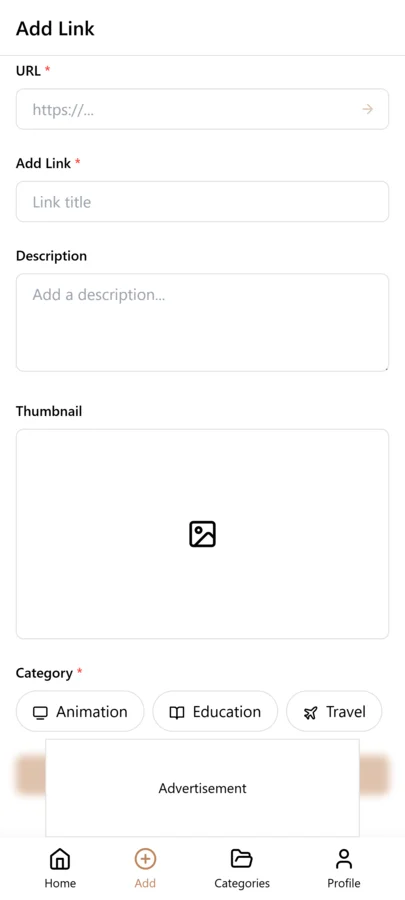
- Open LinkVault and tap + (Add Link)
- Paste the link — the title and description auto-populate
- Add notes like: "Upper body push routine - 45 min - felt great, used 20lb dumbbells" or "High protein breakfast ideas - 3 recipes under 400 cal"
- Tag by muscle group (chest, back, legs), goal (hypertrophy, fat-loss), difficulty (beginner, intermediate, advanced), and equipment (dumbbells, bodyweight, bands)
- Save — the workout is now in your library with full context
- After completing a workout, come back and update notes with results: weights used, reps, how it felt, what to change next time
Building Workout Programs from Saved Content
One of the biggest advantages of a tagged fitness library is the ability to build workout programs on the fly. Instead of following a rigid paid program designed for a generic athlete, you can assemble your own from content you already know works for your body. This is the difference between renting a program and owning one.
For example, if you want to build a push day workout, search "push dumbbells intermediate" and you get every saved video matching those tags. Pick 4-5 exercises from different videos, note the sets and reps, and you have a custom workout built from content you trust. You can do the same for pull days, leg days, or full-body sessions. Because each saved link has notes from when you actually did the routine, you know in advance whether a video is too easy or too hard.
For nutrition, tag meal prep videos by macros ("high-protein," "low-carb") and time ("quick-prep," "batch-cook"). When you are meal planning on Sunday, search "high-protein batch-cook" and get every recipe that fits your current goals. When your goals shift from a bulk to a cut, the same library serves you — just change the search terms.
This turns a scattered collection of saves into a functional fitness system that adapts to your changing goals. A library of 80 tagged workouts is more powerful than any single paid program because it is built from content you have tested on your own body and searchable by exactly the criteria that matter on any given day.
Tips for Fitness Resource Organization
These practices keep your fitness library useful whether you have 20 saved workouts or 200. The goal is a library that gets better with age, not one that decays into an unsearchable pile:
- Add difficulty level in notes (beginner, intermediate, advanced) so you can match workouts to your current fitness level
- Tag by muscle group for targeted workout days — "chest," "back," "legs," "core," "shoulders" — so you can assemble split routines instantly
- Create a "favorites" tag for most effective routines — these are your go-to workouts when you need something reliable
- Note equipment requirements in descriptions — "requires: dumbbells, bench" or "bodyweight only" — so you can filter by what is available
- Build weekly plans by filtering tags — search "push dumbbells" on Monday, "pull bands" on Wednesday, "legs bodyweight" on Friday
- Review and update after trying workouts — add results, adjust difficulty tags, and delete routines that did not work for you
- Keep a "deload" or "recovery" tag for easy mobility and stretching routines you can use on rest days
Tracking Progress and Building a Workout Log
Saving a workout is only half the system. The other half is logging what happened when you actually did it. Without a log, you are relying on memory to track progressive overload — and memory is unreliable after even a few weeks. You think you benched 165 last time, but it was 160. Small errors compound into stalled progress.
LinkVault turns each saved workout into a living log entry. After you finish a session, open the saved link and update the notes with weights used, reps achieved, how the workout felt, and what you would change next time. Over months, this builds a personal training journal attached directly to the routine that produced the results. When you search "chest dumbbells" six months from now, you do not just find the video — you find your entire history with it.
This is especially valuable when you cycle back through programs. If you run a 12-week hypertrophy block, take a break, and return to similar exercises three months later, your notes tell you exactly where you left off. You start the new block ahead of where you would be with a blank slate.
The log also surfaces patterns you would never notice otherwise. Maybe your push workouts consistently feel harder on Mondays after a heavy weekend. Maybe dumbbell rows stall at 40 pounds while barbell rows keep climbing. These insights only appear when you have a searchable record.
Common Fitness Bookmarking Mistakes
Most fitness libraries fail for the same handful of reasons. If your saved workouts are not getting used, check this list — the fix is usually simple:
- Saving without notes — a title like "INSANE LEG WORKOUT" tells you nothing in three weeks; always add how it felt and what equipment it needs
- Using only categories, no tags — categories sort content into buckets but tags let you cross-reference; you need both for a functional library
- No equipment tags — without "dumbbells," "bodyweight," or "bands," you cannot filter by what is in front of you at the gym or at home
- Hoarding workouts you never do — a library of 300 unused routines is demoralizing; delete or archive anything you have not touched in 3 months
- Mixing nutrition and workouts in the same view — keep them in separate categories so a meal-prep search does not surface exercise videos
- Never logging results — saving a workout without updating it after you do it means you lose the most valuable data: your own performance history
- Inconsistent tag names — "hiit" and "HIIT" and "high-intensity" become three separate tags; pick one convention and stick to it
- No time-based tags — without duration tags you cannot match a workout to the 20 minutes you actually have before work
Comparing Fitness Content Organizers
Not every tool is built for fitness content. YouTube playlists assume everything lives on YouTube. Instagram saves assume everything lives on Instagram. LinkVault is platform-agnostic and built for retrieval across every source. The differences matter more as your library grows:
| Feature | YouTube Playlists | Instagram Saves | LinkVault |
|---|---|---|---|
| Works across all platforms | No — YouTube only | No — Instagram only | Yes — any link from any source |
| Personal notes on each workout | No | No | Yes — full notes field with results logging |
| Tag by muscle group and equipment | No — playlists only | No — flat save list | Yes — unlimited custom tags |
| Search across saved content | Playlist titles only | No search at all | Yes — full-text search across notes and tags |
| Filter by workout duration | No | No | Yes — time-based tags like "15-min" |
| Track post-workout results | No | No | Yes — update notes with weights, reps, and effort |
| Cross-device access | Yes — with account | Yes — with account | Yes — desktop, mobile, tablet |
Frequently Asked Questions
Can I organize workout programs by week?
Yes. Use categories for program phases (e.g., "Phase 1: Weeks 1-4", "Phase 2: Weeks 5-8") and tags for specific weeks or workout types. This lets you search "week-3 push" and find exactly the right session without scrolling through your entire library.
How do I track which workouts work best?
After completing a workout, come back to the saved link and update the notes with: weights used, reps achieved, how it felt, and what you would change next time. Over months, this builds a personal fitness log that tells you exactly what works for your body and makes progressive overload measurable instead of guesswork.
Can I save meal prep videos?
Yes. Create a Nutrition or Meal Plans category and save meal prep videos with notes about prep time, macros, and taste. Tag by meal type (breakfast, lunch, dinner, snacks) and dietary preference (high-protein, vegetarian, low-carb) so you can search "high-protein lunch prep" and find options instantly.
Can I save workouts from Instagram and TikTok?
Yes. Copy the post link from any platform and save it in LinkVault with notes and tags. The link opens the original post when you are ready to follow along, and your notes remind you of the routine details and equipment needed.
How do I find quick workouts when I am short on time?
Use a "quick" or time-based tag when saving — e.g., "15-min," "quick-hiit," "express-core." When you have limited time, search by the time tag and get a list of workouts that fit your schedule. No more scrolling through 45-minute videos when you only have 15 minutes.
How do I track my progress over time using saved workouts?
Treat each saved workout as a log entry. After every session, update the notes with the weights you used, the reps you hit, and how the workout felt. When you cycle back to that routine weeks or months later, your previous notes tell you exactly where to pick up. This builds progressive overload into your library — you are building on documented results, not starting fresh each time.
Can I share my workout library with a friend or training partner?
You can share individual saved links with a training partner by sending the original URL along with your notes. For a full shared library, create a dedicated category for routines you want to exchange and tag them by the partner or program name. Your personal notes and results stay private to your own library, while the workout itself is easy to pass along.
How do I organize workouts by the equipment I have available?
Tag every saved workout with the equipment it requires — "dumbbells," "bodyweight," "bands," "kettlebell," "bench," "barbell," or "no-equipment." When you are training at home with just dumbbells, search "dumbbells" and see only routines you can actually do. When you are at a full gym, search "barbell" to surface your heavy compound work. This eliminates the frustration of opening a video only to realize you do not have what it needs.