Best Bookmark App for Freelancers (2026 Guide)
Written by LinkVault Team
Freelancers juggle dozens of clients, each with their own portals, shared drives, invoices, and project briefs. When you are switching between three video calls in an afternoon, the last thing you want is to hunt through browser history for a contractor agreement you saved last month. Without a dedicated system, links pile up in random bookmark folders, browser tabs multiply, and finding the right resource mid-call becomes a stressful scramble. The cost is not just time — it is professional confidence. Fumbling for a link while a client waits on the line makes you look disorganized, even when the actual work you deliver is excellent. This Q&A walks through how LinkVault solves the specific organizational headaches freelancers face — from separating active projects from archived ones to tagging contracts and exporting links when a project wraps. Whether you manage five clients or fifty, these answers help you build a system that scales with your practice and keeps you looking sharp in every client interaction.
How do I organize links by client?
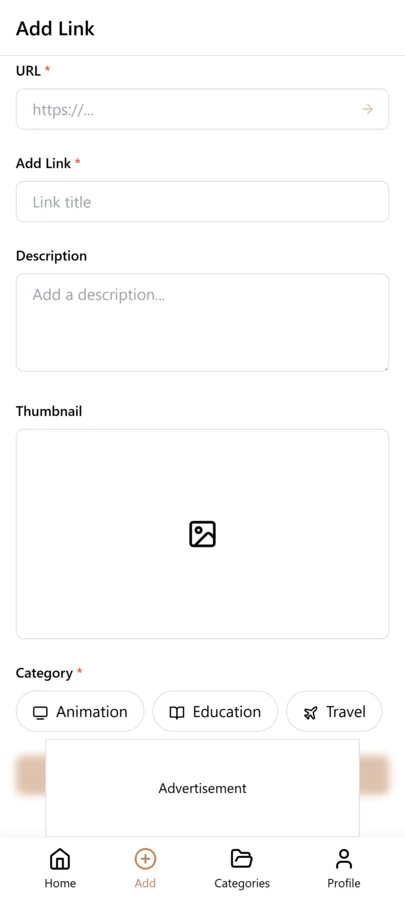
The core principle in linkvault is simple: one category per client. When you create a new category, you give it a name — Acme Corp or Jane Doe Design — and every link related to that client lives inside it. Client portals, shared Google Docs, Figma files, invoicing tools, and project boards all sit in one dedicated space rather than scattered across browser folders or a cluttered bookmarks bar. The benefit becomes obvious the moment a client asks about a document from two months ago during a call — you open the category, glance at the tags, and pull it up immediately instead of fumbling through tabs.
But the one-category-per-client principle works because it mirrors how you actually think about your work. When a client emails you, you immediately know which mental context to switch to. The same should be true of your link library. You should not have to remember whether a particular Figma link was shared in an email thread or pasted into a Slack channel — you just open the client category and it is there. This mental model scales smoothly: at five clients, the category list is short and scannable. At thirty clients, you rely on search within linkvault to jump to the right category instantly, and the structure never breaks down. Compare that to a bookmarks bar where thirty client folders nested inside each other becomes an unusable mess.
Can I tag invoices and contracts?
Yes — tagging is one of the features freelancers rely on most in LinkVault. Tags work across categories, which means you can label a link with invoice whether it lives in your Acme Corp category or your Smith Studio category, then filter by that tag to see every invoice in one view. This is invaluable at tax time or when auditing your billing history across all clients. Common tags freelancers set up include invoice, contract, meeting, brief, feedback, and handover. You can also use tags to mark status — for example, tagging invoice links with unpaid so you can quickly spot which clients still owe you money. Tags are free-form in linkvault, so you are not locked into a preset list.
The cross-category power of tags is what makes them indispensable for freelancers. Suppose you are doing your quarterly bookkeeping and you need every invoice link from every client in one place. In a folder-based system, you would have to open each client folder, hunt for invoice files, and manually compile a list. In linkvault, you simply tap the invoice tag and every invoice link across every client appears instantly — sorted, searchable, and ready to review. The same is true for contracts: tap the contract tag and you see every agreement you have signed, across every client, in one view. This is the kind of workflow that transforms a thirty-minute chore into a thirty-second lookup.
How do I separate active vs archived projects?
Separating active work from completed projects is critical for freelancers who want a clean, distraction-free workspace. In linkvault, the approach is to use a dedicated Archive category. When a project wraps, you do not delete the links — you move them into an Archive category. This keeps your active dashboard focused on the clients you are currently working with, while preserving every link, portal, and document in case a client returns months later. A practical workflow looks like this: keep active client categories at the top level, and maintain a single Archive category where completed engagements go. When a former client emails out of the blue asking for a file, you search the archive, grab the link, and respond in minutes.
Archiving instead of deleting is a deliberate choice that pays off in ways freelancers do not always anticipate. Clients come back — sometimes months later, sometimes years. They ask for a file you shared during the original engagement, or they want to resume work and need context from the last project. If you deleted those links, you are starting from scratch, digging through old emails and Slack archives. If you archived them in linkvault, a quick search brings everything back in seconds. The archive also serves as a portfolio of your work history: every portal, document, and resource you touched is preserved, which is useful when you want to reference past approaches for new clients or when a prospective client asks about similar work you have done.
What is the best setup for recurring client work?
Recurring client work — monthly retainers, weekly check-ins, ongoing maintenance — deserves its own structure because the links you use do not change much from cycle to cycle. The best setup in LinkVault is to create a category for the client, then use tags that mirror your recurring workflow: monthly-reports, recurring-meetings, invoices, and shared-resources. Save the permanent video call link, the shared agenda doc, and any rotating notes with consistent tags. Because the structure stays the same every month, you develop muscle memory — you always know where the meeting link lives and where to drop this month report. For freelancers managing multiple retainers simultaneously, this consistency is what prevents organizational burnout. You are not reinventing a system for each client every month; you are following a template that linkvault keeps in place for you.
A useful refinement is to add date-based notes to recurring links. For instance, on the monthly report link, you might add a note like "January 2026 report submitted Feb 3" each time you use it. Over time, this creates a lightweight log of your deliverables without needing a separate tracking spreadsheet. When the client asks when you sent the October report, your linkvault note has the answer — not your memory and not a search through sent emails.
Can I export links for handover?
Yes, and this matters more than freelancers often realize. When a client relationship ends — whether the project is complete or the client moves work in-house — they may ask for a list of every shared resource, portal, and document you used during the engagement. Exporting from LinkVault lets you generate that list in seconds. You can export an entire category as a structured file, complete with link titles, URLs, tags, and any notes you added. The handover document is not something you scramble to assemble at the last minute; it is a byproduct of the organizational system you have been maintaining all along. For freelancers who want to look professional at the end of an engagement, a clean exported link list is a small touch that leaves a strong final impression. Export formats in linkvault include CSV and JSON, so the data ports cleanly into spreadsheets or other tools the client might use.
The handover export also protects you professionally. If a client later claims they were not given access to a key resource, your exported list — with dates, titles, and your notes — serves as a record of what was shared. This is not about being defensive; it is about maintaining the same level of professionalism at project close that you brought to project kickoff. A clean handover package signals that you treat your clients work with care from beginning to end, and that is the kind of detail that drives referrals and repeat business.
Setting Up Your Freelance LinkVault: A Step-by-Step Guide
Getting started with linkvault as a freelancer takes about fifteen minutes of setup time, and the system pays for itself the first time a client asks for a link you saved weeks ago. Here is the exact setup workflow that works for freelance practices of any size.
- Create your first category for each active client you are currently working with. Name it after the client, not the project, so it scales if the engagement extends.
- Create an Archive category where completed client work will go. This keeps your active workspace clean from day one.
- Define your core tag set before saving your first link. Recommended starter tags: invoice, contract, meeting, brief, feedback, portal, and shared-doc.
- Add a status tag like unpaid to your tag set so you can flag invoices that need follow-up across all clients.
- Import existing client links from your browser bookmarks or email. LinkVault accepts standard HTML bookmark files, so you can pull in everything you have already saved.
- For each imported link, assign it to the right client category and apply the appropriate tags. Spend a focused thirty-minute session on this — it is a one-time investment.
- Install the LinkVault browser extension on every browser you use for work, so saving a new link takes one click instead of copy-pasting.
- Set up the LinkVault mobile app or PWA on your phone so client links are available when a client texts you outside of working hours.
Freelancer-Specific Tips: Invoicing, Onboarding, and Project Handover
Beyond the basics, there are three freelance workflows where linkvault delivers outsized value: invoicing, client onboarding, and project handover. For invoicing, save every invoice link with the invoice tag and a note containing the amount and due date. When tax season arrives, filter by the invoice tag across all clients and export the list — your accountant gets a clean CSV in minutes, not a stack of emails to sort through. You can also use the unpaid tag to track outstanding invoices across your entire client base, so no payment slips through the cracks.
For client onboarding, create a dedicated onboarding tag and save every resource you share with a new client during the first week — your portfolio, process documents, communication guidelines, and project brief templates. When you onboard your next client, filter by the onboarding tag and you have an instant checklist of what to share, ensuring every client gets the same thorough introduction to how you work. This consistency is what separates a professional freelancer from an amateur, and linkvault makes it effortless.
For project handover, the export feature is your closing ritual. When a project wraps, export the entire client category as a CSV or JSON file and include it in your final delivery email. The client receives a structured list of every portal, document, and resource you used — organized by tag, with your notes intact. This is a professional touch that most freelancers never think to provide, and clients remember it. It also creates a clean break: the client has everything they need, you have a record of what was delivered, and the engagement ends as professionally as it began.
Managing Subcontractors and Team Collaboration
As your freelance practice grows, you may start bringing on subcontractors — a designer for a logo, a copywriter for a landing page, a developer for a complex backend build. Coordinating links across a small team introduces a new layer of complexity that solo freelancers never had to worry about. LinkVault handles this with shared categories and permission-controlled tags. You create a category for the project, invite your subcontractor as a collaborator, and both of you can save and access links within that shared space. This means when your designer finds a useful brand guideline page or your developer bookmarks a relevant API doc, those links are visible to everyone on the project instantly — no forwarding emails, no pasting links into Slack and hoping they do not get buried.
The key to making subcontractor collaboration work is establishing tagging conventions upfront. Before the project begins, agree on a small set of tags everyone will use: draft for work-in-progress resources, final for approved deliverables, reference for background material, and review for items that need feedback. When everyone follows the same convention, the shared category stays organized without a dedicated cleanup session. You can also use tags to assign ownership — for example, a tag with the subcontractor name lets you quickly filter to see only the links they have saved, which is useful during weekly check-ins. If a subcontractor leaves the project, you simply revoke their access to the shared category. Every link they saved remains in your vault, fully accessible to you and any future collaborators, which means institutional knowledge from the project is never lost when a team member departs.
For larger engagements with multiple subcontractors, consider creating a master project category with sub-tags for each contributor. This gives you a bird-eye view of every resource the team has gathered while still allowing you to drill into what each person contributed. When the client asks where a specific document came from or who flagged a particular reference, your tagged link history has the answer.
Tracking Proposals and Business Development Links
Business development is the lifeblood of freelancing, yet most freelancers treat proposal and lead-tracking links as an afterthought — scattered across email drafts, browser tabs, and sticky notes. LinkVault gives you a dedicated system for managing the entire business development pipeline through links. Start by creating a category called Business Development or Pipeline, and save every relevant link there: the job posting you want to apply to, the prospective client website, the LinkedIn profile of the person you need to contact, and any research articles about the company that inform your proposal. Tag each link with a pipeline stage — lead, researching, drafting, submitted, follow-up, won, lost — so you can filter by stage and see exactly where every opportunity stands at a glance.
The real power of this approach emerges when you combine pipeline-stage tags with a consistent naming convention. For each prospect, save the initial job posting or referral link with a note containing the contact name, the project scope in one sentence, and the deadline for your proposal. As the opportunity progresses, add new links: the proposal document you submitted, the scheduling link for the intro call, the follow-up email thread. Each one carries the same prospect name in its title and the appropriate pipeline-stage tag. When you filter by the follow-up tag, you see every opportunity that needs a nudge — and the notes remind you exactly what was discussed and when.
Over time, this pipeline category becomes a goldmine of business intelligence. Filter by the lost tag and review the notes to identify patterns: are you losing opportunities at a certain budget level, or in a particular industry? Filter by the won tag and study what worked: which proposals converted, and what research links did you save for those projects? This retrospective analysis is impossible when your proposal links live in a chaotic email inbox. With LinkVault, your business development history is structured, searchable, and ready to inform your next pitch.
Common Mistakes Freelancers Make With Link Organization
Even with a powerful tool like LinkVault, freelancers can undermine their own organizational system through a handful of common but avoidable mistakes. Recognizing these pitfalls early saves you from rebuilding your entire link library months down the road when the mess becomes unmanageable. Below are the most frequent mistakes freelancers make, along with practical fixes you can apply immediately.
- Saving links without any tags or notes: A link saved with just a URL and an auto-generated title is nearly impossible to find later. Always add at least one tag and a brief note explaining why you saved it, even if the note is just "client onboarding resource for Acme." Ten seconds of context at save time saves ten minutes of searching at retrieve time.
- Creating too many narrow tags: Freelancers often create highly specific tags like acme-invoice-january instead of using a broader invoice tag combined with a client category. This fragments your tag library and defeats the cross-category filtering that makes tags powerful. Keep tags broad and reusable, and let categories and notes carry the specific context.
- Never archiving completed projects: Leaving finished client categories mixed in with active ones clutters your workspace and makes it harder to focus on current work. Set a ritual — perhaps at the end of each month — to review your client list and move any completed engagements into your Archive category.
- Using project names instead of client names for categories: If you name a category after a specific project like Acme-Website-Redesign, you need a new category when the same client returns for a different project. Naming the category after the client — Acme Corp — keeps all their work in one place regardless of how many engagements come and go.
- Failing to export at project close: Skipping the handover export means you lose a professional touch and a paper trail. Make exporting the client category a standard part of your project-close checklist, right alongside sending the final invoice.
- Mixing personal and business links in the same category: Freelancers sometimes save personal articles or hobby links into client categories "just for now," and those links linger indefinitely. Keep a separate Personal category so your client categories remain focused and professional.
Frequently Asked Questions
Is LinkVault free for freelancers?
LinkVault offers a free tier covering the essentials — categories, tags, and basic export — which is enough for freelancers managing a handful of clients. Paid plans unlock higher limits, advanced tagging filters, and team sharing for collaborating with subcontractors.
Can I access my client links from multiple devices?
Yes. linkvault syncs across desktop and mobile, so the client portal you saved on your laptop is available on your phone when a client texts you a quick question over the weekend.
What happens to my links if I stop using LinkVault?
Your data is always exportable. Because linkvault supports CSV and JSON exports, you can download every link, tag, and note at any time and walk away with a complete record — no lock-in.
How do I handle tax season with links spread across multiple clients?
Tag every invoice and payment-related link with the invoice tag as you save it throughout the year. When tax season arrives, filter by the invoice tag across all client categories and export the results as a CSV. Your accountant gets a single structured file with every invoice link, amount note, and client name — no email archaeology required. This turns a multi-hour tax prep chore into a five-minute export.
What should I do when a client ends the engagement?
Export the entire client category as a CSV or JSON file and include it in your final delivery email as a professional handover package. Then move the client category into your Archive category — do not delete it. Clients frequently return months or years later, and having every link preserved in the archive means you can pick up where you left off without searching through old emails.
Can I separate my own freelance business links from client links?
Yes. Create a dedicated category for your own business resources — things like your portfolio site, invoicing tool, contract templates, and professional development articles. Keep this separate from your client categories so your personal business resources do not intermingle with client work. This makes it easy to find your own tools without filtering through client-specific links, and keeps your business operations cleanly separated from client deliverables.