Best Bookmark App for Job Seekers (2026 Guide)
Written by LinkVault Team
Job searching involves tracking dozens of listings, researching companies, preparing for interviews, and managing application deadlines. Browser bookmarks can't handle this complexity.
Common job search bookmark problems:
Job listings scattered everywhere, no notes on application status, company research mixed with everything else, no way to track which jobs are priorities, interview prep resources buried in saves, and difficult to follow up on applications.
This guide shows how to organize your job search properly.
Why Job Seekers Need a Dedicated Application Tracker
Job searching is a project with many moving parts. You are simultaneously tracking open positions, researching company cultures, preparing for different interview formats, managing recruiter communications, and remembering follow-up deadlines. Most job seekers try to manage this with a combination of browser bookmarks, a spreadsheet, and emails to themselves. This falls apart within weeks.
The problem is that browser bookmarks only store URLs. They cannot tell you which job you applied to last Tuesday, which company had great benefits but a long commute, or which interview prep article was specifically for your technical round. A dedicated job search bookmark manager changes this by giving every saved link a context layer. When you save a job posting in LinkVault, you add notes about salary range, application date, and what stood out about the role. When you save a company research article, you tag it with the company name so it groups with the corresponding job listing. The result is a searchable job search command center that replaces your spreadsheet, your scattered bookmarks, and your inbox reminders with one system.
What Job Seekers Need
Based on common job search workflows, these are the essential features for application tracking that go beyond what browser bookmarks and spreadsheets offer:
- Save job listings with application status notes
- Organize company research and culture observations
- Tag by priority, industry, or job type
- Track application deadlines and follow-up dates
- Store interview prep resources by company
- Quick search for specific roles or companies
- Access application details from any device during interviews
- Archive rejected or accepted positions to track progress
Step-by-Step: Job Search Setup in LinkVault
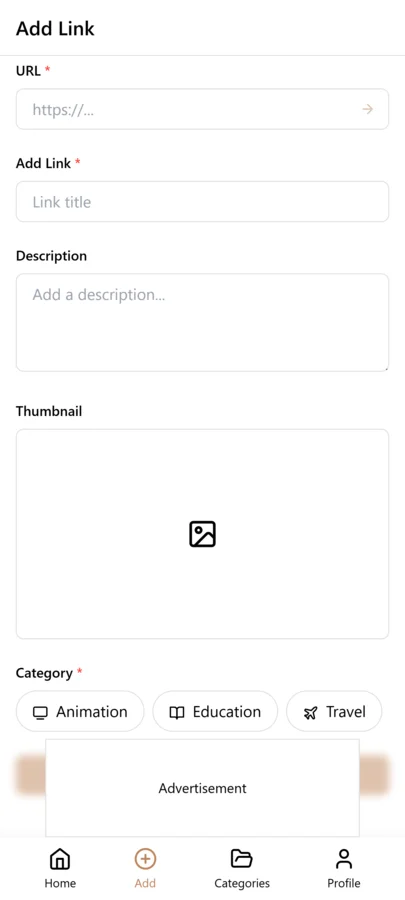
Follow these steps to build your job search command center. The initial setup takes about 10 minutes, and adding a new application takes less than 30 seconds once it becomes a habit.
- Create categories: Job Listings, Company Research, Interview Prep, Networking
- When you find a job posting, copy the link
- Open LinkVault
- Tap + (Add Link)
- Paste the link
- Add notes: "Senior Designer - Applied 12/15 - Remote - $80-100k" or "Great company culture - check benefits"
- Tag by priority, status (applied, interview, offer), or job type
- Update notes as you progress through stages
- Save
Tracking Application Status Without a Spreadsheet
Most job seekers maintain a spreadsheet to track where they applied, when, and what the status is. The problem is that the spreadsheet lives separately from the actual job links, so you constantly switch between the two. You find a job posting in your email, copy the link to your spreadsheet, then later try to find the posting again to check if it is still open.
With LinkVault, the link and the status live together. Each saved job listing has its notes field where you record the application date, current status, salary range, contact person, and next steps. You do not need a separate spreadsheet because searching "applied" shows every job at that stage, filtering by "interviewing" shows only active interviews, and searching a company name pulls up both the job listing and any research you saved about that company. This unified approach means you spend less time managing your search and more time actually applying and preparing.
Tips for Job Search Organization
These best practices come from job seekers who have used LinkVault to manage applications across multiple industries and interview stages:
- Add application date and status in notes
- Tag "priority" for dream roles
- Use status tags: to-apply, applied, interviewing, offer
- Save company culture research with job listings
- Note salary range and key requirements
- Set reminders for follow-ups in notes
- Archive rejected or accepted positions
- Save recruiter contact links with conversation summaries
- Tag by remote, hybrid, or on-site to filter by work arrangement
Using LinkVault for Interview Preparation
Interview preparation is where most job seekers lose organization. You find a great article on behavioral questions, a YouTube video on system design, a GitHub repo of coding challenges, and a blog post about the company's engineering culture. These get saved across different tools and are impossible to find when you need them the night before an interview.
The solution is to save every prep resource with the company name as a tag. When you have an interview at Company X, you search "company-x" in LinkVault and instantly see the job listing, your research notes, the Glassdoor reviews you saved, the interview prep articles, and the salary data you collected — all in one place. You can also create a "prep-checklist" tag for resources that apply to every interview regardless of company, like general behavioral question guides or your portfolio presentation. This dual approach — company-specific tags for targeted prep and general tags for reusable resources — ensures you walk into every interview fully prepared without scrambling the night before.
Researching Companies Before You Apply
Company research is what separates candidates who ask thoughtful questions from those who ask generic ones. But most job seekers do their research at the wrong time — they wait until they have an interview scheduled, then scramble to read everything the night before. By then, they have no time to absorb the information or form genuine insights.
A better approach is to research companies continuously, even before a position opens. When you come across an interesting company, save its about page, recent press releases, and any LinkedIn posts from its leadership team. Tag everything with the company name. Add notes about what stands out: "Recently raised Series B, expanding into European markets" or "CEO posts weekly about engineering culture." Over time, you build a dossier on each company that makes interview preparation nearly effortless. When an interview is scheduled, you search the company name and instantly have weeks or months of organized research at your fingertips. You can also save competitor pages and industry analysis articles, which gives you material for thoughtful questions about market positioning and growth strategy. This approach turns company research from a last-minute panic into an ongoing habit that makes you a more informed and confident candidate at every stage of the process.
Managing Recruiters and Networking Contacts
Recruiter and networking relationships are some of the most valuable assets in a job search, yet most people manage them poorly. You meet a recruiter at a conference, exchange LinkedIn connections, and then forget about them until you are desperately looking for a job months later. By then, the relationship is cold and reaching out feels awkward.
LinkVault helps you maintain these relationships systematically. When you connect with a recruiter or networking contact, save their LinkedIn profile or personal website with detailed notes: "Met at TechConf 2025, specializes in frontend roles at startups, follow up in January." Tag them by industry, recruiter vs. peer, and the event where you met. Set a note about when to follow up, and check your tagged list periodically to stay in touch before you need anything. You can also save job postings that a recruiter shared with you, tagged with their name, so you remember who sent what. This organized approach means that when you do need to reach out, you have context about every conversation and can reference specific details rather than sending a generic "checking in" message. Recruiters remember candidates who are organized and thoughtful, and maintaining a living contact list gives you a significant advantage over job seekers who start networking from scratch every time they look for a new role.
Common Job Search Organization Mistakes and How to Avoid Them
Job searching is demanding enough without organizational mistakes slowing you down. These are the most common errors job seekers make when managing their search, along with practical ways to prevent each one:
- Not recording the application date, making it impossible to know when to follow up — always note the date you applied in the link notes
- Applying to too many roles at once without tracking quality — focus on roles you genuinely want and track them carefully rather than mass-applying
- Saving company research without tagging the company name — always tag with the company name so research groups with the job listing automatically
- Deleting rejected applications instead of archiving them — tag as "rejected" and keep notes on what you learned for future reference
- Not saving recruiter contacts with context — record where you met, what you discussed, and when to follow up
- Mixing interview prep for different companies in one folder — tag every prep resource with the specific company name
- Forgetting to research a company before a phone screen — save at least the about page and one recent news article for every company you apply to
- Losing track of which version of your resume you sent to which employer — note the resume version in the application link notes
Frequently Asked Questions
Can I track multiple job applications?
Yes. Save each listing separately and update status tags as you progress. Search "applied" to see all pending applications, or filter by company name to see every interaction you have had with a specific employer including research, the listing, and prep materials.
How do I organize interview prep?
Create a category for interview prep and tag by company or interview type. When preparing for a specific interview, search the company name tag to pull up all related prep materials alongside the job listing and your research notes in one view.
Can I save networking contacts?
Yes. Save LinkedIn profiles with notes about how you connected, what you discussed, and follow-up plans. Tag by event name or industry so you can find contacts from a specific conference or recruiter conversation later.
How do I track follow-up deadlines?
Add the expected follow-up date in the notes field of the job listing. Each time you check LinkVault, scan for upcoming dates in your "applied" or "interviewing" tags. This replaces separate calendar reminders and keeps the deadline with the job context.
What should I do with jobs I did not get?
Do not delete them. Tag them "rejected" or "closed" and add notes about what you learned from the process. This builds a record of your search history, helps you identify patterns in which roles you advance furthest in, and keeps the company research available if a new role opens at the same company later.
How far in advance should I start researching companies?
Start as early as possible, even before a position opens. When you come across an interesting company, save its about page, recent news, and leadership posts with the company name as a tag. Building a dossier over weeks or months means that when an interview is scheduled, you already have organized research ready instead of scrambling the night before.
What is the best way to keep track of recruiter relationships over time?
Save each recruiter or networking contact link with detailed notes about where you met, what you discussed, and when to follow up. Tag by industry and event name. Check your tagged list periodically so you can stay in touch before you need anything, which keeps the relationship warm and makes future outreach feel natural rather than transactional.