Best Bookmark App for Knowledge Management (2026 Guide)
Written by LinkVault Team
Knowledge management is the discipline of capturing what you learn, organizing it so it is retrievable, and connecting it so it compounds over time. Most people do the first part — they save articles, tutorials, research papers, and videos — and completely fail at the second and third. The links pile up in bookmarks or reading lists without notes, without tags, and without any structure that would let you find them six months later when you actually need them. The knowledge is technically "saved" but practically lost.
The difference between a bookmark pile and a knowledge management system is context. A saved URL is just an address. A saved URL with a note explaining why it matters, what you learned from it, and what you want to do with that knowledge is a building block in a personal knowledge base. Over time, a well-maintained knowledge library becomes one of your most valuable professional assets — a searchable record of everything you have studied, referenced, and built expertise in.
Common knowledge management problems:
Information scattered across tools. Can't connect related concepts. No context when reviewing saved items. Forget why things were saved. Can't retrieve when actually needed. No system for progressive learning.
This guide shows how to build a bookmark-based knowledge management system that actually works — one where the knowledge you save is retrievable, connectable, and genuinely useful to your future self.
Why Most Bookmark Systems Fail at Knowledge Management
The failure mode is the same for nearly everyone. You save a link because it looks valuable in the moment. You add it to a folder called "To Read" or "Resources" or "Interesting." The folder grows. You never go back to it because browsing a long undifferentiated list is too slow and unreliable compared to simply re-Googling. Months later you clear out the folder because it has become psychologically overwhelming, and you lose everything you had saved. Repeat.
The root cause is that saving without context produces content that is not retrievable. You cannot search a bookmark for the concept inside the article — you can only search the page title and URL, which are often uninformative. "Advanced React Patterns - Egghead.io" tells you nothing about whether this article covers the specific compound component pattern you were thinking about last Tuesday. A note that says "covers compound components and render props — useful for the Dashboard redesign" makes that link immediately findable when you search for either the pattern name or the project name.
The second failure mode is saving without a retrieval structure. If every link goes into one folder, you are searching a haystack. A good knowledge management structure pre-organizes your knowledge into domains so that browsing is meaningful and search has context. The goal is not to perfectly organize everything — it is to organize well enough that you can find what you need in under thirty seconds.
What Makes a Good Knowledge Management System
Effective personal knowledge management with bookmarks works in three phases: capture, process, and retrieve. Most people only do capture. Adding the process phase — which takes thirty to sixty seconds per link — transforms a bookmark pile into a knowledge base. The retrieve phase then becomes effortless rather than frustrating.
- Capture with context: save the link immediately with the URL and a one-sentence note on why it matters — the minimum information needed to not lose it
- Connect ideas: use consistent tags to link related concepts across different sources — a single tag connects articles, tutorials, and case studies on the same topic
- Organize for retrieval: create five to eight top-level categories that match your knowledge domains so browsing is meaningful, not just search
- Progressive summarization: after consuming content, add key takeaways and insights to the notes field — the note grows as your understanding deepens
- Review system: a weekly fifteen-minute session to process unread saves and expand notes on the most important links prevents the pile-up failure mode
- Action-oriented: note specifically when and how you plan to apply the knowledge — "use for the Q3 pricing analysis" or "apply to the onboarding redesign"
- Simple enough to maintain: a system with complex rules you abandon after two weeks is worse than a simple one you maintain for two years
Knowledge Base Organization Structure
The organization structure below works for most knowledge workers. Adapt the category names to your specific knowledge domains — the important thing is that you have five to eight meaningful top-level categories that reflect how you actually think about knowledge, not how a librarian would. The test is simple: when you save a link, can you immediately identify which category it belongs in? If yes, the structure is working.
- Technical Skills: programming references, API documentation, framework tutorials, architecture patterns, and tool documentation — organized so you can find a specific technique fast
- Domain Knowledge: industry research, expert writing, case studies, and deep-dive articles in your professional field — the foundational knowledge that makes you better at your work
- Mental Models and Ideas: philosophy, cognitive science, decision-making frameworks, and cross-domain ideas that inform how you think — not just professional knowledge
- Tools and Resources: software tools, services, templates, generators, and productivity resources you reference repeatedly in your work
- Current Projects: everything relevant to active projects — research, references, specs, prior art, and competitor analysis grouped by project so all context is in one place
- Reading Pipeline: high-quality long-form articles and papers you plan to read thoroughly but have not yet — keep this curated and short, not a dumping ground
- Tag by knowledge type: "reference" for things you will look up repeatedly, "learning" for things you are actively studying, "apply" for things with a specific use case in mind
- Tag by topic: use consistent topic tags (react, marketing, negotiation, typography) so links are discoverable across multiple categories simultaneously
Knowledge Management Workflow with LinkVault
This workflow transforms the standard save-and-forget pattern into a genuine knowledge management practice. The key insight is that the effort happens in two places — thirty seconds at capture and fifteen minutes per week in review — rather than in one overwhelming organization session that never actually happens.
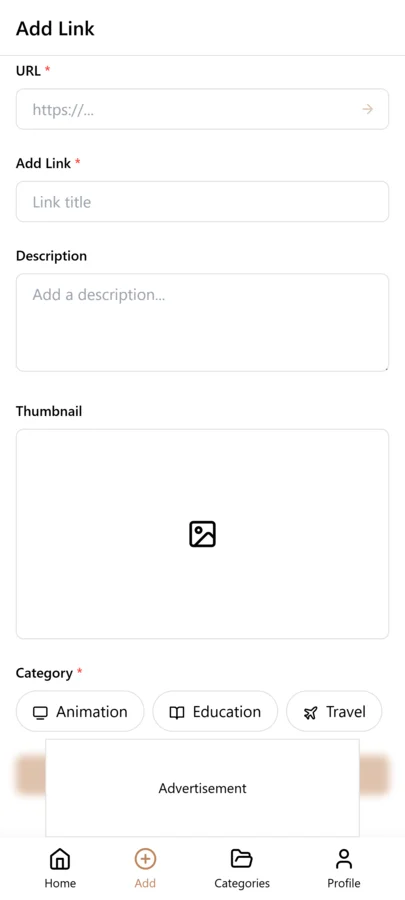
- Capture: save the link immediately with a one-sentence note on why it matters — do not skip the note, even an imperfect one is dramatically better than none
- Connect: use consistent tags to link the link to related knowledge — pick from your established tag vocabulary, do not create new tags every time
- Organize: assign to one of your five to eight categories at capture time — this takes three seconds and prevents the "Inbox" pile-up
- Summarize: after reading or watching the content, return to the link and add key takeaways — two or three sentences about what you learned and what the main insight was
- Review: every week, filter by "saved this week" and spend fifteen minutes expanding notes on the five most valuable links and deleting anything that turned out not to be useful
- Apply: before starting any significant project, search your knowledge base for relevant saved links — the system pays dividends when you use it, not just when you save to it
- Refine: update notes as your understanding deepens — a link you annotated six months ago may now connect to something new you have learned
What to Look For in Knowledge Management Tools
Not every bookmark manager is suitable for knowledge management. These are the features that separate a genuine knowledge base tool from a link saver with a notes field.
- Rich notes support: the notes field should accept at least a paragraph of formatted text — single-line note fields are too limiting for meaningful knowledge annotation
- Flexible tagging: tags should be fast to add, consistent across the library, and searchable alongside notes and titles — not an afterthought
- Fast full-text search: searching across titles, notes, and tags simultaneously in under two seconds is the feature you will use every single day
- Mobile and desktop sync: you need to capture from anywhere and retrieve from anywhere — sync must be instant and reliable, not occasional
- Offline access: your knowledge base should be available without an internet connection for review during commutes, travel, and low-connectivity situations
- Simple enough to maintain long-term: if the system requires significant effort to maintain, it will be abandoned — the best system is the one you actually stick with
- Export options: your knowledge base is a personal asset — you should be able to export everything in a standard format and never be locked into a single tool
Building a Tag Taxonomy for Knowledge Management
A knowledge management tagging system differs from simple bookmark tagging because it needs to reflect how ideas connect, not just what topic they cover. Three types of tags create a knowledge-oriented taxonomy. Domain tags describe the field of knowledge — engineering, marketing, psychology, finance. Skill tags describe the specific capability — writing, negotiation, data-analysis, public-speaking. Status tags describe where you are in the learning process — to-learn, learning, mastered.
The power of this taxonomy is that it maps to how knowledge actually grows. When you save a resource, you tag it with the domain it belongs to, the skill it develops, and your current status with that skill. Over time, you can filter by domain to see your knowledge base in a field, filter by skill to see all resources that develop a specific capability, and filter by status to see what you are currently learning versus what you have mastered.
Cross-domain tags are where knowledge connections become visible. When you save a psychology article about decision-making biases and tag it with both psychology and decision-making, it appears alongside your business strategy resources tagged with decision-making. This cross-pollination of domains is where creative insights emerge — seeing a psychology concept applied to a business problem, or a design principle applied to a marketing challenge. Your taxonomy should encourage these cross-domain connections rather than siloing knowledge into separate fields.
The Weekly Knowledge Review Habit
Knowledge management is not a save-and-forget activity. The value of a knowledge base comes from regular review and synthesis — returning to saved resources, updating your understanding, and connecting new saves to existing knowledge. A weekly review of twenty to thirty minutes is the habit that turns a collection of links into a growing knowledge base.
Start by reviewing the resources you saved in the past week. For each, read your notes and consider how the new knowledge connects to what you already have. Does this article about marketing psychology relate to the negotiation book you saved last month? If so, add a note to both entries cross-referencing the other. This active connection-building is what distinguishes a knowledge base from a bookmark list — the links between ideas are as valuable as the ideas themselves.
Next, review one domain tag in depth. Filter to a domain like marketing and scan all resources saved under that tag. Update notes with new understanding you have gained since saving them. Promote to-learn resources to learning if you have started studying them, and learning to mastered if you have internalized the concept. Retire resources that are no longer relevant or that you have fully internalized and no longer need the reference. This weekly cycle of review, connection, and curation is what makes a knowledge base compound in value over time.
From Saved Links to Connected Knowledge
The transformation from a bookmark collection to a knowledge base happens when you start synthesizing insights across multiple saved resources. Instead of treating each saved link as an isolated reference, you actively look for connections, contradictions, and patterns that emerge when you view related resources together. This synthesis is where the real intellectual work happens, and your tag taxonomy provides the structure that makes it possible.
The practice is to use notes as a synthesis tool, not just a summary tool. When you save a new resource, do not just summarize its content — write how it relates to other resources you have saved. "This article on behavioral economics complements the Kahneman book notes — both argue that loss aversion drives decision-making, but this article applies it to pricing strategy while the book focuses on the psychology." This kind of cross-referencing note transforms a standalone bookmark into a node in a knowledge network.
Over months, your knowledge base develops clusters — groups of resources connected by shared tags and cross-referencing notes that form a coherent body of knowledge on a topic. When you need to understand a topic deeply, you filter by the relevant tags and follow the cross-references between entries, reading your synthesis notes that connect the ideas. This is qualitatively different from reading a list of bookmarks — it is a guided tour through your own accumulated thinking on a subject.
Common Knowledge Management Mistakes
- Saving without context notes — a bare link tells you nothing about why it was valuable or how it connects to your existing knowledge, so always write at least a synthesis note connecting the new resource to what you already know
- No cross-referencing tags — tagging only by domain means related ideas in different fields never appear together, so use cross-domain tags like decision-making or communication that span multiple fields
- Hoarding without reviewing — saving hundreds of resources without ever revisiting them creates a graveyard of links, so review one domain per week to keep your knowledge base current and connected
- Treating bookmarks as knowledge without synthesis — saving a link does not mean you have learned from it, so use notes to synthesize the key insight in your own words and note how it applies to your work
- No regular review — without weekly or monthly review, saved knowledge goes stale and connections are never made, so schedule a recurring knowledge review session on your calendar
Scaling Your Knowledge System Over Months and Years
A knowledge management system is a long-term investment that compounds over months and years, but only if it is maintained and evolves with your growing expertise. What works at fifty saved resources will not work at five hundred, and what works when you are learning a field will not work when you have mastered it. Periodic evolution of your system keeps it useful as your knowledge grows.
Every three to six months, do a taxonomy audit. Review your tag list and check for tags that have become overloaded, tags that are no longer used, and tags that need to be split or merged. As your expertise grows, you may need more granular tags — a general marketing tag might need to be split into content-marketing, growth-marketing, and brand-marketing as your knowledge in each area deepens. Conversely, tags you created when starting out may no longer be needed as your understanding has matured.
Archive outdated knowledge periodically. Resources that were valuable when you were learning a field may be too basic once you have mastered it. Move them to an archive tag rather than deleting them, since they may be useful for onboarding colleagues or for reference when you need to explain fundamentals. Your knowledge base should reflect your current level of expertise, with foundational resources archived but accessible and advanced resources prominent and active.
Frequently Asked Questions
What is the difference between bookmarking and knowledge management?
Bookmarking is saving a URL. Knowledge management is saving a URL with enough context — notes, tags, categorization — that the knowledge inside it is retrievable and usable by your future self. The tools can be the same; what is different is the discipline of annotation. A bookmark pile is a collection of addresses. A knowledge base is a collection of ideas with addresses attached to them.
How is this different from note-taking apps like Notion or Obsidian?
Note-taking apps are optimized for writing original content — your own thoughts, summaries, and documents. Bookmark-based knowledge management is optimized for curating external content — articles, tutorials, papers, and references — with your annotations attached. They are complementary, not competing. Many knowledge workers use both: a bookmark manager for capturing and annotating external sources, and a note-taking app for synthesizing original ideas and longer-form summaries. LinkVault excels at the curation and retrieval side — fast capture, rich notes, and powerful search across your saved library.
How much time does maintaining a knowledge management system actually require?
Thirty seconds per link at capture time and fifteen minutes per week in review. That is the sustainable rhythm. Thirty seconds is enough to write one sentence of notes and add two or three tags — enough to make the link findable later. Fifteen minutes per week is enough to expand notes on the most important saves, delete anything that turned out not to be useful, and process anything you captured in a hurry without proper annotation. Most people who abandon knowledge management systems do so because they try to do too much at once — a weekly fifteen-minute session is far more sustainable than occasional three-hour organization marathons.
How do I connect related ideas across different saved links?
Use consistent topic tags as your connection mechanism. If you have saved ten articles all touching on decision-making under uncertainty, and all ten carry the decision-making tag, filtering by that tag instantly surfaces the entire connected body of knowledge. The note on each link can also explicitly reference related links: "connects to the Kahneman article on System 1 and System 2 thinking saved in Mental Models." This explicit cross-referencing takes five seconds to write and dramatically improves the connectedness of your knowledge base over time.
Can I use this for books, podcasts, and videos — not just articles?
Yes. Save the book page, video URL, or podcast episode with notes about the key ideas you want to remember. For books, save the Goodreads page or the publisher page and put your key takeaways in the notes field after reading. For videos, save the YouTube URL with a note on what timestamp contains the most useful content. For podcasts, save the episode page with a note on the main insight and the timestamp of the most relevant section. The tags and categories work the same way regardless of content type — a "design" tag connects design articles, design books, and design videos into one filterable collection.
How do I handle conflicting information from different saved sources?
Save both sources with notes about the conflict. Tag both with a needs-verification tag so you can filter to all resources with unresolved contradictions. In your notes, document the specific point of disagreement and which source you find more credible, with your reasoning. Over time, as you encounter more evidence, update the notes to reflect your evolving understanding. Conflicting sources are not a problem — they are an opportunity for critical thinking, and your knowledge base should preserve the disagreement rather than papering over it.
Can I use LinkVault alongside a note-taking app like Obsidian or Notion?
Yes, and many knowledge workers use both together. LinkVault serves as the capture and reference layer — where you save links with context notes and organize them with tags. Note-taking apps like Obsidian or Notion serve as the synthesis layer — where you write longer-form analysis, connect ideas in detail, and produce original work. Export curated collections from LinkVault to embed in your note system when you want to write a deep synthesis on a topic. The two tools complement each other: LinkVault for fast capture and retrieval, note-taking apps for deep thinking and output.