Best Bookmark App for Mobile: Android & iOS (2026)
Written by LinkVault Team
Mobile bookmarking has a reputation problem. Ask anyone why they do not use a dedicated bookmark manager on their phone and you will hear the same handful of objections repeated like gospel — browser bookmarks are fine, native apps are mandatory, tagging is clunky on a touchscreen, sync is a gamble. But most of these beliefs are rooted in how things worked five years ago, not how they work today. The mobile landscape has shifted dramatically, and modern tools have solved the pain points that gave bookmarking a bad name. In this guide we debunk the five most persistent myths about mobile bookmarking and show how LinkVault is built specifically to prove them wrong.
Myth 1: Browser Bookmarks Are Enough on Mobile
Your phone built-in browser bookmarks live in one browser, on one device, behind a nested menu that takes five taps to reach. They do not travel when you switch from Chrome to Safari, they offer zero organization beyond folders, and there is no search across what you have saved. When you have got hundreds of links, the browser bookmark list becomes a digital junk drawer. Consider a real scenario: you save a product review link in Chrome on your Android phone, then switch to an iPad for the weekend. That bookmark does not exist on the iPad because it lives in Chrome on Android only. You open Safari on the iPad, search the product name, and end up on a different review page — the original is locked inside a browser you are not currently using.
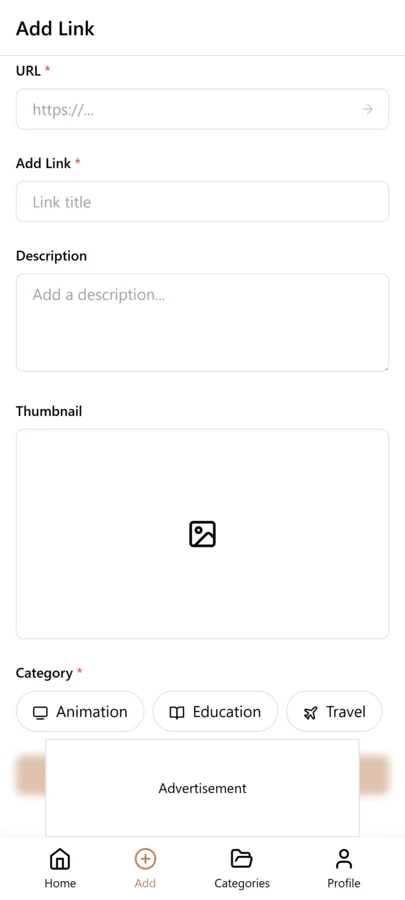
LinkVault replaces that drawer with a purpose-built library. Every link you save is searchable by title, URL, tag, or full-text content, and it is available on every device you sign into. The linkvault share extension means saving takes one tap from any app that exposes a share sheet — no copy-paste, no app switching, no friction. The link you saved on your Android phone this morning is sitting in your library when you open LinkVault on your iPad tonight, tagged and ready.
Myth 2: You Need a Native App for Good Mobile Bookmarking
There is a lingering assumption that only a heavyweight native app downloaded from the App Store or Play Store can deliver a fast, smooth mobile bookmarking experience. That is outdated thinking. The line between web and native has blurred, and linkvault sits right at that intersection.
LinkVault is built as a progressive web app that installs to your home screen, works offline, and launches as fast as any native counterpart — without the storage overhead, permission creep, or update delays that plague traditional apps. You get a touch-tuned interface and the same complete feature set whether you are on Android or iOS. Choosing LinkVault means skipping a bloated download while still enjoying an experience that feels indistinguishable from a native app.
Myth 3: Mobile Bookmark Managers Are Slow
The myth that mobile bookmark tools are sluggish usually comes from early web apps that re-fetched every page on every tap, leaving users staring at loading spinners. Modern LinkVault caching makes that a non-issue.
Saved links load instantly from local storage, the search index runs client-side so filtering thousands of bookmarks returns results in milliseconds, and background sync keeps everything fresh without freezing the UI. Because linkvault stores a parsed preview — title, description, and key text — you can review what a link contains without waiting for the destination page to render. The result is a bookmark manager that feels quicker than opening the original site in a browser tab. In a side-by-side test, opening a saved LinkVault entry with its preview takes under half a second, while loading the original page in a mobile browser averaged four to six seconds over cellular. The speed advantage compounds when you are scanning multiple links to find the right one — what used to take minutes of tapping and waiting now takes seconds of scrolling and reading.
Myth 4: Tags Do Not Work Well on Mobile
Typing tags on a glass keyboard sounds tedious, so many users assume tagging is a desktop-only luxury. LinkVault dismantles that myth with smart suggestions that auto-complete tags as you type, a one-tap tag chip interface for applying existing labels, and intelligent auto-tagging that detects categories like recipe, documentation, or video from page content.
You rarely need to type a full tag from scratch — the system learns from your existing library and suggests the right label before you finish. Over time, your linkvault library develops a consistent taxonomy with almost no manual effort, making retrieval on mobile as simple as tapping a chip and scrolling through perfectly filtered results.
Myth 5: Cross-Device Sync Is Unreliable on Mobile
Sync anxiety is the oldest fear in bookmarking: you save a link on your phone, open your laptop, and it is gone. That reputation comes from legacy tools that relied on infrequent, conflict-prone batch syncing that could silently drop data.
LinkVault uses real-time cloud sync backed by a robust database layer, so a link saved on iOS appears on your desktop, tablet, or Android secondary device within seconds. Conflicts are resolved automatically, and every change is versioned so you can recover an accidentally deleted bookmark without filing a support ticket. With LinkVault, the device you are holding is simply a window into one unified library — sync is invisible because it just works, every time.
Setting Up LinkVault on Mobile: A Quick Start Guide
Getting LinkVault running on your phone takes under two minutes. Follow these steps to turn your mobile browser into a full-powered bookmark manager.
- Open your phone browser and navigate to the LinkVault web app. Sign in or create a free account — the entire process happens in-browser with no app store visit required.
- Tap the browser share or menu icon and select Add to Home Screen. This installs LinkVault as a progressive web app with its own icon, full-screen mode, and native-style launch speed.
- Open any app with a share sheet — Safari, Chrome, Twitter, YouTube — and tap Share. LinkVault appears in the share menu. Tap it to save the current link instantly.
- In the LinkVault app, create your first category and add a few tags. This initial structure takes thirty seconds and sets the foundation for an organized library.
- Save your first three links using the share sheet. Within a minute you will see how saving feels frictionless — no copy-paste, no app switching, just tap and done.
Mobile Bookmarking Tips for Power Users
Once you have the basics down, these techniques help you squeeze maximum value from LinkVault on mobile.
- Pin LinkVault to your home screen for one-tap access — launching the PWA is as fast as opening any native app, and you skip the browser chrome entirely.
- Use the share sheet as your primary save method. It works from nearly every app — Instagram, TikTok, YouTube, Reddit, news readers — and captures the link without leaving the source app.
- Enable offline mode in settings so you can browse, search, and read your saved link previews even on a plane or in a subway tunnel with no signal.
- Batch-file unsorted links during your commute. LinkVault holds incoming saves in an inbox, so you can swipe through and categorize ten links in two minutes while riding the train.
- Use voice dictation for notes. On both iOS and Android, the notes field accepts voice input, so you can dictate a quick context note without typing on a glass keyboard.
- Create a quick-add tag like read-later for links you want to triage later. File them properly during a dedicated sorting session instead of forcing a category decision mid-scroll.
The Verdict: Stop Believing the Myths
Stop letting outdated assumptions keep your links trapped in browser silos. Whether you are on Android or iOS, LinkVault turns mobile bookmarking into something fast, organized, and reliable. The myths are busted — browser bookmarks are not enough, native apps are not required, mobile tools are not slow, tags work fine on touchscreens, and sync just works. It is time to start saving smarter with linkvault and turn your phone into the organized link library it always should have been.
Frequently Asked Questions
Is LinkVault free to use on mobile?
LinkVault offers a generous free tier with unlimited bookmarks and sync across two devices, plus premium plans for power users who need shared collections, advanced automation, and unlimited device syncing.
Does LinkVault work on both Android and iOS?
Yes. LinkVault runs as an installable progressive web app on both platforms, so you get identical features on an iPhone or a Pixel without downloading separate apps from each store.
Can I import my existing browser bookmarks into LinkVault?
Absolutely. LinkVault supports one-click import from Chrome, Safari, Firefox, and standard HTML bookmark files, preserving your folder structure and automatically converting it into tags for easier mobile retrieval.
Does LinkVault drain my phone battery?
No. Because LinkVault runs as a progressive web app rather than a background process, it only consumes resources when you actively use it. There is no constant background syncing, no push notification polling, and no location tracking. The client-side cache loads from local storage on demand, which is far more power-efficient than native apps that maintain persistent background connections.
Can I use LinkVault without an internet connection?
Yes. LinkVault caches your saved links, notes, tags, and previews locally on your device. You can browse your library, search through saved links, and read link previews even with no cellular or Wi-Fi connection. Any links you save while offline are queued and synced automatically the moment your connection returns, so you never lose a save because you happened to be in a dead zone.