Best Bookmark App for Reading Lists (2026 Guide)
Written by LinkVault Team
Everyone saves articles to read later. The problem is that "saved" becomes a chaotic pile with no context, no organization, and no motivation to actually go back and read anything. Pocket had the right idea — save now, read later — but it failed at the retrieval part. Hundreds of unread articles pile up, and when you finally have time to read, you cannot remember why you saved half of them. Browser bookmarks are even worse: flat folders, no notes, no tags, no way to search by why you saved something.
Common read-later problems: hundreds of unread articles with no organization, no notes to remember why you saved something, no way to prioritize what to read first, articles from different topics mixed together, no motivation to read because the pile feels overwhelming, and no way to search by topic when you have 15 minutes and want something specific. The result is a graveyard of good intentions — links you meant to read, never opened again.
This guide shows how to build a functional read-later system using LinkVault — one where every saved article has a reason attached, where you can filter by topic and time available, and where the pile shrinks instead of growing forever.
Why Most Read-Later Systems Fail
The average read-later user saves 3-5 articles per week but reads fewer than 1. The gap between saving and reading is not a motivation problem — it is a retrieval problem. When you have 200 unread articles in a flat list, choosing what to read feels like work. You scroll, feel overwhelmed, close the app, and read nothing. The pile grows, the guilt grows, and the avoidance cycle reinforces itself.
The fix is context. When you save an article, you know why it caught your attention — an insight relevant to a project, a technique you wanted to try, a perspective that challenged your thinking. But if you do not capture that reason at save time, it is gone forever. Three weeks later, you see the title and think "why did I save this?" and skip it.
Browser bookmarks make this worse. They force you into rigid folder hierarchies that never match how you think about content. You create a folder called "Work" and within a month it contains 80 links you will never open. No notes, no tags, no priority markers, no search beyond the page title. Bookmarks were designed for URLs you visit repeatedly, not articles you plan to read once.
A good read-later system captures the why at the moment of saving, organizes by topic so you can match reading to your current mood, and uses priority tags so the most valuable articles surface first. It treats your reading list as a living queue that shrinks over time, not a bottomless archive. This is what LinkVault does differently — it is built for retrieval, not just capture.
What Makes a Good Reading List App
Based on analysis of why read-later apps succeed or fail, these are the essential features for a reading list that actually gets read:
- Save articles with context notes — capture why you saved it the moment you save it
- Tag by topic and priority so you can filter by mood or urgency
- Organize by interest area — keep work articles separate from personal growth and leisure
- Mark as "read" or "priority" to track your queue and surface what matters
- Search by subject — type "negotiation" and get every saved article on that topic
- Review and remove outdated content — articles lose relevance over time
- Cross-device access — save on desktop, read on phone, search from tablet
- Fast save flow — if saving takes more than 15 seconds, you will skip the note
Step-by-Step: Reading List Setup in LinkVault
Follow these steps to build a reading list you will actually use. The setup takes 5 minutes and the habit takes one week. Once you do this for seven straight saves, it becomes automatic.
- When you find an article worth reading later, copy the link from your browser or share sheet
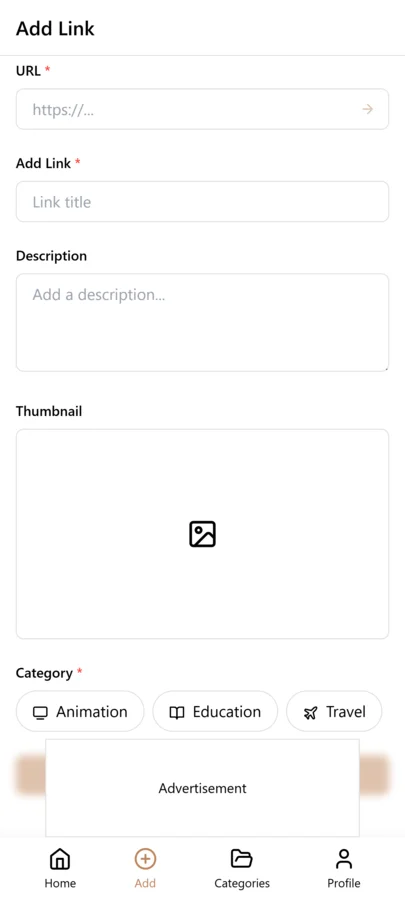
- Open LinkVault and tap + (Add Link)
- Paste the article link — the title and description auto-populate from the page metadata
- Add a note answering one question: "Why do I want to read this?" — one sentence is enough ("New framework for prioritization — looks better than Eisenhower matrix")
- Add tags by topic (business, health, technology, career, personal-growth) so you can filter by mood later
- Tag "priority" for must-reads this week and "weekend" for longer articles that need focused time
- Save — the article is now in your library with context, topic, and priority attached
- When you have time to read, search by tag to find articles matching your current mood and time available
The "Why I Saved This" Habit
The single most important habit for a functional reading list is writing one sentence about why you saved an article at the moment you save it. This takes 10 seconds and transforms your retrieval rate from 20% to 80%. It is the difference between a library you use and a graveyard you avoid.
Without the note, you rely on the article title to jog your memory three weeks later. Titles are designed to get clicks, not remind you of your personal reasoning. "10 Productivity Hacks That Changed My Life" tells you nothing about which hack interested you. "The Hidden Cost of Remote Work" could be about team dynamics, real estate, or mental health — you have no idea which angle mattered to you.
With the note, retrieval becomes effortless. You search "prioritization" and find the article with the note "New framework — looks better than Eisenhower matrix for creative work." You immediately know what it is, why you saved it, and whether it is worth reading now. If the note no longer resonates, you delete the article — no guilt, no hoarding.
This habit also filters out impulse saves. When you have to articulate why an article matters, you save fewer low-value links. The quality goes up, the quantity goes down, and you actually read what you save — most users report saving 40% fewer articles and reading 3x more of what they keep.
Tips for Maintaining Your Reading List
These practices keep your reading list functional over months and years, not just the first week. A reading list needs maintenance to stay useful:
- Always add "why this matters" in notes — one sentence at save time saves ten minutes of searching
- Use priority tags — "this-week" for urgent, "this-month" for important, no tag for whenever
- Set a weekly reading goal — 3 articles per week keeps the list moving
- Archive or delete articles you no longer need — 30 curated articles beat 300 hoarded
- Create "weekend reads" vs "quick reads" tags — match reading time to article length
- Review your list monthly and remove outdated content — trends and news lose relevance fast
- After reading, add a one-line takeaway in notes before archiving — builds a knowledge base
- Do a quarterly purge — if an article is 3 months unread, the note probably no longer resonates; delete
Building a Weekly Reading Habit
A reading list only works if you actually read from it. The biggest mistake people make is treating reading as something that happens "when I have time" — which is to say, never. Time is never found; it is allocated. If you do not schedule reading, it will not happen.
Start with a realistic goal. Three articles per week is enough to keep the list moving without feeling like a chore — roughly 30-45 minutes that fits into a commute, a lunch break, or the 20 minutes before bed. The goal is consistency, not volume — 3 articles every week for a year is 156 articles, far more than the average person reads from a read-later app.
Use your tags to match reading to context. On a Monday commute, search "quick-read" and "career" for something short and relevant to the workday. On a Sunday afternoon, search "weekend" and "personal-growth" for a longer article. The tags you added at save time make reading frictionless.
Schedule it and track it. Pick two or three recurring time slots tied to existing habits like your morning coffee or train ride. Each week, count how many articles you read. If you hit zero two weeks in a row, shrink the list and improve your notes. The goal is a system that runs itself.
Common Reading List Mistakes and How to Fix Them
Most reading list problems fall into a small number of patterns. If your list is not working, check this list — the fix is usually straightforward:
- Saving without notes — the title will not remind you why it mattered in three weeks; always write one sentence at save time
- No priority tags — without markers, everything looks equally important; tag the top 5 as "this-week" and ignore the rest
- Hoarding instead of curating — 300 unread articles is demoralizing; archive anything older than 3 months unread
- Mixing time-sensitive and evergreen content — tag news as "time-sensitive" and delete after a week if unread
- No time-based tags — without "quick-read" vs "deep-read", you cannot match articles to available time
- Saving everything that looks interesting — if you cannot articulate why in one sentence, skip it
- Never archiving after reading — read articles clutter your active list; archive immediately
- No weekly review — the list drifts without a check-in; spend 5 minutes every Sunday reviewing and purging
Comparing Read-Later Apps: LinkVault vs Pocket vs Browser Saves
Not all read-later tools serve the same purpose. Browser bookmarks were designed for URLs you revisit. Pocket was designed for capture. LinkVault was designed for retrieval — save with context, find by topic, read on a schedule. The differences compound as your library grows.
| Feature | Browser Bookmarks | LinkVault | |
|---|---|---|---|
| Context notes at save time | No — folders only | Limited — tags only | Yes — full notes field |
| Topic and priority tags | No | Basic tags | Yes — topic and priority tags |
| Full-text search across notes | No | No | Yes — search notes and titles |
| Time-based filtering | No | No | Yes — quick-read, weekend tags |
| Automatic metadata extraction | No — manual titles | Yes | Yes |
| Cross-device sync | Depends on browser | Yes | Yes — desktop, mobile, tablet |
| Archive and read tracking | No | Yes — basic archive | Yes — archive with takeaways |
Frequently Asked Questions
How is this different from Pocket?
Pocket was designed for capture — save now, read later. LinkVault is designed for retrieval. It gives you categories for broad organization, tags for cross-cutting topics, a notes field for capturing why you saved each article, and full-text search across all of it. Pocket gives you a flat list; LinkVault gives you a searchable, tagged, prioritized library you actually return to.
Can I mark articles as read?
Yes. Use a "read" tag to mark finished articles, or move them to an "Archive" category to keep your active list clean. Many users add a one-line takeaway in the notes before archiving, building a personal knowledge base over time.
What if I save too many articles?
This is the most common problem. The fix is the "why I saved this" habit — when you have to write one sentence about why an article matters, you naturally save fewer low-value links. Then use priority tags to surface the top 5-10 articles and set a weekly reading goal. Archive everything else without guilt — a curated list is more motivating than an overwhelming one.
Can I organize articles by how long they take to read?
Yes. Use tags like "quick-read" (under 5 minutes), "medium-read" (5-15 minutes), and "deep-read" (15+ minutes). When you have 5 spare minutes, search "quick-read" and find something that fits.
Does LinkVault work offline for reading?
LinkVault works offline for searching and browsing your saved links. The article content lives on the original website, so you need connectivity to read it. However, your notes, tags, and organization are all available offline, so you can plan your reading queue during a commute.
How do I build a consistent reading habit with my saved articles?
Start with a realistic goal — 3 articles per week keeps the list moving. Schedule two or three recurring time slots tied to existing routines like your morning coffee or evening commute. Use time-based tags like "quick-read" and "weekend" to match articles to available time. If you hit zero two weeks in a row, shrink the list and improve your notes rather than pushing harder.
What is the best way to organize articles by topic?
Use a small set of broad topic tags — 5 to 7 is ideal. Common categories include work, career, technology, health, personal-growth, finance, and leisure. Avoid creating a tag for every narrow subject; if you have 40 tags, filtering becomes as overwhelming as the unsorted list. Combine topic tags with priority tags like "this-week" and "weekend" so you can filter by both subject and urgency.
Can I import my existing Pocket library into LinkVault?
Yes. Pocket lets you export saved articles as an HTML file from account settings. Import that file into LinkVault and each article appears with its title and URL. Because Pocket does not export notes or tags, imported articles will not have context — spend 15 minutes adding one-sentence notes to the articles you plan to read, and archive the rest. Most users find 80% of their Pocket library is no longer relevant.