Best Bookmark App for Recipes & Cooking (2026 Guide)
Written by LinkVault Team
Home cooks save recipes from blogs, YouTube, Instagram, and cooking sites. But when it's time to actually cook, finding that perfect recipe becomes impossible.
Common recipe bookmark problems:
Recipes scattered across browser bookmarks and social saves, no notes about modifications or results, no way to search by ingredient or cuisine type, Pinterest boards that are overloaded and disorganized, and no way to quickly find weeknight versus special occasion recipes.
This guide shows how to build a searchable recipe library.
Why Home Cooks Need a Dedicated Recipe Manager
If you cook at home regularly, you have probably experienced the frustration of knowing you saved a great recipe somewhere — but not being able to find it when you need it. The problem is not memory; it is the system. Browser bookmarks mix recipes with work links, bank logins, and random articles. Pinterest boards grow so large that scrolling through them takes longer than cooking the meal. Instagram saves disappear into an endless feed with no search capability.
A dedicated recipe bookmark manager solves this by giving every recipe a home with context. When you save a recipe link in LinkVault, you can add notes about what attracted you to it, tag it by cuisine and ingredient, and rate it after cooking. The next time you wonder what to make for dinner, you search "pasta" or filter by the "quick" tag and instantly see every recipe you have saved that matches — along with your own notes about how it turned out. This transforms recipe collecting from a hoarding exercise into an actual cooking resource.
What Home Cooks Need
Based on common cooking workflows, these are the essential features for recipe organization that go beyond what browser bookmarks and Pinterest offer:
- Save recipes with personal notes and modifications
- Organize by meal type and cuisine
- Tag by main ingredient or dietary restriction
- Quick search when planning meals
- Rate and review tried recipes
- Build meal plans from saved favorites
- Access recipes from any device while shopping or cooking
- Add cooking results and family feedback for future reference
Step-by-Step: Recipe Library Setup in LinkVault
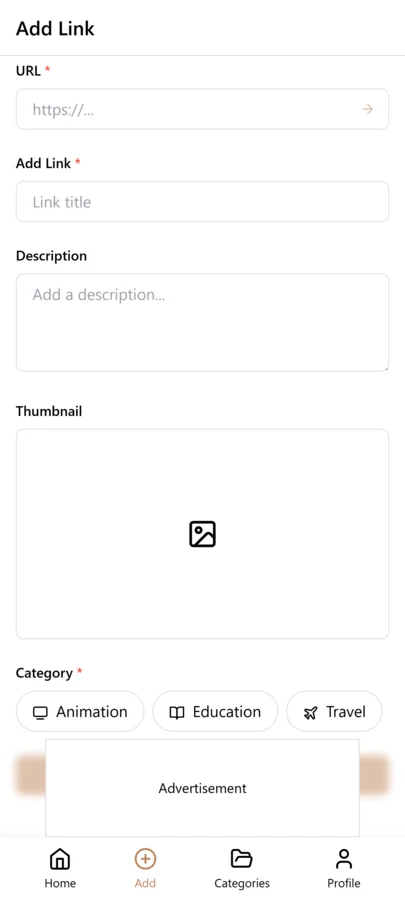
Follow these steps to build your recipe library from scratch. The initial setup takes about 10 minutes, and after that, adding a new recipe takes less than 30 seconds once you are in the habit.
- Create categories: Breakfast, Lunch, Dinner, Desserts, Snacks
- When you find a recipe, copy the link
- Open LinkVault
- Tap + (Add Link)
- Paste the recipe link
- Add notes: "Easy weeknight pasta" or "Birthday cake - kids loved it"
- Tag by cuisine, ingredient, or occasion
- After cooking, add modifications and ratings in notes
- Save
Organizing by Cooking Context, Not Just Cuisine
Most people start by organizing recipes by cuisine — Italian, Mexican, Asian — but this only helps when you already know what type of food you want. The real power comes from organizing by cooking context. A "weeknight" tag for recipes that take 30 minutes or less. A "weekend" tag for slow-cooking projects. A "crowd-pleaser" tag for dishes that always get compliments. A "kids-approved" tag for recipes picky eaters actually eat.
This contextual tagging means when you are tired on a Wednesday evening, you search "weeknight" and see only recipes that fit your situation. When you are hosting a dinner party, you filter by "crowd-pleaser" and pick from proven winners. The combination of categories (meal type) and tags (cooking context) gives you multiple ways to find the right recipe for any moment, which is something no browser bookmark folder can do.
Tips for Recipe Organization
These best practices come from home cooks who have built recipe libraries of 200+ saved recipes and actually use them regularly:
- Tag "quick" for 30-min or less recipes
- Use "tried" tag after cooking and add your review
- Tag by main protein (chicken, beef, vegetarian)
- Note prep time and difficulty in descriptions
- Create "favorites" tag for family hits
- Tag by season for seasonal ingredients
- Add a "to-try" tag for recipes you have not cooked yet
- Note substitutions that worked or did not work
Using LinkVault for Meal Planning and Grocery Runs
Meal planning becomes effortless when your recipe library is organized. Each week, create a "this-week" tag and assign it to 5-7 recipes you plan to cook. When you open LinkVault on your phone at the grocery store, filter by "this-week" and you see exactly what you need to buy, with the recipe links ready to open. No more forgetting an ingredient because you could not remember which recipe you planned.
After the week is done, remove the "this-week" tag from those recipes. Recipes that were winners get a "favorites" tag. Recipes that did not work out get deleted or noted with what went wrong. This weekly cycle keeps your library fresh, relevant, and actually useful rather than a growing archive of recipes you will never cook. The key insight is that a recipe library only has value if you can find and use the recipes — and that requires active organization, not passive saving.
Handling Recipes from Different Formats and Platforms
Recipes come from an increasingly diverse set of sources, and each format presents its own challenge when it comes to saving and organizing. Blog recipes are usually the easiest because the page itself is the recipe — you save the URL and the page contains ingredients, instructions, and often a story that gives you context. YouTube recipes are harder because the recipe is inside a video, not on a page. When you save a YouTube cooking link, add a note with the timestamp where the recipe starts and a brief summary of the key ingredients and steps. This way you do not have to rewatch the entire video to find the part you need. Instagram and TikTok recipe videos are the most challenging because the content is ephemeral and the caption often does not include full instructions.
For social media video recipes, capture as much as you can in the note while the video is in front of you. Write down the ingredient list, any measurements shown on screen, and the basic steps. Save the link with a note like "Short pasta video from @chefname — 2 cloves garlic, 1 can tomatoes, basil, red pepper flakes — 15 min total." Even if the video is later removed or the algorithm buries it, your note preserves the recipe. For recipes from cooking apps or subscription sites, save the link and note whether the recipe requires a login to view. If a recipe is behind a paywall, consider taking a screenshot of the recipe text and noting where the original came from so you can credit it if you share it later. The principle across all formats is the same: the link is the anchor, but your notes are what make the recipe actually usable when you are standing in the kitchen with flour on your hands.
Adapting and Personalizing Saved Recipes Over Time
A recipe is rarely a static document. The first time you cook it, you follow the instructions as written. The second time, you tweak the salt. The third time, you swap an ingredient because you could not find the original at the store. By the fifth time, the recipe in your head is substantially different from the one on the page, and if you have not been recording those changes, you will forget which version was the one that actually worked. LinkVault solves this by making the notes field a living document for each recipe. After every cooking session, open the saved recipe in LinkVault and append a dated note describing what you changed and how it turned out.
Over months, these accumulated notes transform a generic recipe into a personalized version that reflects your taste, your kitchen, and your family preferences. A recipe note might evolve from the original "Tried 3/15 — good but needed more salt" to "Tried 4/22 — added extra garlic and used half the red pepper, much better, kids ate it" to "Final version: double the garlic, skip the red pepper, add a squeeze of lemon at the end. This is now the house version." When you reach that point, the saved link is less a recipe and more a reference point for your own creation. Another benefit of tracking adaptations is that you can reproduce a hit. If guests rave about a dish and ask for the recipe months later, you do not have to guess what you did differently — your notes tell the exact story. This ongoing personalization is what separates a recipe collector from an actual cook, and it is the single highest-value habit you can build around your LinkVault recipe library.
Common Recipe Organization Mistakes and How to Avoid Them
Building a recipe library is simple in concept but easy to get wrong in practice. The mistakes below are the ones that most often turn a promising collection into an unusable mess, and each one has a specific, quick fix that takes only a few extra seconds when saving a recipe. What makes these mistakes sneaky is that they do not cause problems immediately — a library of twenty untagged recipes is still browsable. But by the time you have a hundred or more, the lack of structure becomes paralyzing and the effort required to retroactively organize everything is enough to make most people give up entirely. The fix is to build the right habits early, while your library is still small enough that every recipe gets the attention it deserves. Review this list as a checklist whenever you save a new recipe, and within a few weeks the correct workflow becomes automatic.
- Saving recipes without tags: A recipe with no tags is invisible to filtering. Always add at least one cuisine tag and one context tag, such as weeknight or weekend, before saving.
- Never recording cooking results: A recipe you tried but did not review is a missed opportunity. After each cooking session, add a dated note about what worked, what did not, and what you would change next time.
- Using categories and tags interchangeably: Categories should represent meal types like Dinner or Desserts, while tags should represent cuisines, ingredients, and cooking contexts. Mixing the two makes both systems less effective.
- Saving recipes you will never cook: Be honest with yourself. If a recipe requires equipment you do not own or skills far beyond your level, saving it only adds clutter. Save recipes you genuinely intend to try within the next few months.
- Ignoring the source: Always note where you found the recipe — a blog name, a YouTube channel, a friend. If the link breaks, the source note helps you track down the original or credit the creator when sharing.
Frequently Asked Questions
Can I save Instagram recipe videos?
Yes. Copy the post link and save it with notes about what the recipe is. Add tags for the dish type and main ingredients so you can find it later even if you forget the creator.
How do I organize meal planning?
Use tags for meal types and create a "this-week" tag for current meal plans. At the grocery store, filter by "this-week" to see all planned recipes and their ingredient lists in one place.
Can I add my own modifications?
Yes. Add all modifications and feedback in the notes field after trying recipes. Note what you changed, how it affected the result, and whether you would make it again. This turns your library into a personal cookbook that improves over time.
What is the best way to handle dietary restrictions?
Use tags like "vegetarian," "gluten-free," "dairy-free," or "keto" when saving recipes. When planning meals for someone with a dietary restriction, filter by that tag to instantly see all matching options.
How many recipes should I save before organizing?
Start organizing from the very first recipe. It is much harder to retrofit organization onto 100 untagged recipes than to tag each one as you save it. Build the habit of adding at least one tag and a short note every time you save.
How do I save recipes from short-form video platforms like TikTok and Instagram Reels?
Copy the post link and save it to LinkVault, but do not rely on the video alone. While the video is in front of you, write down the ingredient list and key steps in the notes field. Videos get removed, accounts get deleted, and algorithm feeds bury old content, so your notes become the durable version of the recipe. Include the creator handle so you can find them again, and tag by dish type and main ingredient so the recipe surfaces in the right searches later.
What should I do with recipes I tried once and did not enjoy?
You have two options. If the recipe was fundamentally flawed or just not to your taste, delete it from your library so it does not clutter your search results. If the recipe had potential but needs adjustments, keep it and add a note explaining what went wrong and what you would change next time. Tag it with something like retry so you can find it when you are ready to give it another shot with modifications. Deleting or marking a recipe is just as important as saving it, because a curated library is far more useful than an overstuffed one.