Best Bookmark App for Researchers (2026 Guide)
Written by LinkVault Team
Research involves managing hundreds of papers, articles, references, and resources across multiple projects, devices, and collaborators. Browser bookmarks and folders cannot handle this complexity — they lack tagging, search across notes, and cross-device sync. The result is a growing pile of URLs that you can never search by content, never filter by methodology, and never trust to surface the exact paper you need when the deadline pressure is on.
Common research organization problems: papers saved without proper context or citation details, no system for tracking which references are read or critical, difficulty organizing by topic or methodology, losing that perfect reference when writing a literature review, and resources spread across lab computer, laptop, phone, and cloud drives. Add in preprints from arXiv, datasets on GitHub, methodology tutorials on YouTube, and links forwarded by colleagues, and the fragmentation becomes unmanageable within a single semester.
The deeper issue is that research is not a linear process. You collect papers during a literature search, set them aside while you run experiments, return months later to write the discussion, and suddenly need every reference that touches a specific finding. A system designed only for capture — save now, organize never — fails this workflow completely. You need a system designed for retrieval: one that lets you search your own notes, filter by research phase, and surface a paper by a half-remembered phrase in seconds.
This guide shows how researchers can build a searchable, tagged, and cross-device research library using LinkVault — one that turns a chaotic pile of PDFs and URLs into a structured knowledge base you can actually retrieve from when writing. Whether you are running a solo thesis, collaborating with a lab, or conducting a systematic review, the workflow below scales from 10 papers to 1,000 without breaking down.
Why Researchers Need a Dedicated Bookmark Manager
Academic research generates links at an overwhelming rate. You find a paper through Google Scholar, save it to your browser. A colleague sends a relevant article via email — you bookmark that too. You discover a dataset on GitHub, a methodology tutorial on YouTube, and a preprint on arXiv, all in the same afternoon. By the end of the week, you have 40 new links scattered across three browsers, two email accounts, and a dozen open tabs.
The problem is not saving — it is retrieval. When you sit down to write a literature review, you need to find every paper you saved on a specific topic, remember why each one mattered, and pull out the key findings. Browser bookmarks give you folders and titles. That is not enough. You need full-text search across your own notes, tags that cross-reference methodology and subject area, and the ability to filter by research phase (background, methods, discussion) so the right subset appears on demand.
A dedicated bookmark manager like LinkVault solves this by giving every saved paper a rich note field, unlimited tags, category organization, and full-text search across all of them. You save a paper once, add a two-line note about why it matters, tag it by topic and method, and months later you search a keyword and it appears instantly — no matter which device you saved it from.
This matters most under deadline pressure. When a grant submission is due in 48 hours and you need every reference supporting your methods section, scrolling through an unsorted browser bookmark list is a form of self-sabotage. A tagged, searchable library turns that panic into a five-minute search. The time you invest in adding a note and two tags at save time is repaid many times over at retrieval time.
Finally, research increasingly spans resource types that citation managers were never built for. A code repository, a conference talk recording, a blog post from a leading researcher, a forum thread on a replication problem — none of these fit neatly into Zotero or Mendeley, yet all of them are essential to your work. A bookmark manager that treats every URL as a first-class, searchable, taggable object is the missing layer in most research workflows.
What Researchers Need from a Bookmark App
Based on interviews with academic users and analysis of common research workflows, these are the essential features for research link organization:
- Save papers with full citation notes (author, year, journal, DOI) in a dedicated notes field
- Organize by research project or topic using categories that mirror your actual project structure
- Tag by methodology (qualitative, quantitative, mixed), subject area, and relevance level
- Full-text search across titles, notes, and tags so you can find a paper by a phrase you remember
- Cross-device access — save at the lab, read at home, search from the library on your phone
- Export reference lists as needed for collaboration, manuscript preparation, or grant submissions
- Offline access for reading saved papers during commutes or travel without connectivity
- No item limits on the free tier — research libraries grow into the hundreds, not dozens
- Filter by multiple tags at once to narrow a large library down to a precise working set in seconds
Step-by-Step: Research Setup in LinkVault
Follow these steps to build your research library from scratch. The setup takes about 15 minutes and gives you a system that scales from 10 papers to 1,000 without breaking down.
- Create categories for each active research project — e.g., "Thesis Chapter 3", "Grant Proposal 2026", "Collaboration with Dr. Smith"
- When you find a paper through any source (Google Scholar, PubMed, arXiv, colleague email), copy the link
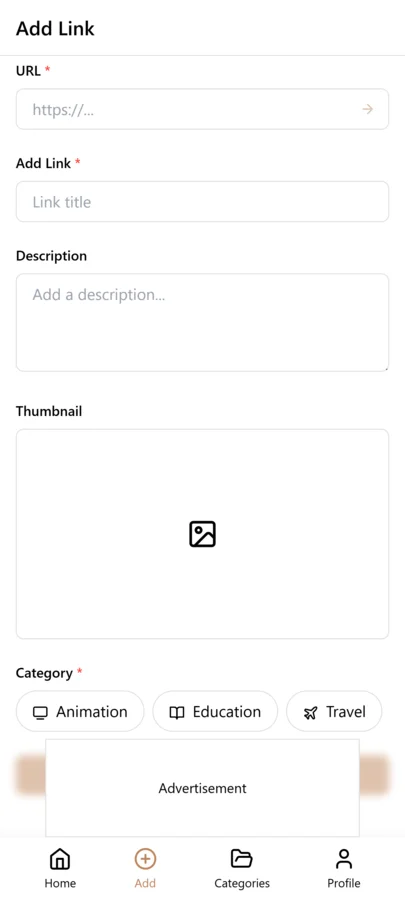
- Open LinkVault and tap + (Add Link) — paste the URL. The title and description auto-populate from the page metadata
- Add notes with: Author names, Year, Journal or conference, Key findings in 1-2 sentences, and why this paper is relevant to your project
- Tag by research method (e.g., "qualitative", "meta-analysis"), subject area (e.g., "cognitive-load", "user-study"), and priority level ("critical", "supporting", "background")
- Add a "to-read" tag for papers you have saved but not yet reviewed — change it to "reviewed" after reading
- When writing a literature review or paper, use search to find all papers tagged with a specific topic — they appear instantly with your notes attached
- Export citation lists as needed by filtering by category or tag, then sharing the exported file with collaborators
- Run a monthly review pass — upgrade useful "to-read" papers, delete dead links, and re-tag items whose relevance has shifted as your project evolves
Organizing by Research Phase and Methodology
One of the biggest mistakes researchers make is organizing links by source (Google Scholar, PubMed, email) rather than by how they use them. A paper found through Google Scholar and one forwarded by a colleague often serve the same purpose in your research — so they should be organized the same way.
The LinkVault approach is to organize by research phase instead. Create tags for "background" (foundational papers everyone cites), "methods" (papers whose methodology you want to replicate or adapt), "discussion" (papers that support or challenge your findings), and "to-cite" (papers you plan to reference in your current manuscript). This way, when you are writing the methods section, you search the "methods" tag and every relevant paper appears — regardless of where you originally found it.
For methodology, use tags like "systematic-review", "RCT", "case-study", "survey", or "experimental". When you need to compare your methodology against similar studies, filter by the methodology tag and you have your comparison set ready in seconds. This is especially powerful when a reviewer asks you to justify your methodological choices — you can produce a supporting reference set almost instantly.
Phase and methodology tags also make your library future-proof. A paper tagged "background" for your current thesis might become a "methods" reference in your next project. Instead of moving it between folders and losing its original context, you simply add the new tag. The paper now appears in both searches, and your notes preserve the full history of how you have used it across different phases of your work.
The payoff compounds as your library grows. With 50 papers, folders might be enough. With 500, only a tag-and-search system keeps retrieval fast. Researchers who maintain a 1,000-plus library report that the combination of phase tags, methodology tags, and full-text search across notes is what keeps the system usable year after year — not the size of the library, but the quality of the retrieval paths into it.
Tips for Research Organization
These best practices come from researchers who have used LinkVault to manage libraries of 500+ papers across multiple projects:
- Add full citation info in notes immediately — do not tell yourself you will do it later. A paper saved without a citation note becomes untraceable in 3 months
- Tag by research phase (background, methods, discussion) so you can pull papers by how you use them, not where you found them
- Create "to-read" and "reviewed" tags to track your reading queue — search "to-read" to see your backlog at a glance
- Note key quotes or page numbers for easy reference during writing — "p.47: defines cognitive load as..." is searchable later
- Archive completed project references separately — move finished projects to an "Archive" category to keep your active workspace clean
- Use a "critical" tag for the 10-20 papers that form the backbone of your current work — these should be one search away at all times
- Review your library monthly — upgrade useful "to-read" papers, delete ones you will never use, and re-tag papers that have shifted in relevance
- Add a one-sentence "why this matters" note at save time so a half-remembered title never leaves you guessing months later
- Keep a "rejected" tag for papers you evaluated and dismissed — it prevents you from re-reading and re-rejecting the same source twice
Using LinkVault for Literature Reviews
A literature review requires you to synthesize dozens of papers by theme, identify gaps, and trace the evolution of ideas. This is nearly impossible with browser bookmarks because you cannot search across your own notes or filter by theme.
With LinkVault, the workflow becomes systematic. As you read each paper, add a note summarizing the key argument in your own words and tag it with the theme it addresses (e.g., "motivation-theory", "behavioral-economics", "ux-research-methods"). When it is time to write, search each theme tag and you get an instant list of every relevant paper with your summaries attached. You can then write your synthesis directly from the search results, citing each paper as you go.
For systematic reviews specifically, the ability to export your tagged library means you can share your complete reference set with co-authors, include it as supplementary material, or import it into reference management tools like Zotero or Mendeley for final citation formatting. The tagging discipline you build during screening also doubles as a transparent audit trail — you can demonstrate exactly which papers were tagged for inclusion, exclusion, or discussion, which strengthens the reproducibility of your review.
A practical pattern for thematic synthesis is to create one tag per theme in your review outline before you start reading. As you screen papers, each one gets at least one theme tag plus a two-sentence note on its contribution to that theme. When you reach the writing stage, the theme-by-theme structure of your review is already mapped out by your tags — you are writing from an organized evidence base rather than reconstructing it from memory.
This approach also exposes gaps early. If a theme tag has only two papers attached after weeks of searching, you immediately know where your coverage is thin and can target follow-up searches. That kind of visibility is impossible when references live as undifferentiated entries in a browser bookmark bar.
Collaborating with Co-Authors and Research Teams
Research is rarely a solo activity. Co-authors, supervisors, lab mates, and external collaborators all need access to the same body of references, and they need it organized in a way that makes sense to more than just the person who saved each link.
With LinkVault, the collaboration workflow starts with export and import. Filter your library by the project category or a shared tag, export the filtered set, and send it to a co-author. They import it into their own account with all notes and tags preserved, so the context you captured travels with the reference — not just a bare URL. This is far more useful than a shared spreadsheet of links, which loses every note and tag the moment it leaves your library.
For ongoing collaboration, agree on a shared tagging convention up front. If everyone on the team uses the same phase tags ("background", "methods", "discussion") and the same methodology tags, imported references slot directly into each coauthor existing searches without reorganization. A short shared vocabulary document — even five or six agreed tags — prevents the fragmentation that otherwise happens when each person invents their own labels.
When it is time to write, each author can export the subset relevant to their assigned section. The methods lead exports everything tagged "methods", the discussion lead exports "discussion" and "to-cite", and everyone works from the same curated evidence base. Merged exports can be shared with reviewers or included as supplementary material, giving external readers a transparent view of the literature behind the manuscript.
For multi-site teams, the cross-device bookmark manager sync means a reference saved by a collaborator in one time zone is searchable by another the next morning, with notes intact. This keeps distributed research projects coherent without forcing everyone into a single shared folder structure that no one maintains.
Common Research Organization Mistakes
Avoid these failure patterns that turn a promising reference library into an unusable graveyard of links:
- Saving links without any note — a URL with only a title is untraceable weeks later when you forget why it mattered
- Organizing by source instead of use — Google Scholar, PubMed, and email folders tell you nothing about how a paper fits your argument
- Over-tagging with single-use labels — 200 unique tags that each apply to one paper defeats search; consolidate into reusable themes
- Treating "to-read" as permanent storage — papers that sit unread for six months rarely get read; review and prune the queue regularly
- Mixing active and finished projects in one view — completed work clutters searches for your current manuscript; archive it instead
- Skipping citation details at save time — reconstructing author, year, and DOI later costs ten times the effort of pasting them in up front
- Hoarding every link you encounter — a curated library of 200 high-value references beats a dump of 2,000 unreviewed ones every time
- Not re-tagging as projects evolve — a paper that was "background" may become "to-cite"; update tags so retrieval paths stay accurate
Research Tool Comparison: LinkVault vs Zotero vs Mendeley
Each tool has a different strength. Many researchers use LinkVault for capture and organization alongside a citation manager for final formatting.
| Feature | Zotero | Mendeley | LinkVault |
|---|---|---|---|
| Primary purpose | Citation management and PDF annotation | Citation management and PDF library | Capture, organization, and retrieval of any research link |
| Full-text search across notes | Limited | Limited | Yes, indexed across titles, notes, and tags |
| Unlimited tags with multi-tag filtering | No | No | Yes |
| Handles non-paper resources (code, video, blogs, datasets) | Weak | Weak | First-class — any URL is searchable and taggable |
| Cross-device sync | Yes (paid for storage) | Yes | Yes |
| Citation formatting (APA, MLA, Chicago) | Yes, strong | Yes, strong | Via export to Zotero or Mendeley |
| Free tier limits | 300 MB storage | 2 GB storage | No item limits on links |
Frequently Asked Questions
Can I use this for literature reviews?
Yes. Tag each paper by theme as you read it, add a one-sentence summary in the notes field, and when writing your review, search by theme tag to pull all relevant papers instantly. This turns a literature review from a days-long search into a focused writing session.
How do I track citation information?
Add full citation details (author, year, journal, DOI) in the notes field for each paper when you save it. The notes field is indexed for full-text search, so you can search by author name, journal, or any citation detail and find the paper immediately.
Can I share reference lists with collaborators?
Yes. Filter your library by category or tag to isolate the references you want to share, then export the filtered set as HTML, CSV, or JSON. Your collaborator can import the file into their own reference manager or LinkVault account with all notes and tags preserved.
How is this different from Zotero or Mendeley?
Zotero and Mendeley are excellent for citation management and PDF annotation. LinkVault complements them by handling the broader set of research resources — YouTube tutorials, blog posts, datasets, tool documentation, and colleague recommendations — that do not fit neatly into a citation manager. Many researchers use LinkVault for capture and organization, then export to Zotero for final citation formatting.
Can I access my research library from multiple devices?
Yes. LinkVault syncs across every device you sign in on. Save a paper at the lab computer, read your notes on your laptop at home, and search your library from your phone during a conference — all without manual syncing.
Can I run a systematic review with LinkVault?
Yes. Use a consistent tagging scheme during screening — for example "include", "exclude", and "discuss" — and add a one-sentence rationale in the notes for each decision. You can then filter by each tag to produce your PRISMA-style counts, export the included set for your co-reviewers, and import it into a citation manager for the final reference list. The tags create an auditable trail of every inclusion and exclusion decision.
How does collaboration work for research teams?
Agree on a shared tagging vocabulary with your co-authors up front, then export filtered subsets by category or tag so each team member works from the same curated evidence base. Imported references keep their notes and tags, so context travels with the link rather than getting lost in a shared spreadsheet. Multi-site teams benefit from cross-device sync that makes a reference saved in one time zone searchable by another the next morning.
How do I manage a large research library without it becoming overwhelming?
Combine phase tags (background, methods, discussion), methodology tags, and a "critical" tag for the 10-20 backbone papers of your current work. Run a monthly review to upgrade useful "to-read" papers, delete dead links, and re-tag items whose relevance has shifted. Archive finished projects to a separate category so only active work appears in your daily searches. Multi-tag filtering lets you narrow a 1,000-paper library down to a precise working set in seconds.