Best Bookmark App for Shopping & Product Research
Written by LinkVault Team
Online shopping involves researching products across multiple sites. Most people lose track of items they were considering or forget why they liked a specific product.
Common shopping bookmark problems:
Product links scattered across browser tabs, no notes comparing features or prices, wishlists buried in different shopping sites, no way to remember which product had better reviews, and no system for tracking price drops or sales.
This guide shows how to organize product research properly.
Why Smart Shoppers Need a Dedicated Product Research Manager
Online shopping has become a research project. Before buying almost anything, you read reviews, compare prices across stores, watch video reviews, and check community discussions. The problem is that this research happens across days or weeks, across multiple devices, and the links pile up in browser tabs that get closed, bookmarks that get lost, and notes that disappear.
A dedicated product research manager changes this. When you save a product link in LinkVault, you capture not just the URL but the context: the price you saw, the features that mattered, the alternatives you were considering, and whether it is a want or a need. Weeks later when you are ready to buy, you open LinkVault, search the product name, and immediately see every option you researched with your own notes about why each one was on your list. This eliminates re-researching products you already evaluated, saves money by avoiding impulse buys, and ensures you actually buy the best option rather than the last one you looked at.
What Smart Shoppers Need
Based on common online shopping workflows, these are the essential features for product research organization that browser bookmarks and wishlist features cannot provide:
- Save product links with comparison notes
- Organize by category or purchase priority
- Tag by price range or urgency
- Add notes about pros, cons, and reviews
- Quick search when ready to buy
- Track items across multiple stores
- Access saved research from any device while shopping
- Archive purchases to build a buying history
Step-by-Step: Shopping Vault Setup in LinkVault
Follow these steps to build your shopping research vault. The initial setup takes about 5 minutes, and adding a new product takes less than 30 seconds once it becomes a habit.
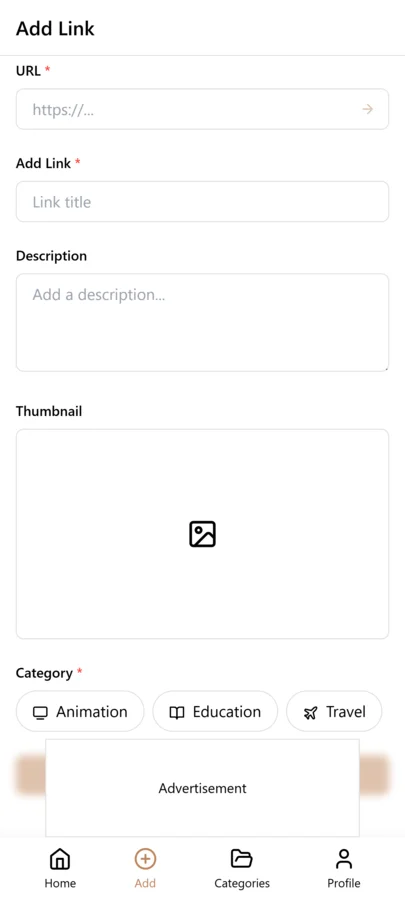
- Create categories: Electronics, Home, Clothing, Gifts, etc.
- When researching a product, copy the link
- Open LinkVault
- Tap + (Add Link)
- Paste the product link
- Add notes: "Best rated laptop - $899 - great battery life" or "Living room chair - compare with option 2"
- Tag by urgency, price range, or occasion
- Save
Comparing Products the Right Way
The biggest mistake shoppers make is saving product links without any notes. Three weeks later, you open a saved link and have no idea why you saved it, what the price was, or how it compared to the other options. The link alone is useless without context.
The solution is to treat each saved product as a mini review entry. When you save a laptop link, add notes like: "$899 at Store A, 16GB RAM, 512GB SSD, 12-hour battery, reviewer X praised the keyboard but criticized the screen brightness. Compare with the Dell option saved separately." This takes 15 seconds but saves you from re-doing hours of research later. When you are ready to buy, filter by your comparison tag and read through your notes to make the final decision in minutes instead of starting the research over from scratch.
Tips for Shopping Organization
These best practices come from shoppers who use LinkVault to manage product research across categories and avoid buyer remorse:
- Add current price and date in notes
- Tag "priority" for immediate needs
- Use "wishlist" tag for future purchases
- Note key features that matter to you
- Compare multiple options by filtering tags
- Archive or delete after purchase
- Add a "researching" tag for items still being evaluated
- Note the store name in case prices differ across retailers
Building a Purchase Archive for Smarter Future Buying
One overlooked benefit of organizing shopping research is the purchase archive. When you buy something, do not delete the saved link — instead, tag it "purchased" and add notes about whether the product lived up to expectations. Over time, this builds a personal review database that helps you make better buying decisions.
For example, if you saved three vacuum cleaner options, bought one, and noted "Great suction but noisy, would buy again," that information is valuable when a friend asks for a recommendation or when you need to buy a second vacuum for another floor. You can also track which stores had the best prices, which products had quality issues, and which categories tend to disappoint you. This archive turns every purchase into a data point that improves your future shopping, something no browser bookmark system can do because it lacks the notes and searchability to make past research useful again.
Tracking Price Changes and Timing Your Purchases
Price tracking is one of the most practical ways to save money on online shopping, yet most people do it inconsistently or not at all. The problem is that prices fluctuate constantly, and without a record of what a product cost last week or last month, you have no way to tell whether a current sale is actually a good deal or just a return to the regular price after an artificial mark-up.
With LinkVault, you can build a simple price history by updating the notes field each time you check a product. Save the link once, then every few days or weeks, open it and append a new line: "$899 on 10/15, $849 on 10/28, $799 on 11/10 (Black Friday preview)." Over a few weeks, you develop a clear picture of the price floor and ceiling for that product. When you see it drop to $799 again, you know it is a genuine low and not just a random dip. This approach is especially powerful for products you plan to buy during seasonal sales like Black Friday, Prime Day, or end-of-season clearances. Instead of guessing whether the holiday discount is real, you compare it to the actual price trend you recorded. You can also tag items as "wait-for-sale" so they surface when you are specifically looking for deals, and set a target price in your notes so you know exactly when to pull the trigger rather than reacting to marketing urgency.
Researching Big-Ticket Items Without Getting Overwhelmed
Big-ticket items like laptops, televisions, furniture, and appliances require more research than everyday purchases, and that research can quickly become overwhelming. You end up with twenty browser tabs open, three different review sites, a YouTube video playing in the background, and a Reddit thread that contradicts everything the professional reviewers said. The information is useful but the chaos makes it hard to reach a decision.
The key is to break the research into structured phases and use LinkVault to organize each phase. Start by saving the top three to five candidate products as individual links, each with a tag like "tv-comparison." Then save the key review articles and videos, tagging each with the product name so they group with the listing. Add notes summarizing the verdict: "RTINGS.com gave it 8.4, praised contrast but criticized viewing angle." Save community discussions separately and note the consensus: "Reddit users report backlight bleed after 6 months." Once you have gathered enough information, use the tag filter to see all notes for a single product in one view, which makes it easy to do a final side-by-side comparison. This structured approach prevents the research from sprawling indefinitely, gives you a clear endpoint, and ensures that when you finally decide, you are choosing based on organized evidence rather than the last review you happened to read.
Common Shopping Research Mistakes and How to Avoid Them
Even with a good tool, certain habits undermine your shopping research. These are the most common mistakes people make when organizing product research online, along with practical ways to avoid each one:
- Saving links without any notes, then forgetting why you saved them — always add at least the price, date, and one reason you saved it
- Comparing too many options at once, which leads to decision paralysis — narrow to three to five candidates before deep-diving into reviews
- Ignoring total cost including shipping, tax, and returns — note the landed price, not just the headline number
- Trusting a single review source — save at least one professional review and one community discussion per product
- Forgetting to check the return policy and warranty terms — add these details to your notes since they affect the real value
- Not recording the date of your price checks — prices change, and undated notes become meaningless within weeks
- Deleting research immediately after buying — keep it as a purchase archive for future reference and recommendations
- Mixing impulse wants with planned purchases in the same view — use separate tags like "wishlist" and "buying-now" to keep them distinct
Frequently Asked Questions
Can I track prices over time?
Yes. Update the notes field with new prices and dates as you check back. This creates a price history so you can see if a sale is actually a good deal or just a return to the normal price.
How do I compare similar products?
Save all options in the same category, add detailed notes about features and prices for each, and use a shared tag like "laptop-comparison" to group them. Filter by that tag to see all options side by side with your notes.
Can I organize gift ideas?
Yes. Create a "Gifts" category and tag by recipient or occasion. When a birthday or holiday approaches, filter by the recipient tag to see everything you have been considering for them.
What happens after I buy something?
Tag it "purchased" and add notes about whether it met your expectations. This builds a purchase archive that helps with future buying decisions and makes it easy to recommend products to friends and family.
Can I save products from my phone while shopping in a store?
Yes. LinkVault works on mobile, so you can save a product link from a store website or Amazon while standing in a physical store, add notes about the in-store price, and compare later before deciding where to buy.
How do I know if a sale price is actually a good deal?
Build a price history by updating the notes field each time you check a product over several weeks. Record the price and date each time. When a sale appears, compare it to your recorded history. If it matches or beats the lowest price you tracked, it is a genuine deal. If it is only a few dollars off the highest price you saw, the sale is likely inflated and you should wait.
What is the best way to research expensive items like laptops or TVs?
Start by saving three to five candidate products with a shared comparison tag. Then save at least one professional review and one community discussion for each, tagging every resource with the product name. Add notes summarizing each source. Once you have enough material, filter by the product tag to see all notes in one view for a final side-by-side decision.
Should I keep my research after I have already bought the product?
Yes. Tag the purchased item as "purchased" and add notes about whether it met your expectations. This builds a purchase archive that helps with future buying decisions, warranty claims, and recommendations. If you ever need to buy a similar product again, your past research is already organized and ready to reference.