Best Bookmark App for Teams & Collaboration (2026 Guide)
Written by LinkVault Team
Teams share resources constantly — competitor research, tool links, client portals, documentation, onboarding guides, design references, and dozens of other links that need to be accessible to the right people at the right time. The problem is that most teams have no dedicated place to put these links. They get posted in Slack channels where they are buried within hours. They end up in email threads that new hires cannot access. They get pasted into shared Google Docs that become stale and unsearchable. And they get saved in individual team members' personal bookmarks, where they are invisible to everyone else.
The cost is real and measurable. Every time someone asks "does anyone have that link to the analytics dashboard?" or "where's the client portal for Acme Corp?" or "what was that tool we evaluated last quarter?", the team is paying a productivity tax on poor knowledge organization. New hires pay it the most — they spend their first weeks repeatedly interrupting colleagues to ask for links that should simply be findable in a shared system.
Common team bookmark problems:
Links lost in Slack channels. Email threads become link graveyards. No central place for team resources. Can't find shared tools and portals. New team members lack resource access. No way to organize by project or client.
This guide shows how to build a shared bookmark system that eliminates these problems and turns your team's collective knowledge into a searchable, organized library everyone can use.
Why Teams Need Better Bookmark Systems
The core problem with Slack, email, and shared documents as link repositories is that none of them were designed for retrieval. Slack is designed for real-time conversation. Email is designed for communication threads. Google Docs are designed for collaborative writing. When you use any of these to store links, you are working against the grain of the tool — and retrieval suffers because of it.
A Slack message with a valuable link is retrievable only if you know it exists, remember roughly when it was posted, and search the right channel with the right keywords. An email with a link is retrievable only if it was not archived, deleted, or buried under reply threads. A Google Doc with links requires the doc to stay updated, which it rarely does once the initial burst of enthusiasm fades.
A dedicated bookmark system for teams is fundamentally different because it is organized for retrieval from the start. Links have categories, tags, and notes that describe why they matter. The search covers everything simultaneously. New team members can browse the entire library on day one without asking anyone for help. And when the team's needs change — a new project, a new client, a new tool stack — the organization evolves alongside the work. That is what a shared knowledge system looks like in practice.
What Teams Need in a Bookmark Tool
Not all bookmark tools are built for team use. A personal bookmark app that happens to have a "share" button is not a team knowledge system. Here are the features that matter for genuine team-wide knowledge management, and why each one is essential rather than optional.
- Shared categories accessible to the whole team: a single organized library everyone can browse and search, not individual silos
- Individual and team workspaces: team members should have private bookmarks alongside shared ones — not everything needs to be visible to everyone
- Notes field on every link: the link title alone is rarely enough context; a one-sentence note explaining why the link matters transforms retrieval quality
- Tags for cross-project organization: a competitor research link might belong in both the "Research" category and the "Acme Project" tag — tags allow this without duplication
- Fast full-text search: searching all shared bookmarks by keyword in under two seconds is the feature teams use every single day
- Mobile and desktop sync: team members save links from their phones and need to find them on desktop — sync must be instant and reliable
- Easy onboarding for new members: a new hire should be able to access the full team library on day one with zero setup and no colleague assistance
- No special training required: if using the system requires training, it will not be adopted — simplicity is a feature, not a compromise
Team Bookmark Organization Structure
The right organization structure for a team depends on how the team works — by client, by project, by department, or by function. The categories below work for most teams but should be adapted to your specific context. The key principle is that every team member should be able to look at the category list and immediately understand where to find something and where to put something new. If the structure requires explanation, it is too complex.
- Team Tools: every app, platform, and service the team uses — admin dashboards, analytics tools, hosting consoles, email platforms, design tools, communication apps
- Client Work: one sub-category or tag per active client, containing portals, briefs, brand assets, communication histories, and deliverable links
- Research: competitor analysis, market research, industry reports, benchmark data, and reference material the whole team draws on
- Learning and Training: tutorials, documentation, onboarding guides, style guides, process documents, and external learning resources
- Active Projects: one entry per live project with links to project briefs, shared documents, staging environments, and tracking boards
- Inspiration and References: design inspiration, copywriting examples, product teardowns, and any "save for later" material the team finds useful
- Tag by department or role: engineering, design, marketing, sales, operations — so each team can filter to links most relevant to their work
- Tag links by status: "active", "evaluate", "archive" — helps keep the library current during quarterly reviews
Step-by-Step: Building Your Team Bookmark System
Roll out a shared bookmark system in one focused work session. The goal is to get from zero to a functional, populated library in under two hours so the team can start using it immediately. Adoption happens when the system already has useful content — a mostly-empty library is hard to get people excited about.
- Set up top-level categories together as a team: call a fifteen-minute meeting to agree on five to seven category names that reflect how your team actually works
- Have one person do the initial population: one team member spends thirty to forty-five minutes adding all the tools, portals, and frequently-used links the team relies on
- Add notes to every link during population: write one sentence per link explaining what it is and when to use it — this context is what makes the library useful for new hires
- Share the library link with the whole team: ensure everyone has access before the initial population is complete, so they can watch the library grow
- Hold a ten-minute "add your links" session: schedule a slot where everyone adds the links from their personal bookmarks that should be shared
- Establish a team norm: when you post a valuable link in Slack or email, also save it to the shared library — this keeps the library growing without effort
- Assign a library curator: one person does a monthly five-minute review — removes dead links, merges duplicate tags, archives links from completed projects
- Review and onboard new members with the library: make "browse the shared bookmark library" the first task for every new hire, on their first day
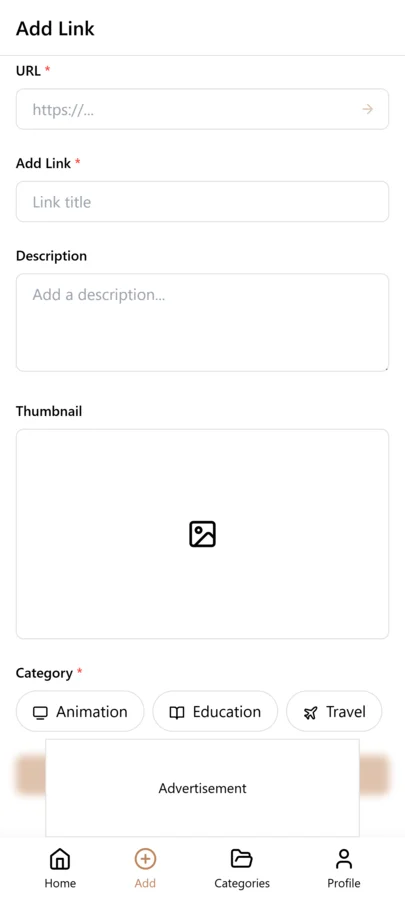
Team Bookmark Use Cases by Role
The shared bookmark system serves different functions for different roles on the team. Here is how each function benefits, and what they specifically contribute and draw from the shared library.
- New hires: browse the full library on day one to understand tools, processes, and resources without interrupting colleagues — dramatically shortens time-to-productivity
- Designers: save and share design inspiration, brand guidelines, component libraries, client assets, and reference UI patterns under a shared Design category
- Engineers: maintain a shared library of API docs, architecture references, code review links, staging environments, and technical standards documents
- Account managers: keep all client portals, brief documents, deliverable histories, and contact pages organized per client and accessible to the whole account team
- Marketing: organize campaign links, analytics dashboards, ad platforms, content calendars, and competitor tracking in one place the whole marketing team can access
- Leadership: maintain a board resources category with investor materials, benchmark data, strategic documents, and external advisor links
- Operations: centralize vendor portals, contract documents, compliance resources, and process documentation so anyone can find operational information without asking
Tagging Team Bookmarks by Project, Client, and Department
Team bookmark tagging needs to serve multiple people with different roles and priorities. A developer looking for API documentation, a designer looking for brand assets, and a project manager looking for client requirements all need to find what they need quickly. A three-layer tagging system — project tags, client tags, and department tags — provides the filtering dimensions that serve everyone.
Project tags group all resources for a specific project or initiative. Client tags group all resources related to a specific client or customer account. Department tags group resources by team — engineering, design, marketing, sales, operations. When a developer needs API docs for a specific client project, they filter by the client tag and the engineering tag and find exactly what they need. When a project manager needs all resources for a project across all departments, they filter by the project tag alone.
The key to team tagging success is a shared tagging standard. Document the agreed-upon tags in a team wiki or shared document, and review the tag list quarterly to add new tags for new projects and retire tags for completed work. Without a shared standard, team members create their own inconsistent tags — one person uses frontend, another uses front-end, and a third uses FE — and the library fragments. Consistent tagging is a team discipline, not an individual one.
Monthly Team Library Review Habit
A shared team library degrades without regular maintenance. Bookmarks for completed projects linger, links break when external sites change, and tags drift as team members apply them inconsistently. A monthly team library review of thirty minutes, conducted by a designated library owner, keeps the shared library current and trustworthy.
The review starts with completed projects. Filter by project tags for projects that ended in the past month and add a completed tag to all entries. Remove active-status tags so these entries no longer appear in active project filters. Check for broken links — external sites restructure URLs, and a monthly check prevents broken links from accumulating. Delete entries for resources that are no longer relevant or that have been superseded by newer references.
Review the tag list for consistency. Are team members using the agreed-upon tags, or have informal tags crept in? If someone created frontend instead of front-end, consolidate them. Are there tags for new projects that need to be added to the shared standard? The monthly review is also the time to identify gaps — if the team library lacks resources for a new technology or client, note it and ask team members to contribute relevant bookmarks they have in their personal collections.
Onboarding New Team Members with a Bookmark Library
A well-maintained team bookmark library is one of the most effective onboarding tools available. Instead of pointing new hires at a wall of documentation and hoping they find what they need, you provide a curated, tagged, and annotated collection of the exact resources they need to get up to speed. This reduces onboarding time and ensures every new team member starts with the same foundational knowledge.
Create onboarding-specific tags like onboarding-engineering, onboarding-design, or onboarding-general. Tag the most essential resources — architecture overviews, coding standards, key API documentation, design system references — with the relevant onboarding tag. Add notes to each entry explaining why it is important for a new team member to read. When a new hire starts, they filter by their onboarding tag and get a curated reading list that a senior team member has already vetted.
For role-specific onboarding, create role tags like new-developer, new-designer, or new-pm. A new frontend developer filters by new-developer and frontend to see the resources most relevant to their specific role. This targeted approach is far more effective than a generic onboarding document, because each resource comes with context notes explaining its relevance and is part of a larger, searchable library the new hire will continue to use throughout their tenure.
Common Team Bookmarking Mistakes
- No tagging standards — when each team member creates their own tags, the library fragments and search results are inconsistent, so document a shared tag vocabulary and review it quarterly
- Duplicating resources — when multiple team members save the same resource without checking the shared library first, duplicates accumulate and notes get fragmented, so always search before saving
- No cleanup process — completed project bookmarks linger in the active library and clutter search results, so designate a library owner to archive completed projects monthly
- Mixing personal and team bookmarks — when team members save personal resources in the shared library, it dilutes the professional focus, so keep personal bookmarks in private categories
- No ownership for maintaining the library — without a designated owner, the shared library degrades over time as no one is responsible for cleanup, so assign a library owner who conducts the monthly review
Scaling Team Bookmarks as Your Organization Grows
A bookmark library that works for a five-person team will face different challenges at fifty people. At scale, the volume of bookmarks grows exponentially, tags proliferate as more people contribute, and the library needs structure that small teams can manage informally. Planning for scale from the beginning prevents painful reorganizations later.
At the department level, maintain separate tag prefixes for each team — eng- for engineering tags, design- for design tags, mkt- for marketing tags. This prevents cross-department tag collisions where engineering uses pipeline for CI/CD and marketing uses pipeline for sales processes. Department prefixes keep tags organized and make it clear which team owns each tag. For company-wide resources that span departments, use a shared- prefix so everyone knows these are cross-functional.
When teams reorganize or merge, the tag structure needs to evolve. Plan a tag migration as part of the reorganization — map old tags to new tags and update all affected bookmarks in one batch. Without this planning, the library accumulates orphaned tags from defunct teams that confuse new members. Designate a library owner for each department who is responsible for their team tags, and coordinate company-wide tag changes through a shared document that all library owners can review and approve.
Frequently Asked Questions
Can multiple team members access and add to the same bookmark library?
Yes. In LinkVault, you can organize shared categories that the whole team can browse and search. Team members can contribute new links to shared categories while also maintaining their own private bookmarks for personal research. The shared library grows organically as the team saves links — it does not require any one person to maintain it alone.
How do I organize resources for different clients without creating a mess?
Create one category per active client and use that category for all links related to that client — their portal, brief documents, communication history, brand assets, and deliverable links. When the engagement ends, archive the category rather than deleting it, so historical resources remain accessible. You can also add a tag for each client name on top of the category structure, which lets you filter client-related links across categories when a single link relates to multiple clients.
Can I control who sees sensitive bookmarks like financial dashboards or client contracts?
Yes. Use personal (non-shared) bookmarks for sensitive links that should not be visible to the whole team. In practice, most teams benefit from being transparent about tool access, but anything involving financials, legal documents, or confidential client information should stay in personal bookmarks with the sensitive link details in notes rather than in a publicly-shared category. This way the library stays genuinely useful for the whole team without inadvertently exposing sensitive information.
How do we keep the shared library from becoming outdated?
Assign one person as the library curator — it does not need to be a full-time responsibility. Once a month, that person spends five to ten minutes doing three things: deleting links that are dead or no longer relevant, archiving categories for completed projects, and merging any duplicate tags that have accumulated. Beyond that, the team habit of saving to the library when posting in Slack naturally keeps the content fresh. A five-minute monthly review is all it takes to maintain a library that stays useful long-term.
How do we get the whole team to actually use it?
Adoption follows utility. The fastest way to get team buy-in is to populate the library with immediately useful content before you ask anyone to use it. When a new team member can find every tool, portal, and process document on day one without asking anyone, word spreads quickly. Reinforce the habit with one simple norm: whenever you share a valuable link in Slack or email, save it to the shared library as well. Within two weeks, the library becomes the default first stop for finding team resources, which is the behavior that sustains it long-term.
How do we handle bookmarks for confidential projects without exposing them to the whole team?
Use private categories for sensitive project links that should only be visible to authorized team members. Keep confidential resources in separate categories with restricted access, and share only non-confidential resources in the team library. Use notes to flag the confidentiality level of each entry — "confidential — client contract terms, do not share outside project team." For highly sensitive projects, maintain a separate LinkVault category that only core team members can access, and use the shared library for non-sensitive project resources that benefit the broader team.
What happens to team bookmarks when a team member leaves the company?
Shared bookmarks remain in the team library since they were contributed to the collective resource. Personal bookmarks that the departing member saved to private categories can be exported by the departing member before they leave. Designate a library owner who can reassign maintenance responsibility for any tags the departing member was managing. Review the departing member contributions during the next monthly library review to ensure all their shared bookmarks are properly tagged and that no critical resources are lost when their personal account is deactivated.