Best Bookmark App for Travel Planning: Build Your Trip Vault
Written by LinkVault Team
Planning a trip is thrilling, but keeping track of every flight confirmation, hotel reservation, restaurant recommendation, and tour booking scattered across dozens of browser tabs is not. If you have ever scrolled through your browser history at midnight trying to rediscover that boutique hotel you saved three weeks ago, you already understand the pain. LinkVault was built to solve exactly this problem. By creating a dedicated travel vault inside LinkVault, you can organize every booking, reservation, and recommendation in one searchable, taggable, and retrievable place. This step-by-step tutorial walks you through the entire process from a blank vault to a fully organized itinerary so you can travel with confidence instead of chaos.
Why You Need a Dedicated Travel Vault
Most travelers rely on a messy mix of browser bookmarks, email confirmations, screenshots, and sticky notes. The result is duplicated links, broken pages, and forgotten gems. A travel vault inside LinkVault changes the game because every link lives in a structured, taggable home that you can search instantly. Instead of wondering whether you saved a restaurant on your laptop or your phone, linkvault syncs everything to one accessible space. You gain a single source of truth for your trip, which means less stress before departure and faster decisions on the road.
Step 1: Set Up Your LinkVault Account
Before you can build a travel vault, you need a place to put it. Setting up LinkVault takes only a few minutes.
- Go to the LinkVault sign-up page and create an account with your email address.
- Confirm your account through the verification email to activate syncing across devices.
- Install the LinkVault browser extension so you can save links with one click while you browse.
- Log in on your phone and laptop to verify that your vault appears on both devices.
Step 2: Create Trip Categories
Categories are the backbone of your travel vault. Think of each category as a folder for a specific trip or trip segment.
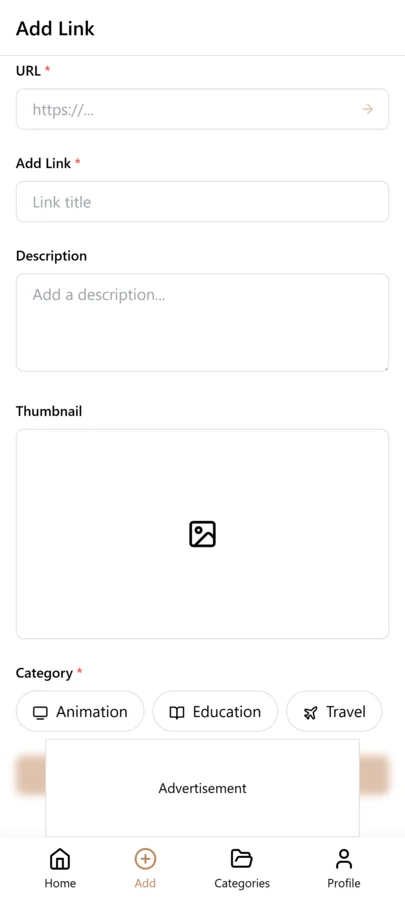
- Open LinkVault and click the New Category button in your dashboard.
- Name the category after your destination, such as Japan Spring Trip or Weekend in Lisbon.
- Add a short description so you can identify the category later when your vault grows.
- Repeat this process for each upcoming trip so every link has an obvious home.
Step 3: Add Booking Links with Notes
A bookmark without context is just a URL you will forget. LinkVault lets you attach notes to every saved link.
- Browse to a booking page, confirmation email link, or blog recommendation.
- Click the LinkVault extension icon to save the page directly to your active trip category.
- Open the saved bookmark in LinkVault and add a note with key details like confirmation numbers, check-in times, or cancellation deadlines.
- Paste any relevant reservation code or booking reference into the note field for quick access later.
Step 4: Tag Every Link by Type
Tags let you filter your vault instantly. When you are standing in an airport looking for your flight check-in link, a single tag saves you from scrolling through thirty hotel bookmarks.
- Open a saved bookmark inside your trip category.
- Add one or more tags such as hotel, flight, tour, food, map, or transport.
- Use the same tag spelling every trip so your tags stay consistent across categories.
- Save the bookmark and repeat the process for every link you add to the vault.
Suggested Categories and Tags for Trip Planning
Use this reference table as a starting framework when you build your first travel vault.
| Category Idea | Suggested Tags | What to Save Inside |
|---|---|---|
| Flights and Transport | flight, transport, boarding | Airline booking pages, train passes, ferry schedules, ride-share apps |
| Accommodation | hotel, hostel, airbnb, check-in | Hotel reservations, cancellation policies, check-in instructions |
| Food and Drink | food, restaurant, cafe, bar | Restaurant reservations, blog recommendations, menus, dietary-friendly spots |
| Tours and Activities | tour, activity, tickets, museum | Guided tour bookings, museum tickets, event passes, skip-the-line options |
| Maps and Directions | map, directions, transit | Google Maps links, subway maps, walking routes, airport layouts |
| Emergency and Backup | emergency, insurance, embassy | Travel insurance docs, embassy contacts, emergency numbers, backup hotels |
Step 5: Retrieve Your Info During Travel
The real value of a travel vault shows up the moment you need a link on the road.
- Open LinkVault on your phone or any connected device.
- Tap your trip category to see every saved link in one organized list.
- Use the tag filter to show only hotel, flight, or food links depending on what you need.
- Search by keyword if you remember a restaurant name or confirmation detail but not the tag.
- Tap any bookmark to open the original page and access your saved note instantly.
Pro Tips for Power Users
Once you master the basics, these habits will make your LinkVault travel vault even more effective.
- Create a separate Inspiration category for future trips so dream destinations never get lost.
- Add a done tag to links you have already used so you can focus on what remains.
- Review your vault the night before departure and delete outdated or broken links.
- Share a read-only trip category with travel companions so everyone stays on the same page.
- Back up important confirmation numbers in the notes field in case you lose internet access abroad.
Collaborating With Travel Companions
Travel is rarely a solo endeavor, and the organizational system you use needs to account for the fact that other people are part of the trip. When you are traveling with a partner, family members, or a group of friends, the travel vault stops being just your personal tool and becomes a shared resource that keeps everyone aligned. LinkVault handles this through shared categories with configurable permissions, so you can invite your travel companions to view and contribute to a trip category without exposing the rest of your library. The practical workflow starts before departure. Create the trip category, add your co-travelers as collaborators, and agree on a tagging convention together. If one person is handling flights and another is researching restaurants, tags like transport and food let each person focus on their area while still seeing the full picture. When your partner finds a great restaurant recommendation on their lunch break, they save it to the shared category with the food tag, and by the time you meet up that evening, it is already in the vault waiting for you. During the trip itself, the shared vault becomes the single source of truth that prevents the most common group travel friction: everyone has a different version of the itinerary in their head. When someone asks what time the train leaves, they open the shared category, filter by transport, and find the answer without a group text chain. When someone wants to suggest a restaurant for dinner, they save it to the vault with a note about why they chose it, and everyone can review the option at their own pace. After the trip, the shared category becomes a collaborative memory — a record of every place you went, every booking you made, and every spontaneous recommendation someone added along the way.
Managing Multiple Trips and Future Travel Dreams
A travel vault is not just for the trip you are taking next week. The real power of LinkVault for travelers is how it scales across multiple simultaneous trips and across the long arc of your travel aspirations. At any given time, you might have a confirmed weekend trip coming up next month, a bigger international trip in the planning stages for next summer, and a bucket list of destinations you hope to visit someday but have not committed to yet. Each of these deserves its own category, and the tagging system keeps them from bleeding into each other. For confirmed trips, the category is your active workspace — bookings, confirmations, and practical logistics all live there. For trips in the planning stages, the category is a research hub where you save flight options you are comparing, hotel reviews, blog posts about the destination, and sample itineraries other travelers have shared. The notes field becomes especially valuable here because you can record your reasoning: why you are leaning toward one neighborhood over another, what the tradeoffs are between two different flight routes, what your budget ceiling is for accommodation. For future travel dreams, create an Inspiration category where you save anything that catches your eye — a stunning hotel review, a travel documentary, a friends photo album from a place you want to visit. Tag these by region or vibe — beach, city, adventure, foodie — so that when you are ready to start planning a real trip, you already have a curated starting point instead of starting from a blank search. Over months and years, this approach builds a travel library that reflects your personal tastes and aspirations, and the transition from dream to plan to booked itinerary becomes seamless because the content is already organized and waiting.
Handling Travel Emergencies and Last-Minute Changes
Travel rarely goes exactly according to plan, and the moments when you need your information most are often the moments when you are most stressed, most rushed, and least able to dig through a disorganized pile of links. Flights get cancelled. Hotels overbook. A sudden illness means you need to find a pharmacy or clinic in an unfamiliar city. A transit strike changes your entire ground transportation plan. In these situations, the value of a well-organized LinkVault travel vault is not convenience — it is composure. The key preparation happens before you depart. Create a dedicated Emergency and Backup category alongside your main trip category, and populate it with the links you hope you never need: your travel insurance policy page and claim number, the nearest embassy or consulate contact information, local emergency numbers, a backup hotel in each city you are visiting, and links to local pharmacy chains or medical clinics. Tag each entry clearly — insurance, embassy, medical, backup-hotel — so you can filter instantly in a crisis. When a flight cancellation strands you in a connecting city at midnight, you open the Emergency category, filter by backup-hotel, and you have a pre-vetted option to book instead of frantically scrolling through hotel booking sites on your phone in a dark airport terminal. For last-minute itinerary changes that are not emergencies but still require quick action, the tag and search system saves you from having to remember where you saved the relevant link. If a museum you planned to visit is unexpectedly closed, search the vault for the museums name or filter by the activity tag to find alternative options you saved during your research phase. The discipline of saving links with descriptive notes pays off most in these moments, because the note often contains the information you need without even reopening the original page. A travel vault built with emergencies in mind transforms a potential crisis into a manageable inconvenience, and that transformation is worth every minute you spent organizing before you left.
Frequently Asked Questions
Is LinkVault free to use for travel planning?
LinkVault offers a free tier that is perfect for organizing a single trip. If you manage multiple simultaneous trips or need advanced features, you can upgrade at any time.
Can I access my travel vault offline?
LinkVault syncs your saved links across devices when you are online. For true offline access, copy critical confirmation numbers and addresses into the notes field so they remain visible even without a connection.
How is a travel vault different from regular browser bookmarks?
Browser bookmarks are flat and hard to search. A LinkVault travel vault adds categories, tags, searchable notes, and cross-device sync, which makes retrieving a specific booking link seconds faster than digging through a browser folder.
Can I share my travel vault with my travel companions?
Yes. LinkVault lets you share specific trip categories with collaborators, so your travel companions can view and add links to the shared category without seeing the rest of your library. This is ideal for group trips where different people are handling different aspects of planning — one person manages flights while another researches restaurants, and everything lands in one shared, searchable space that everyone can access from their own devices.
What should I put in my travel vault in case of emergencies?
Create a dedicated Emergency and Backup category and save your travel insurance policy page and claim number, embassy or consulate contact details, local emergency phone numbers, links to nearby medical clinics or pharmacies, and a backup hotel option for each city on your itinerary. Tag each entry clearly — insurance, embassy, medical, backup-hotel — so you can filter to the exact resource you need in seconds. This preparation takes fifteen minutes before departure and can save you hours of stress if something goes wrong on the road.