Best Bookmark Manager for Cross-Device Sync (2026 Guide)
Written by LinkVault Team
Modern work happens across devices: research on desktop, capture on mobile, reference on tablet. A link you find on your phone during a commute needs to be accessible on your desktop when you sit down to work, and a resource you save on your laptop at the office needs to be available on your tablet when you are reading on the couch in the evening. Browser bookmarks sync poorly and break when switching browsers, leaving you with fragmented collections that never quite match across devices.
The common cross-device problems are well known to anyone who has tried to rely on browser bookmarks for professional or personal resource management. Chrome and Safari sync only works within that specific browser ecosystem — use Chrome on desktop and Safari on iPhone, and you have two separate bookmark systems that never communicate with each other. Switching browsers means losing your bookmarks entirely or attempting a painful, incomplete migration. Mobile and desktop bookmarks feel disconnected, with different organizational structures on each device. There is no offline access when switching devices or traveling. You cannot save from all apps uniformly — browser bookmarks only capture what you find in a browser window, not links from social media, messaging apps, or email. And sync conflicts create duplicate bookmarks that slowly corrupt your library over time.
This guide shows how to maintain one unified bookmark system across all devices — one that works regardless of browser, operating system, or device type, and that keeps your entire link library synchronized and searchable from anywhere.
Why Browser Sync Fails
Browser sync locks you into one ecosystem and only syncs within that specific browser. If you use Chrome on your desktop and Safari on your iPhone, you have two completely separate bookmark systems that never communicate with each other. The bookmarks you save on your phone do not appear on your desktop, and the ones you carefully organized on your desktop are not available when you need them on your phone. This fragmentation forces you to maintain two parallel libraries, which inevitably drift apart and become unreliable.
If you switch browsers entirely — say from Chrome to Firefox or from Edge to Safari — migration is painful and incomplete. Browser bookmark exports only capture URLs and folder titles, losing any context about why you saved a link or what project it relates to. The import process often flattens nested folder structures, creating a mess that takes hours to reorganize. And even within a single browser ecosystem, sync is not reliable: sync conflicts can cause bookmarks to silently disappear, browser updates occasionally corrupt the bookmark file, and signing into a different browser profile on a work or shared computer gives you access to a completely different set of bookmarks.
The fundamental problem is that browser sync was designed for a single user with a single browser on multiple devices — not for users who switch between browsers, work on shared computers, or need their bookmarks accessible from any device without installing or signing into a specific browser profile. A dedicated, browser-independent bookmark manager solves all of these issues by storing your library in the cloud, accessible from any browser on any device with no installation required.
What Cross-Device Sync Needs
True cross-device sync means more than just having your bookmarks appear on multiple devices. It means having a single, unified library that is consistent, reliable, and instantly accessible regardless of which device or browser you are using. The essential features for effective device sync are not optional — they are the minimum requirements for a system you can actually trust and rely on daily. Without all of these capabilities, you will eventually encounter a situation where the link you need is on the wrong device or in the wrong browser, and the system fails you when you need it most.
- Platform-agnostic: works on any device
- Browser-independent: not tied to Chrome/Safari/Firefox
- Instant sync: changes appear immediately
- Offline-first: works without connection
- Conflict-free: no duplicate bookmarks
- Universal capture: save from any app
Step-by-Step: Cross-Device Setup with LinkVault
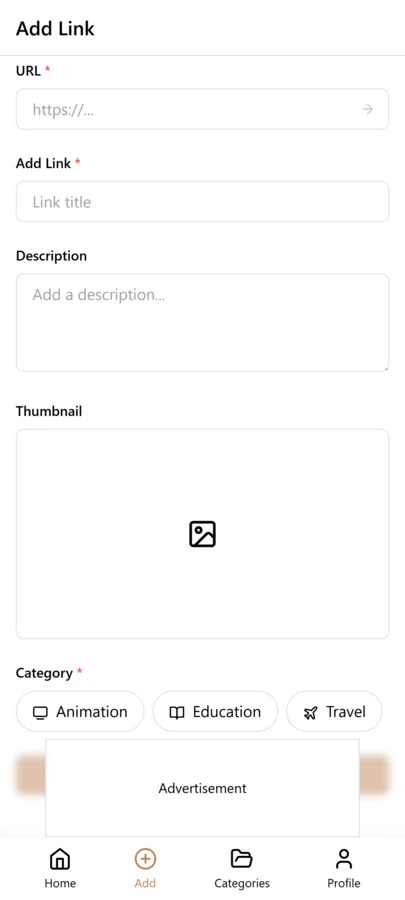
Setting up unified cross-device bookmarking with LinkVault takes about ten minutes and requires no installation on any device. The system works through any web browser, so you do not need to install an app or extension on each device — you simply sign in and your full library is there. Here is the step-by-step setup:
- Install LinkVault on all devices (phone, tablet, desktop)
- Sign in with the same account
- On mobile: capture links quickly with minimal notes
- On desktop: add detailed notes and organization
- Use search to retrieve on any device
- Everything stays synced automatically
- Works offline, syncs when reconnected
Best Practices for Multi-Device Use
Once your cross-device system is set up, the key to getting maximum value is optimizing how you use it on each device type. Different devices have different strengths — mobile is best for quick capture, desktop is best for organization and deep review — and your workflow should take advantage of these differences rather than treating every device the same. The following best practices come from users who maintain large, well-organized libraries across three or more devices without experiencing sync issues or organizational drift.
- Mobile for quick capture, desktop for organization
- Use consistent tag vocabulary across devices
- Add to home screen on mobile for quick access
- Desktop browser extension for one-click saving
- Trust search over folder browsing
- Review and organize on your primary device
- Offline mode ensures access anywhere
Best Bookmark Manager with Tagging, Search, and Cross-Device Sync
The best cross-device bookmark manager does more than sync — it makes finding links fast regardless of which device you are on. LinkVault combines all three capabilities:
- Tagging — assign one or more tags per link for cross-category filtering
- Full-text search — searches titles, notes, tags, and URLs simultaneously
- Real-time sync — any link saved on mobile appears on desktop within seconds
- Offline-first — all bookmarks available without an internet connection
- Browser-agnostic — access via any browser on any device
Which Browsers Support Cross-Device Bookmark Synchronization?
Every major browser offers some form of built-in bookmark synchronization, but each is limited to its own ecosystem. None of them work across different browsers, which means if you use more than one browser — or if you work on devices where you cannot install your preferred browser — you are left with incomplete sync. Here is how each browser's sync capability compares:
- Chrome Sync — works across Chrome only; requires Google account
- Safari iCloud Sync — works across Apple devices only; not available on Android or Windows
- Firefox Sync — works across Firefox installations; not cross-browser
- Edge Sync — works across Edge browsers only; tied to Microsoft account
- LinkVault — browser-independent, works on any browser, any OS, any device
Best Browser for Bookmark Syncing in 2026
If you are committed to using a single browser on all your devices, Chrome has the widest cross-platform support, with versions available on Windows, macOS, Linux, iOS, and Android. However, even Chrome's sync has limitations: it does not work if you use a different browser on any device, it requires signing into a Google account on every device, and it does not sync to browsers other than Chrome. The best approach for true cross-device freedom is to use a browser-independent bookmark manager that works across all browsers simultaneously. This gives you several advantages:
- Browser sync locks you into one vendor
- Switching browsers means losing your bookmarks
- Dedicated managers like LinkVault work across ALL browsers simultaneously
- You can use Safari on iPhone, Chrome on Windows, and Firefox at work — all synced
Browser Bookmark Sync vs Dedicated Bookmark Manager
The difference between relying on browser-native sync and using a dedicated bookmark manager is not just a matter of convenience — it affects whether your system actually works when you need it most. Here is a direct comparison of the two approaches across the features that matter most for cross-device use:
| Feature | Browser Sync | LinkVault |
|---|---|---|
| Works across all browsers | No | Yes |
| Notes per bookmark | No | Yes |
| Tags and categories | Limited | Yes |
| Full-text search | Limited | Yes |
| Offline access | Limited | Yes |
| Export formats | HTML only | CSV, JSON, HTML |
| Privacy control | Vendor-dependent | Yes — Encrypted |
Best Apps for Syncing Bookmarks Across Devices
Several tools offer cross-device bookmark management, but they vary significantly in their approach, limitations, and suitability for different use cases. Here are the top options for cross-device bookmark management in 2026, evaluated specifically on their sync capabilities:
- LinkVault — best overall; browser-independent, tagging, notes, offline, free
- Raindrop.io — strong visual organization; good cross-device support
- Notion — powerful but overkill for simple bookmark syncing
- GoodLinks — Apple ecosystem only; not cross-platform
- Pocket — article-focused; not suitable for general link management
Why Tagging and Search Are Better Than Folders Alone
Folders force you to choose one location for each bookmark, which becomes a significant limitation as your library grows and links become relevant to multiple contexts. A research article might be relevant to both a "marketing" project and a "2026-planning" initiative, but a folder system forces you to choose one — and when you look in the other folder later, the link is not there. Tags and search remove this constraint entirely, allowing a single link to exist in multiple conceptual spaces simultaneously. This becomes increasingly important as your library grows:
- A single link can have multiple tags (e.g., "research" + "marketing" + "2026")
- Tags surface related bookmarks across different categories
- Search finds links even when you forget which folder they are in
- Tagging takes seconds; building folder trees takes hours
- As your library grows, search scales — folders do not
Frequently Asked Questions
Will my bookmarks sync instantly across devices?
Yes. Changes sync in real-time when connected. Offline changes sync when you reconnect.
What if I use different browsers on different devices?
No problem. LinkVault is browser-independent so it works everywhere regardless of your browser choice.
Can I access bookmarks offline on all devices?
Yes. LinkVault works offline on all devices. Sync happens automatically when you reconnect.
What is the best bookmark manager for cross-device sync in 2026?
LinkVault is the best bookmark manager for cross-device sync in 2026. It is browser-independent, works on any device, supports offline access, and syncs automatically — unlike browser-native sync which only works within one browser ecosystem.
Which browser has the best bookmark sync across devices?
For single-browser users, Chrome has the widest cross-platform support. However, for true cross-device and cross-browser sync, a dedicated tool like LinkVault is better — it works across Chrome, Safari, Firefox, and Edge simultaneously.