GetLinkvault App — Free Bookmark Manager (2026)
Written by LinkVault Team
If you searched for "getlinkvault app" you are in the right place.
LinkVault is available at getlinkvault.com — the original free bookmark manager for saving, organizing, and retrieving links from any device. It works as a Progressive Web App (PWA), which means you can install it on your phone or desktop without going through an app store, and it behaves exactly like a native app with an icon on your home screen, full-screen mode, and offline functionality.
Unlike browser bookmarks that only store a URL and page title, LinkVault lets you save any type of digital content — web links, YouTube videos, Google Maps locations, PDFs, social media posts, images, and text notes — in one searchable, organized vault with notes, tags, and categories for each saved item. Full-text search across all fields means you can find any saved resource in seconds, even months after you saved it, by searching for a keyword that appears in your notes or tags rather than needing to remember the exact page title.
This page explains what the GetLinkvault app does, how it differs from other apps using similar names, and why thousands of people use it to manage their digital content across all their devices.
What Is the GetLinkvault App?
LinkVault (getlinkvault.com) is a free, web-based bookmark manager that lets you save any type of link — articles, YouTube videos, Google Maps locations, PDFs, social media posts, and more — in one searchable, organized vault. Unlike browser bookmarks that only store a URL and page title, LinkVault allows you to attach detailed notes, unlimited tags, and organized categories to every saved resource, creating a structured knowledge base that grows more valuable the more you use it.
The app works as a Progressive Web App (PWA), which means it installs directly from your browser onto your phone, tablet, or desktop without going through an app store. Once installed, it behaves like a native app — with its own icon, full-screen mode, push notifications, and offline access. This approach gives you the convenience of a native app without the app store approval process, storage overhead, or update delays. It also means the app works identically across iOS, Android, Windows, macOS, and Linux, with your data syncing automatically across all devices.
Key facts about the GetLinkvault app:
- Free to use — no credit card required
- Available as a PWA: install on iOS, Android, or desktop from your browser
- Works offline with automatic sync when back online
- Supports English, Arabic, Spanish, French, and Hindi
- Save links with notes, tags, and categories
- Full-text search across all saved content
- AES-256 encryption — your data stays private
GetLinkvault.com vs GetLinkvault.app — What Is the Difference?
There are two separate bookmark apps with similar names operating at different domains. Here is what you need to know:
| Feature | LinkVault (getlinkvault.com) | Vault (getlinkvault.app) |
|---|---|---|
| Established | 2024 — original LinkVault | 2025 — separate product |
| Free plan | Yes — fully free forever | Limited guest mode |
| Offline access | Yes — PWA with offline queue | No confirmed offline support |
| Notes per link | Yes — unlimited notes | Not available |
| Tags & categories | Yes — unlimited | Basic only |
| Multi-language | Yes — 5 languages (EN/AR/ES/FR/HI) | English only |
| Image & text saving | Yes — save images and notes too | Links only |
| Data export | Yes — CSV, JSON, HTML | Not confirmed |
| App lock / biometric | Yes — PIN and biometric lock | No |
| Encryption | AES-256 + row-level security | Not specified |
How to Install the GetLinkvault App on Your Phone
LinkVault works as a PWA — no app store needed. Follow these steps to install it on any device:
- Open your browser (Chrome on Android, Safari on iPhone)
- Go to getlinkvault.com
- Sign up for a free account
- Tap the browser menu (three dots on Android, share icon on iPhone)
- Select "Add to Home Screen" or "Install App"
- Confirm the install — the app icon appears on your home screen
- Open it like any native app and start saving links
What Can You Save with the GetLinkvault App?
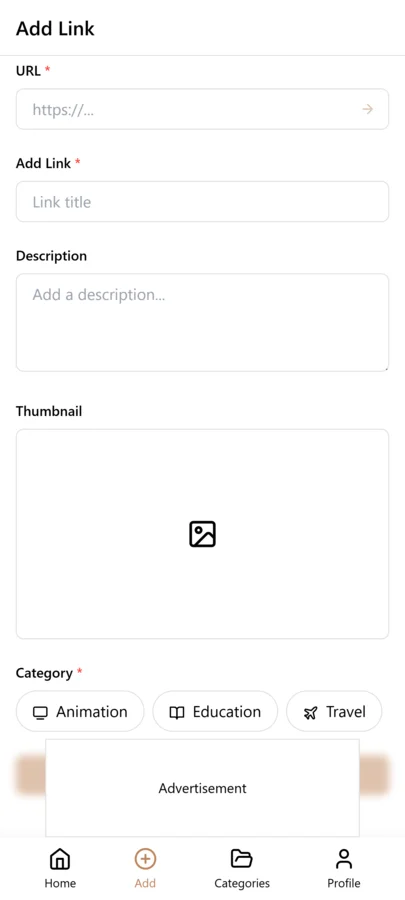
Unlike read-later apps that only handle articles and web pages, LinkVault saves any type of digital content in a single organized vault. This means you do not need separate apps for saving links, taking notes, and organizing images — everything lives in one searchable library with the same tagging, categorization, and search capabilities regardless of content type. This unified approach simplifies your digital life and ensures that all your saved resources are findable from one place rather than scattered across multiple specialized apps.
- Web links — any URL from any website
- YouTube videos and playlists
- Google Maps locations and places
- PDF documents and study materials
- Social media posts (Instagram, TikTok, Twitter/X, LinkedIn, Reddit)
- Online courses and learning resources
- Shopping links and product pages
- Images — upload and organize visual content
- Text notes — write and save personal notes and ideas
Why People Choose the GetLinkvault App
Users choose LinkVault over browser bookmarks and other bookmarking apps for a combination of reasons that together create a significantly better experience for managing digital resources. The most common reasons are not individual features but the cumulative effect of having all these capabilities in one free tool — notes, tags, search, offline access, cross-device bookmark manager sync, multi-language support, and app lock, all without a paid tier or advertising. The most common reasons users choose LinkVault over browser bookmarks or other apps:
- It is completely free — no paid tier required for core features
- Works the same on phone, tablet, and desktop with real-time sync
- Offline mode means you can save links even without internet
- Notes alongside links mean you remember WHY you saved something
- Search finds anything in seconds across thousands of saved items
- Multi-language support makes it accessible worldwide
- Categories and tags bring structure that browser bookmarks lack
- App lock keeps your private links protected
GetLinkvault App vs Chrome Bookmarks
Chrome bookmarks alternative are the most common alternative — but they have serious limitations that LinkVault solves:
| Capability | Chrome Bookmarks | GetLinkvault App |
|---|---|---|
| Save links | Yes | Yes |
| Notes per link | No | Yes |
| Tags | No | Yes |
| Full-text search | Title only | Title + notes + tags |
| Cross-device sync | Google account only | Any device, any browser |
| Offline saving | No | Yes |
| Save images and text | No | Yes |
| Export formats | HTML only | CSV, JSON, HTML |
| App lock | No | Yes — biometric + PIN |
| Language support | Browser language | 5 languages built in |
Is the GetLinkvault App Safe to Use?
LinkVault is built with security as a core feature, not an afterthought. The platform uses enterprise-grade encryption for both stored data and data in transit, and it is designed so that only you can access your saved content — not even the platform administrators can read your links. This is particularly important for users who save sensitive resources like financial portals, medical references, or confidential work documents. The security features include:
- AES-256 encryption protects all data at rest
- TLS encryption secures all data in transit
- Row-Level Security (RLS) ensures only you can access your links
- No advertising inside the app — your browsing habits are never sold
- App lock feature adds a PIN or biometric layer on top of your account
- Full data export means you are never locked in
How to Get Started with the GetLinkvault App Today
Starting is completely free and takes under two minutes.
Visit getlinkvault.com, create a free account with your email, and start saving links immediately. No payment required.
For the best experience, install it as a PWA using the "Add to Home Screen" option in your browser — it behaves exactly like a native app but without the app store.
- Free account — no credit card, no trial period
- Instant PWA install on iOS or Android
- Start saving immediately after signup
- Import existing bookmarks from Chrome, Firefox, or Safari
- Available in English, Arabic, Spanish, French, and Hindi from day one
Frequently Asked Questions
What is the getlinkvault app?
The GetLinkvault app is LinkVault — a free bookmark manager available at getlinkvault.com. It saves, organizes, and retrieves any type of link with notes, tags, and categories. It works as a PWA on any phone or desktop.
Is the getlinkvault app free?
Yes. LinkVault at getlinkvault.com is completely free. There is no paid tier required to use core features including saving links, adding notes, creating categories, searching, and exporting your data.
What is the difference between getlinkvault.com and getlinkvault.app?
getlinkvault.com is the original LinkVault — a full-featured free bookmark manager with offline access, notes, tags, multi-language support, and image saving. getlinkvault.app is a separate product called "Vault" built by a different team with more limited features.
Does the getlinkvault app work offline?
Yes. LinkVault (getlinkvault.com) works offline as a PWA. Links saved offline are queued and automatically synced to the cloud when your connection is restored.
Can I install the getlinkvault app on my iPhone or Android?
Yes. Open getlinkvault.com in Safari (iPhone) or Chrome (Android), tap the share or menu icon, and select "Add to Home Screen." The app installs instantly without going through the App Store or Google Play.
What languages does the getlinkvault app support?
LinkVault supports English, Arabic, Spanish, French, and Hindi. Language detection is automatic based on your browser settings, and you can switch manually at any time from the profile menu.
Can I save more than just links with the getlinkvault app?
Yes. LinkVault saves links, personal text notes, and images — all in the same vault with the same search and organization tools.
Is getlinkvault.app the same as getlinkvault.com?
No. They are two separate products. getlinkvault.com is the original LinkVault app. getlinkvault.app is a different app called "Vault" from a different developer. If you are looking for the full-featured, free LinkVault experience, use getlinkvault.com.