How to Build a Digital Second Brain with Links (2026 Guide)
Written by LinkVault Team
The concept of a "second brain" has gained enormous popularity in recent years, and for good reason. Your biological brain is designed for generating ideas, not storing them. When you try to keep every useful link, article, and resource in your head, you create cognitive overload that makes it harder to think clearly about anything. A second brain — an external system that captures, organizes, and surfaces knowledge when you need it — frees your mind for creative thinking while ensuring that valuable information is never truly lost.
But most people's attempt at building a second brain fails in the same way: they save links everywhere — browser bookmarks, social media saves, read-later apps, notes apps, spreadsheets — but never build a true retrieval system. They capture enthusiastically but retrieve almost never. Their saved content sits in scattered silos, unsearchable, unconnected, and effectively useless. The problem is not that they lack discipline; it is that they lack a system designed for retrieval, not just capture.
This guide shows you how to build a functional second brain using links as the foundation. Unlike note-taking systems that require you to write everything from scratch, a link-based second brain leverages the vast amount of valuable content already on the internet. Your job is not to create knowledge but to capture it, add context, connect it to related ideas, and review it regularly so it becomes part of your working knowledge rather than a forgotten archive.
What is a Second Brain?
A second brain is an external system that captures, organizes, and surfaces knowledge when you need it. It is not just storage — it is a retrieval and learning system built on deliberate organization and regular review. The distinction matters because most people already have storage: hundreds of browser bookmarks, dozens of articles saved across platforms, a notes app full of fragments. Storage without retrieval is just digital hoarding. A true second brain is designed so that when you need a piece of information, you can find it in seconds, not minutes or hours.
The concept draws on productivity researcher Tiago Forte's CODE framework: Capture, Organize, Distill, Express. You capture valuable content as you encounter it. You organize it into a structure that makes retrieval natural. You distill it by adding your own notes and key takeaways. And you express it by applying the knowledge in your work and projects. The system fails at any stage — if you capture but never organize, if you organize but never distill, if you distill but never review — the knowledge remains locked away, inaccessible when you need it.
A link-based second brain is particularly effective because most of the knowledge you encounter already exists as web content. Instead of trying to rewrite every useful article in your own words, you save the link and add a note explaining why it matters. The link preserves the full source for when you need depth; your note provides the quick summary for when you need speed. Together, they give you both the forest and the trees — the high-level takeaway for scanning and the full detail for deep reference.
Core Principles for Link-Based Knowledge
- Capture with context: Always add why this matters and what you want to remember — a link without a note is just a pointer, not knowledge
- Connect ideas: Use tags to link related concepts so knowledge from different sources accumulates into thematic collections
- Organize for retrieval: Use broad categories for browsing by domain (Learning, Reference, Projects) and tags for filtering by specific topic
- Review regularly: Weekly review sessions to refresh your memory, update notes, and reinforce learning so saved knowledge stays active
- Progressive summarization: After consuming content, add key takeaways to your notes — your initial note captures why you saved it, your follow-up note captures what you learned
- Action orientation: Track what you want to apply from saved knowledge — tag items as to-apply or link them to active projects so learning translates into action
Designing a Tag Taxonomy for Your Second Brain
A second brain without a tagging system is just a pile of links with a search bar. Tags are what turn that pile into a navigable knowledge graph. The goal is to create a taxonomy that reflects how you think and work, not one that mirrors a folder structure. Start with three tag categories: domain tags that describe the subject area (psychology, engineering, finance, design), format tags that describe the content type (article, video, course, paper, tool), and status tags that describe where the knowledge sits in your learning pipeline (to-read, reading, internalized, to-apply, applied).
The status tags are the ones that make your second brain actionable. When you filter by to-apply, you see every piece of knowledge you have identified as worth implementing but have not yet acted on. When you filter by applied, you have a record of what you have actually done with your saved knowledge — a powerful feedback loop that shows whether your learning is translating into action. Avoid the temptation to create dozens of narrow tags. A flat list of fifteen well-chosen tags is far more usable than a sprawling collection of fifty tags that you cannot remember at save time. The best test of a tag taxonomy is simple: can you recall the right tag without looking at a list? If not, the tag is too obscure and should be replaced with something more intuitive.
Connecting Ideas Across Topics
The true power of a second brain emerges when you start connecting ideas across different domains. A bookmarking system stores links by topic. A second brain stores links by relationship. When you save a link about behavioral economics, you might tag it with both psychology and finance — because the idea bridges both fields. When you save a link about design systems, you might tag it with both design and engineering. These cross-domain tags are what allow your second brain to surface unexpected connections: the marketing principle that explains a user experience problem, the engineering concept that solves a process bottleneck.
To encourage cross-domain thinking, review your library by tag rather than by category every few weeks. Pick a broad tag like psychology or systems and read through everything you have saved under it, regardless of which category it lives in. You will start to notice patterns and connections that were invisible when you were saving links one at a time. When you find a connection worth preserving, create a new tag that captures the relationship — for example, decision-making could link articles about cognitive bias, product management, and behavioral economics. Over time, these cross-cutting tags become the most valuable part of your taxonomy because they represent insights you discovered yourself, not categories you copied from a syllabus.
Weekly vs Monthly Review: Finding Your Rhythm
The review habit is what separates a second brain from a bookmark graveyard, but the right cadence depends on how much you save and how you use the knowledge. For most people, a two-tier rhythm works best: a light weekly review and a deeper monthly review. The weekly review takes fifteen minutes and focuses on housekeeping. Filter by saved this week, verify that each link has at least one tag and a note, add tags to anything you saved in a hurry, and delete links that upon reflection are not worth keeping. The weekly review prevents backlog from accumulating.
The monthly review takes forty-five minutes to an hour and is where the real knowledge work happens. Pick two or three tags and read through everything under them. Update notes with insights you have gained since saving the link. Add cross-domain tags where you see new connections. Move items from to-read to reading or internalized based on what you have actually consumed. Identify three to five items tagged to-apply and decide whether you will act on them this month or drop them. The monthly review is also the time to retire tags that are no longer useful and add new ones that reflect evolving interests. Together, these two rhythms keep your second brain current without making maintenance feel like a chore.
Handling Knowledge from Different Sources
A second brain draws from many sources: articles, videos, courses, podcasts, papers, forum discussions, and conversations. Each source type has different characteristics that affect how you capture and store it. Articles and papers are link-based and can be saved directly with the URL as the primary reference. Videos and podcasts require a timestamp note — "key insight at 14:30" — so you can return to the specific moment without rewatching the entire thing. Courses need a progress tag so you know where you left off. Forum discussions and conversations often contain knowledge that exists nowhere else, so saving the link is not enough — you need to capture the key insight in your own words as the note.
The unifying principle is that the note matters more than the link. A URL is an address; the note is the knowledge. When you save a link, ask yourself: if this URL broke tomorrow, would my note still be useful? If the answer is no, your note is not detailed enough. For the most important items in your second brain, write notes that are self-sufficient — notes that capture the core argument, the key data point, or the actionable takeaway in your own words. These notes become the real content of your second brain, and the links become supporting references rather than the primary material. This shift in perspective is what transforms a link collection into a genuine knowledge system.
Common Second Brain Mistakes and How to Fix Them
Building a second brain is a practice, not a one-time setup, and certain mistakes consistently undermine the system over time. The patterns below are the most common reasons second brain implementations fail, and each fix is a small habit change that keeps the system healthy. Review this list monthly during your deeper review session and audit yourself honestly.
- Saving without notes: A link with no note is a bookmark, not knowledge. Always capture at least one sentence about why the link matters and what you expect to get from it.
- Over-tagging: Twenty tags on a single link means you will never remember which tag to search by. Limit yourself to three to five tags per link and make each one count.
- Never reviewing: A second brain that is never reviewed is just a junk drawer with better search. The weekly and monthly reviews are what make the system live.
- Treating it as an archive: Your second brain is not a museum. Delete links you have internalized, links that are no longer relevant, and links you saved months ago but never opened again.
- Copying someone else's taxonomy: Your tag system should reflect how you think, not how a productivity blogger organizes their notes. Build your taxonomy from your own saving patterns.
When to Archive vs Delete in Your Second Brain
One of the hardest decisions in maintaining a second brain is knowing when to keep a link, when to archive it, and when to delete it entirely. The rule of thumb is simple: if the knowledge is internalized and you can recall the key idea without referring to the link, delete it. Your second brain should contain knowledge you still need to reference, not knowledge you have already absorbed. Keeping internalized links clutters search results and dilutes the value of the library. If the link represents a decision record — something you want to be able to look up later to understand why you made a certain choice — keep it but tag it as decision-record so it does not clutter your active knowledge views.
For links that are no longer actively useful but might become relevant again — a course you paused, a topic you are not currently working on — archive them by moving them to an archive category or tagging them as archive. Archived items do not appear in your default search results but are still findable if you explicitly search for them. The goal is to keep your active second brain small and focused. A library of two hundred links you actually reference is infinitely more valuable than a library of two thousand links you never open. Treat your second brain like a garden: prune regularly, compost what is dead, and give your attention to what is growing.
Step-by-Step: Second Brain Setup in LinkVault
Building your second brain takes about ten minutes of initial setup, then thirty seconds per saved item as you go. The system compounds over time — the more you use it, the more valuable it becomes, because each new item connects to and enriches the knowledge already there.
- Create four broad categories: Learning (for courses, tutorials, educational content), Reference (for documentation, tools, resources), Projects (for active work), and Ideas (for inspiration and future exploration)
- When you find valuable content, pause and ask yourself: why does this matter? What problem does it solve or what insight does it provide?
- Copy the link from the source
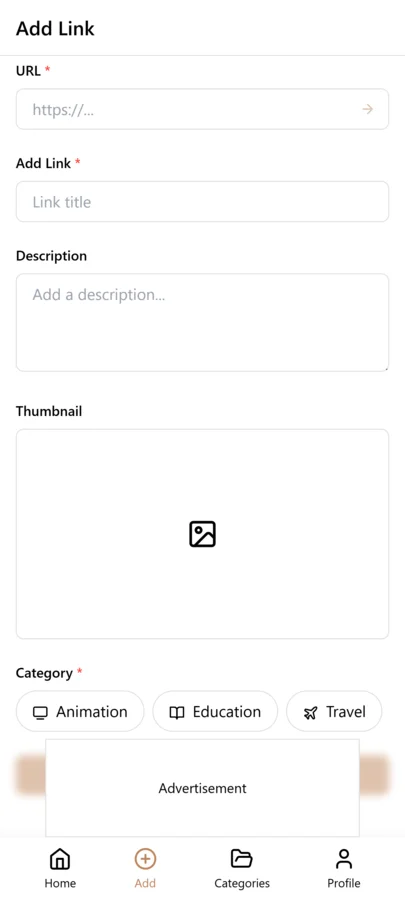
- Open LinkVault and tap the + (Add Link) button
- Paste the link into the URL field
- Add notes answering three questions: What is the key insight? How might I use this? What does this connect to that I have already saved?
- Tag by topic and concept — use consistent tags so related items accumulate together over time
- After consuming the full content, return and add key takeaways to your notes — this progressive summarization is what transforms a saved link into internalized knowledge
- During your weekly review, filter by tags to revisit topics and refresh your memory — update notes with new insights or connections you have discovered
- Save — your annotated, tagged, categorized knowledge item is now part of a growing, searchable, connected knowledge base
The Review Habit That Makes Knowledge Stick
The single most important habit for a functioning second brain is regular review. Without review, your saved content degrades from knowledge into clutter. The links sit untouched, the notes go stale, and the connections between ideas that seemed obvious when you saved them fade into obscurity. You end up with a large archive that you never revisit — which is storage, not a second brain.
The practice is a weekly review session of fifteen to twenty minutes. During this session, you do three things. First, you filter by a specific tag or category and scan through the items, refreshing your memory on what you have saved and why. This passive review reinforces learning simply by re-exposing you to the ideas. Second, you look for connections — items saved at different times that relate to the same topic or problem — and update the notes to cross-reference them. This active connection-building is where the real cognitive value happens, because it mirrors how your brain forms long-term memories: through association rather than repetition. Third, you identify items that are relevant to your current work or projects and surface them for immediate use, ensuring that your saved knowledge translates into action rather than sitting dormant.
Over time, this weekly review creates a compounding effect. Each session reinforces earlier knowledge, surfaces new connections, and keeps your mental map of what you know current and accessible. After six months of consistent review, your second brain becomes an extension of your biological brain — when you encounter a problem, your first instinct is to search your vault, because you trust that the relevant knowledge is there and findable. That trust is what separates a true second brain from a pile of bookmarks.
Frequently Asked Questions
How is this different from regular bookmarking?
Regular bookmarking is capture without context, organization, or review. You save a link and hope you will find it later, but without notes explaining why it mattered, without tags connecting it to related ideas, and without a review habit to reinforce learning, most saved links are never retrieved. A second brain adds three things that transform storage into knowledge: context through notes that explain why each item matters, connections through tags that link related concepts across different sources, and review through regular sessions that reinforce learning and surface relevant knowledge when you need it. The difference is not in what you save but in what you can find and use.
How often should I review my second brain?
Weekly reviews of fifteen to twenty minutes work best for most people. During each session, filter by a specific tag or category, scan through the items to refresh your memory, look for connections between items saved at different times, and identify knowledge relevant to your current work. This regular re-exposure is what moves saved content from your archive into your active working knowledge. If weekly feels like too much, start with biweekly or monthly — consistency matters more than frequency. The key is making review a habit rather than something you do only when you cannot find something.
Can I use this for work and personal learning?
Yes. Use categories to separate domains — Work for professional resources, Learning for personal development, Personal for life-related content — and use tags to connect concepts that cross boundaries. A link about productivity might live in your Learning category but also be tagged with work-technique, so it surfaces when you filter by that tag regardless of which category it lives in. This approach keeps your domains cleanly separated for browsing while still allowing cross-domain discovery through shared tags, which is often where the most valuable insights emerge — at the intersection of different fields.
What should I do with content I have already internalized?
Once you have fully internalized the knowledge from a saved item — you can explain it, apply it, and no longer need to reference the source — you can remove it from your vault or archive it. Your second brain should contain knowledge you will actually reference again, not everything you have ever encountered. Keeping your vault lean ensures that when you search, the results are relevant and useful rather than cluttered with items you have already outgrown. During your weekly review, identify items you have internalized and remove them with confidence — the knowledge lives in your biological brain now, and your second brain is freed for new learning.
How is a link-based second brain different from a note-taking system?
A note-taking system requires you to write everything in your own words, which is valuable for deep learning but time-consuming and impractical for the volume of valuable content you encounter daily. A link-based second brain leverages content that already exists on the web — you save the link and add a short note explaining why it matters, rather than rewriting the entire article. This approach scales to hundreds of saved items because the capture effort per item is minimal. The ideal system combines both: save links with context notes for most content, and write full notes only for the most important ideas that deserve deeper synthesis.
What if I already have hundreds of unorganized bookmarks?
Start fresh rather than trying to clean up your existing mess. Export your old bookmarks as a backup, then begin building your second brain in LinkVault from scratch. Only re-save links you actually need — most old bookmarks are stale and irrelevant. For each link you re-save, add proper notes and tags as part of the capture process. This approach is faster than auditing hundreds of existing bookmarks, and it forces you to evaluate each link with fresh eyes. Within a few weeks of active use, your new second brain will surpass your old bookmark collection in usefulness, and you will wonder why you ever tried to maintain the old system.
How do I handle knowledge from sources that do not have a URL, like podcast episodes or in-person conversations?
For sources without a clean URL, create a text note in LinkVault that captures the key insight in your own words. For podcasts, search for the episode page and save that URL with a timestamp note like "key insight at 14:30" so you can return to the exact moment. For in-person conversations or lectures, write a note titled with the date and context — "2026-03-15 conversation with Sarah about hiring strategy" — and capture the key takeaways as bullet points within the note. Tag these entries with the same domain and status tags you use for link-based knowledge so they surface alongside your other saved content. The medium does not matter as much as the note: a well-written note from a conversation is just as valuable as a saved article, and sometimes more so because it captures knowledge that exists nowhere else in writing. The goal is to have one searchable system for all your knowledge, regardless of where it came from.