How to Organize Bookmarks Like a Pro (Step-by-Step Guide)
Written by LinkVault Team
Most people have hundreds — sometimes thousands — of saved bookmarks they can never find. Folders with names like "Useful Stuff", "Read Later", and "TODO" that contain a random mix of articles, tools, tutorials, and random pages saved in a moment of optimism. Over time the collection grows and becomes increasingly useless: every link is technically saved, but nothing is actually retrievable when you need it.
The good news is that professional bookmark organization is not a personality trait — it is a learnable skill with a clear system behind it. People who maintain genuinely useful bookmark libraries are not more disciplined or more organized than average. They just follow a few consistent principles that make their saves retrievable, and they have built a lightweight maintenance habit that keeps the system clean without significant ongoing effort.
Signs your bookmark system needs a rebuild:
You cannot find links when you need them. Bookmarks pile up unsorted for weeks. Folders nested five levels deep. No idea why you saved most things. Duplicate bookmarks scattered across folders. Work and personal links mixed with no clear boundary.
This guide teaches the exact system that makes bookmarks genuinely useful — not just saved.
Why Amateur Bookmark Systems Fail
There are three predictable failure modes that destroy bookmark systems, and understanding them makes the solution obvious.
The first failure mode is over-organizing at the folder level. People create elaborate nested folder hierarchies — "Work > Projects > Client A > Phase 1 > Research > Competitor Analysis" — that are too specific to be useful and too complex to maintain. Every new save requires a filing decision, the hierarchy becomes outdated as projects evolve, and browsing it is slower than just re-Googling.
The second failure mode is saving without context. A URL and a page title are not enough to reconstruct why you saved something. "Getting Things Done - Lifehacker" saved six months ago tells you nothing useful. "GTD method explained — relevant to my team's project management problem" saved six months ago is immediately actionable. The thirty seconds it takes to add that note is the difference between a retrievable resource and digital clutter.
The third failure mode is optimizing for browsing rather than search. Amateur bookmark systems are designed to be browsed — folders you can click through to find things. Professional systems are designed to be searched — every link has enough textual context (title, notes, tags) that a keyword search returns the right result immediately. The shift from "I'll look in the Work folder" to "I'll search for what I need" is the most important mindset change in the whole system.
The Three-Layer Professional System
The professional bookmark system has exactly three organizational layers, each serving a different retrieval purpose. Using all three is what separates a working system from a pile. Understanding what each layer does — and what it does not do — prevents the over-engineering that kills most attempts at good organization.
- Layer 1 — Categories: three to five broad buckets that reflect your life domains (Work, Personal, Learning, Projects) — the coarse navigation layer that tells you roughly where something lives
- Layer 2 — Tags: flexible, multi-value labels that create cross-cutting connections a folder hierarchy cannot (a link can carry both the "react" tag and the "performance" tag and the "tutorial" tag simultaneously)
- Layer 3 — Notes: one to three sentences of context per link explaining why you saved it, what the key insight is, and when you would use it — the retrieval layer that makes search actually work
- Search: the primary retrieval method — not browsing — because search across titles, notes, and tags simultaneously is faster and more accurate than clicking through folders
- The layers compound: a link with a good category, two or three consistent tags, and a one-sentence note is findable four different ways — by browsing the category, filtering by either tag, or searching any keyword from the note
Step 1: Choose Your Categories
Start with three to five top-level categories and resist the urge to add more until you have been using the system for at least a month. The most common mistake at this stage is creating too many categories — ten, fifteen, sometimes more — which turns every save into a classification problem and makes browsing the category list feel like work.
The right number is small enough that you can hold all the category names in your head simultaneously. If you have to look at the category list to remember your own categories, you have too many. Three to five categories means every save takes three seconds to categorize — you know immediately which bucket it belongs in.
Common category frameworks that work for different types of people:
Work / Personal / Learning — the simplest possible structure, works for most people
Work / Projects / Reference / Ideas — adds a dedicated bucket for active projects and for raw inspiration that does not yet belong anywhere
Active / Archive / Resources — functional organization focused on whether something is currently relevant rather than on topic area
Pick one framework based on how you actually think about your saved content. You can always change the names later, but pick one and start — the perfect category structure that you never implement is worse than the imperfect one you use every day.
Step 2: Build a Tag Vocabulary
Tags are the layer that makes your bookmark system genuinely powerful. Unlike folders, a link can carry multiple tags simultaneously — so a React performance tutorial can be tagged "react", "performance", "tutorial", and "frontend" and appear in searches for any of those terms. This multi-dimensional organization is impossible with folders alone.
The key discipline is consistency. Tags only work if you use the same term every time — "javascript" not sometimes "JavaScript" or "JS" or "js-tutorial". Before adding a new tag, check whether an existing tag covers the same concept. A tag vocabulary of twenty to thirty consistent, well-chosen tags is more powerful than a hundred ad-hoc ones.
- Technology and topic tags: specific and reusable — "react", "css", "python", "machine-learning", "design-systems", "typography"
- Content type tags: "tutorial", "reference", "article", "tool", "video", "course", "documentation" — tells you what kind of content to expect before clicking
- Status tags: "to-read", "in-progress", "read", "to-implement" — turns your bookmark library into a lightweight reading and task queue
- Project tags: one tag per active project or client — "project-redesign", "client-acme", "q3-campaign" — connects all resources for a project regardless of their topic category
- Use lowercase-with-hyphens format consistently: "design-systems" not "Design Systems" or "designSystems" — consistency is what makes tags searchable and filterable
- Audit your tags every few months: merge tags that mean the same thing, delete tags with only one link, and rename vague tags to more specific ones
Step 3: Write Notes That Make Retrieval Work
The note field is the most underused feature in every bookmark system, and the biggest single lever for improving retrieval quality. A bookmark without a note is just an address. A bookmark with a note is a piece of knowledge with an address attached.
You do not need to write a summary. One sentence is enough. The sentence should answer one of these questions: why did I save this, what is the key insight, or when would I use this. Any one of those answers transforms a dead URL into a retrievable resource.
- Answer "why did I save this": "saved because it explains the CSS specificity rules I keep forgetting" gives future you instant context
- Capture the key insight: "main point: lazy loading images reduces initial page load by 40-60% — has a code snippet for React" makes this link findable for both the concept and the use case
- Note the application: "useful when setting up the next client onboarding flow" connects this link to a specific future moment when you will want it
- Flag the format: "fifteen-minute video tutorial" or "detailed academic paper" sets expectations before you click so you know whether you have time to engage with it now
- Include author or source when it adds credibility: "Paul Graham on founder mode" or "Nielsen Norman Group research on navigation patterns" signals the quality of what you saved
- Keep it under three sentences: the goal is retrieval cues, not a book report — a long note you never write is worse than a short note you always write
Step 4: Search First, Browse Second
The single most important mindset shift in professional bookmark organization is this: when you need to find something, search first. Do not open your bookmark library and start clicking through folders. Type the keyword you are looking for and let the search engine surface the result.
This shift matters because it changes how you optimize your saves. If you know you will search for your bookmarks, you naturally write better notes — because you know the notes will be searched. You apply more consistent tags — because you know the tags will filter your results. You stop worrying about whether a link belongs in the "Work" or "Projects" folder, because you know you will find it by searching the content regardless.
Search-first organization is also more forgiving of imperfection. A link saved to the slightly wrong category is still findable by search. A link with imperfect tags is still findable by the note text. The system does not require perfect classification to be useful — it requires enough textual context for search to work, which is a much lower bar.
The Weekly Review — 15 Minutes That Prevent Chaos
Every professional bookmark system includes a regular maintenance ritual. Without it, even a well-organized library gradually accumulates noise — outdated links, dead pages, duplicate saves, tags that drifted from the vocabulary, and notes that were never written. With a fifteen-minute weekly review, all of that stays manageable before it becomes overwhelming.
The review is not about organizing everything perfectly. It is about keeping the signal-to-noise ratio high enough that searching the library returns useful results rather than outdated clutter.
- Review everything saved in the past seven days: add notes to any link saved in a hurry without proper annotation, and delete anything that turned out not to be worth keeping
- Archive or delete completed project tags: when a project ends, archive all links tagged with that project name so they are still accessible but not cluttering active searches
- Merge duplicate tags: if you saved some links as "javascript" and others as "JS", merge them to the consistent form — this takes thirty seconds and dramatically improves tag filtering
- Check for dead links in high-value categories: pages go offline regularly — a quick scan of your most-used categories catches broken links before you need them urgently
- Update status tags: move "to-read" links you have read to "read" and archive "in-progress" links from completed work
- Add notes to the five most valuable recent saves: if the whole note-writing habit is too much at once, just commit to annotating the five links you know will be most useful — this is better than annotating nothing
- The whole review takes fifteen minutes maximum: set a timer, do not let it expand — a tight, fast review done weekly beats a thorough one done never
Migrating Your Existing Bookmarks
If you have an existing pile of unsorted bookmarks, the right approach is almost never to organize them all at once. A "big organization session" that takes hours is exhausting and typically produces a system you do not stick with because it was painful to build.
The better approach is triage plus forward-only organization. Triage the existing pile in one focused hour: keep the fifty links you know are valuable, delete everything that is obviously outdated or irrelevant, and delete everything else rather than moving it to a vague "Archive" folder. Then stop. Do not try to organize the middle — just delete it. From that point forward, apply the full system to every new save. Within a month, your active library will be entirely populated with properly organized, annotated links.
- Set a one-hour timer and open your existing bookmark collection
- Delete anything obviously outdated: old news articles, expired offers, pages you visited once in 2019 and saved "just in case"
- Save the fifty links you know are genuinely valuable to LinkVault with proper notes and tags
- Delete the rest without guilt — the useful links are the ones you remembered are useful; the rest you would not have found by searching anyway
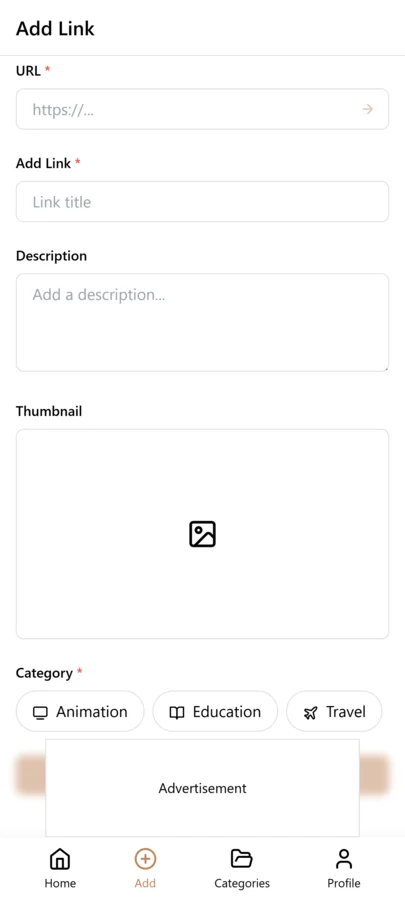
- From this point forward, apply the full system to every new save: category, one or two tags, one sentence of notes
- In week two, do your first weekly review to catch any new saves that were added in a hurry
- After one month, your active library is clean, annotated, and fast to search — the old chaos is gone
Frequently Asked Questions
How long does it take to organize bookmarks like a pro?
The initial triage of an existing collection takes about an hour — the goal is not to organize everything but to delete ruthlessly and rescue the fifty links you know are genuinely valuable. Setting up the new system (choosing categories and a tag vocabulary) takes another thirty minutes. After that, maintaining the system takes about thirty seconds per new save and fifteen minutes per week for the review ritual. Most people find they recoup the setup time within the first week from faster retrieval alone.
Should I organize my existing bookmark mess before starting fresh?
No — at least not comprehensively. The right approach is triage: in one focused hour, rescue the fifty links you know are valuable, delete everything obviously outdated, and delete the uncertain middle rather than archiving it. Then apply the full system to all new saves going forward. Trying to perfectly organize hundreds or thousands of old bookmarks before starting the new system is the most common reason people never actually build a better system — the scope of the task becomes an excuse to delay starting.
How many tags should I have in my tag vocabulary?
Twenty to thirty tags is the sweet spot for most people. Fewer than fifteen and tags lose their specificity — you end up with broad tags like "work" that are not much more useful than the category itself. More than forty and the vocabulary becomes hard to remember consistently, which leads to multiple tags covering the same concept. Start with fifteen tags that cover your most common save topics, and add new ones deliberately only when you have saved at least three links that genuinely needed a new tag category.
What if I cannot decide on the right category for a link?
Pick the most obvious one and move on. If a link could reasonably go in two categories, the tags and the notes will make it findable regardless of which category you choose. Category placement matters much less than annotation quality — a well-annotated link in the slightly wrong category is far more retrievable than a perfectly categorized link with no notes and no tags. The goal of the category is just to give you a rough browsing option; search does the real work of retrieval.
How do I build the habit of annotating every link I save?
Tie the annotation to the save action rather than treating them as separate steps. When you save a link, keep the app open and write one sentence before you close it. The note does not have to be perfect — even an imperfect one-sentence note is dramatically better than no note at all. For the first two weeks, do not worry about tags or categories — just write one sentence. Once the annotation habit is locked in, adding tags becomes a natural extension of the same save workflow. Start with the smallest possible habit and add to it incrementally.