How to Save API Docs & Tool References (2026)
Written by LinkVault Team
You are three hours into a coding session. Your API integration is almost working — authentication is passing, the base URL is correct, but the response payload does not match what you expect. You know the answer is in the documentation somewhere. You open your browser bookmarks, scroll through a folder called "APIs" with forty saved links, click the one labeled "Stripe API docs," land on the homepage of the documentation site, and spend the next fifteen minutes navigating to the specific endpoint page you need. Then you realize you also need the webhook payload schema, which is on a different page entirely. By the time you find both pages and get back to your code, you have lost your train of thought.
Every developer knows this pain. Documentation is the most frequently accessed resource in a developer's workflow, yet it is the most poorly organized. Browser bookmarks fail completely — they store URLs with auto-generated titles like "API Reference — Stripe Documentation" that tell you nothing about why you saved the link or which specific endpoint or function it was for. You end up with folders full of generic doc links, none of them annotated, none of them tagged by use case, none of them connected to the problem you were solving when you saved them.
The solution is a documentation vault: a personal, annotated, searchable collection of the specific doc pages you actually use, each one tagged by technology, annotated with the use case it solves, and organized so that finding the right endpoint takes seconds instead of minutes. This guide shows you how to build that vault in LinkVault, so the next time you need the Stripe webhook payload schema, you search "webhook" and find it instantly — with a note you wrote reminding yourself how you used it last time.
What Developers Need for Docs
A documentation system that actually works for developers must solve problems that browser bookmarks fundamentally cannot. Each feature below addresses a specific failure point that developers hit daily — losing the specific endpoint among hundreds of generic doc links, finding the same Stack Overflow answer twice because you forgot you already solved this problem, or struggling to share documentation with teammates who need context you only have in your head.
- Save specific doc pages, not documentation homepages — "Stripe Create Payment Intent endpoint" is useful, "Stripe Documentation" is not, because you still have to navigate from the homepage to find the endpoint every single time
- Annotate each link with the use case it solves — "used for subscription billing flows, see example 3 for recurring payment setup" transforms a bare URL into a retrievable solution you can find by searching for the problem, not the URL
- Tag by technology, version, and category so you can filter to "all React hooks docs" or "all Stripe API v2024 endpoints" when you are working within a specific stack or need version-specific behavior
- Store Stack Overflow answers and forum solutions alongside official docs — when you solve a tricky bug, the answer you found is as valuable as official documentation, and keeping both in one place means you never re-solve the same problem twice
- Search across all documentation by keyword so you can type "webhook" and instantly see every doc page, Stack Overflow answer, and forum post you have saved that mentions webhooks across all technologies
- Sync across devices so your documentation vault is available at your desk, on your laptop in a meeting, and on your phone when you are reviewing code away from your computer
Step-by-Step: Docs Vault Setup in LinkVault
Setting up your documentation vault takes one initial organization pass, then seconds of maintenance each time you look something up. The key habit is to save and annotate at the moment you find a useful doc page — not later, when you have forgotten why this specific endpoint mattered and what problem it was going to solve.
- Create categories that match your tech stack: Frontend Docs, Backend Docs, Database Docs, DevOps Docs, and a catch-all Reference for general resources
- When you find a specific documentation page you need — an API endpoint, a function reference, a configuration guide — copy the exact URL of that page, not the docs homepage
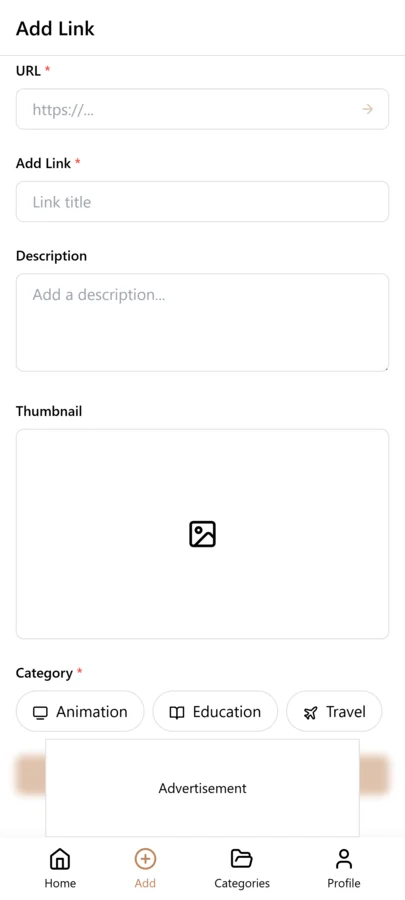
- Open LinkVault and tap the + (Add Link) button
- Paste the documentation URL into the link field
- Add notes describing what this page is for and how you use it: "Stripe Payment Intents API — create endpoint — use for one-time payments, see the payment_method_types parameter for cards — example in docs section 2 shows the full flow" or "React useEffect docs — cleanup function pattern — use when subscribing to WebSocket, return cleanup function from effect to avoid memory leaks"
- Tag by technology (stripe, react, postgres), version if relevant (v2024, v18), and category (api, hooks, queries) so you can filter by any dimension
- Save the bookmark — your annotated doc link is now searchable, synced, and ready to find instantly the next time you need it
- When you solve a problem using documentation, update the notes with your solution — "used this endpoint for subscription billing, needed to add setup_future_usage parameter for recurring payments" — so the entry becomes a record of how you applied the docs, not just where to find them
Tips for Documentation Organization
These practices come from real development scenarios where a missing annotation or a disorganized doc link meant wasted time hunting for something you had already found once. Each tip addresses a specific situation — migrating between versions, finding one endpoint among hundreds, sharing knowledge with a team — where the right organization saves you and your teammates significant time.
- Save the specific endpoint or function page, not the documentation homepage — navigating from a homepage to the endpoint you need wastes minutes every time, while a direct link with a descriptive note takes you there instantly
- Tag by version when working across framework versions — if you maintain projects on React 17 and React 18, tagging each doc link with its version lets you filter to the right docs for the project you are working on
- Annotate with the use case, not just the title — "Stripe webhooks — signature verification" is a title, "used to verify webhook signatures in Node.js, compare HMAC from stripe-signature header with computed signature using stripe.webhooks.constructEvent" is a solution you can search for and apply
- Save Stack Overflow answers that solved your problem — the accepted answer to a tricky question is often more useful than official docs, and keeping it alongside your doc links means you find it by searching your vault instead of re-Googling the same question
- Create a team category if you work with others — save documentation that your team uses frequently and share the links with notes about how your team applies each resource in your specific codebase
- Note deprecated or archived documentation explicitly — tag with deprecated and add notes like "replaced by v2 API, only relevant for legacy integration" so you do not waste time following outdated patterns
- Group related docs with tags — if authentication spans multiple services, tag all auth-related docs with authentication so you can see your complete auth reference across Stripe, your database, and your framework in one filtered view
Managing Documentation Across Multiple Tech Stacks
Few developers work with a single technology. A typical full-stack developer might use React on the frontend, Node.js or Python on the backend, PostgreSQL for the database, and AWS or Vercel for deployment — each with its own extensive documentation. A mobile developer might juggle Swift, Kotlin, and React Native simultaneously. The challenge is not finding documentation for one stack; it is keeping documentation organized when you work across three or four stacks at once, sometimes in the same day.
The solution is to use both categories and tags to create a two-level organization. Categories give you the high-level separation — Frontend Docs, Backend Docs, Database Docs, DevOps Docs — so you can immediately narrow to the right layer of the stack. Tags give you the cross-cutting filtering — react, node, postgres, aws — so you can find all documentation for a specific technology regardless of which category it lives in. This two-level system means you never have to remember whether you saved the Stripe webhook docs under Backend Docs or Reference — you just search "webhook" or filter by the stripe tag and find it instantly.
When you switch between projects that use different stacks, the tag system becomes especially powerful. If you work on a React project on Monday and a Vue project on Tuesday, filtering by the react or vue tag shows you only the documentation relevant to that day's work. This prevents the cognitive overhead of seeing Vue docs when you are deep in React code, and vice versa. Your documentation vault adapts to what you are working on, showing you only what is relevant in the moment.
For developers who consult or work across many stacks simultaneously, consider adding a project tag as well — project-alpha, project-beta — so you can filter to all documentation for a specific client or project. This is particularly useful when you return to a project after weeks away and need to quickly reload the technical context: filter by the project tag and you see every doc page, every Stack Overflow solution, and every annotated reference you saved while working on that project, with your notes explaining how each one was used.
Preserving Solutions to Problems You Already Solved
The most expensive waste in software development is solving the same problem twice. You spend two hours debugging a CORS issue, find the answer on a Stack Overflow thread, fix your code, and move on. Three months later, you hit the same CORS issue on a different project. You cannot remember the solution. You Google it, wade through the same Stack Overflow results, and spend another two hours arriving at the same answer you already found. This time waste is entirely preventable.
The practice is to save the solution the moment you find it. When a Stack Overflow answer, a GitHub issue comment, or a forum post solves your problem, save it to LinkVault immediately — not the question page, but the specific answer — and annotate it with the problem it solved and how you applied it. "CORS error with credentials — needed to set Access-Control-Allow-Credentials: true on server AND credentials: include on fetch request — see accepted answer on this SO thread — applied in Express by adding credentials flag to cors() middleware." This annotation tells you everything you need to know: the problem, the solution, and how to implement it, all in one searchable entry.
Over time, this builds a personal solutions library that is more valuable than any documentation. Official docs tell you how an API is supposed to work; your solutions library tells you how to fix it when it does not work as expected. The two complement each other — save both, tag both with the relevant technology, and you have a complete reference that covers both the happy path and the error paths you have already walked.
The compounding value is significant. After a year of saving solutions, you will have entries for dozens of problems you have already solved — CORS configuration, JWT refresh token logic, Postgres connection pooling, React hydration mismatches. Each one is annotated with your specific implementation context, searchable by keyword, and ready to apply the moment you encounter the same problem again. While other developers are Googling and reading Stack Overflow, you are searching your own vault and finding the exact solution you already proved works — in seconds, not hours.
Tagging Documentation by Use Case and Tech Stack
Effective documentation tagging goes beyond the technology name. When you tag a doc page only with react or postgres, you know which technology it relates to but not what problem it solves. The result is that when you need to solve a specific problem — authentication, error handling, data migration — you cannot filter by use case because no use-case tag was applied. The fix is to use two layers of tags: tech-stack tags (react, node, postgres, stripe) and use-case tags (authentication, error-handling, deployment, caching, webhooks).
Use-case tags are what make your documentation vault searchable by problem rather than by technology. When you save the Stripe webhook signature verification docs, tag it with both stripe and webhooks. When you save the Node.js error handling guide, tag it with both node and error-handling. Later, when you need to implement webhooks, you filter by the webhooks tag and see every doc page and Stack Overflow solution you have saved on that topic across all technologies.
This cross-stack filtering is especially valuable when you work with multiple services that have similar functionality. If you use both Stripe and PayPal for payments, tagging both sets of webhook docs with webhooks lets you compare implementations side by side, with your notes on how each service handles signature verification and event delivery.
Building a Personal Solution Library from Stack Overflow and Docs
The most valuable entries in a documentation vault are not official docs but the Stack Overflow answers and forum posts that solved specific problems you encountered. Official docs describe how APIs are supposed to work; community solutions describe how to fix them when they do not. Together, they form a complete reference that covers both the happy path and the error paths you have already walked.
The practice is to save the solution the moment you find it, not the question page but the specific answer, with an annotation of the problem it solved and how you applied it. "CORS error with credentials — needed Access-Control-Allow-Credentials: true on server AND credentials: include on fetch — applied in Express cors() middleware" tells you everything: the problem, the solution, and the implementation. Tag it with the technology (node, express) and the use case (cors, error-handling) so you can find it by either dimension.
Over a year of active development, you accumulate dozens of these solution entries. When you encounter the same problem again on a different project, you search your vault instead of re-Googling and re-reading the same Stack Overflow threads. While colleagues spend hours debugging the same issues you already solved, you find your annotated solution in seconds and apply it immediately.
Weekly Documentation Review Habit
A documentation vault needs regular maintenance to stay current, because documentation changes frequently and your tech stack evolves over time. A weekly review of ten minutes keeps your vault accurate and prevents outdated references from misleading you during future coding sessions.
Start by reviewing documentation you saved in the past week. Check that your notes are clear and that the tags are consistent with your existing taxonomy. If you created a new tag this week that duplicates an existing one — for example, auth when you already use authentication — consolidate them immediately. Next, review any documentation tagged with technologies you are no longer using. If you moved from Redux to Zustand, your Redux docs can be archived rather than deleted, since you may encounter legacy code that uses Redux.
Monthly, do a deeper review. Check for broken links — documentation sites restructure their URLs periodically, and a link that worked six months ago may now redirect to a homepage. Update broken links or note them as broken with the key content preserved in your notes. Review deprecated tags and remove entries for technologies you have fully migrated away from, keeping your vault lean and focused on the tools you actively use.
Common Documentation Saving Mistakes
- Saving the docs homepage instead of the specific page — navigating from a homepage to the endpoint you need wastes minutes every time, so always save the direct URL to the specific doc page or API endpoint
- No use-case note — a doc link without a note about what problem it solves is just a title, and you will have to re-read the page to remember why you saved it, so always annotate with the use case and how you applied it
- No version tag — when working across framework versions, unversioned doc links lead you to the wrong API, so tag each doc with its version (v18, v19) so you filter to the correct version for your current project
- Keeping deprecated docs without marking them — outdated documentation that looks current is dangerous because you may follow deprecated patterns, so tag deprecated docs explicitly and note what replaced them
- Not capturing the code snippet that made the doc useful — when a doc page contains a specific code example that solved your problem, paste it into your notes so the solution is available without re-opening the page
Sharing Documentation References with Your Development Team
When you work on a development team, your personal documentation vault becomes more valuable when shared. Instead of each developer maintaining their own isolated collection of doc links and Stack Overflow solutions, a shared documentation library ensures that when one person solves a problem, the solution is available to everyone.
The approach is to use a shared category or tag for team documentation. When you save a doc page or solution that is relevant to your team, tag it with team in addition to your personal tags. Your colleagues can then filter by the team tag to see all shared references, each with notes from the person who saved it explaining how it applies to your codebase.
For onboarding new developers, curate a collection of foundational documentation tagged with onboarding. When a new team member joins, they filter by the onboarding tag and see the key doc pages, architectural decisions, and solutions to common problems that the team has already encountered. This gives them a running start instead of requiring them to discover everything from scratch, and it standardizes the knowledge base across the team.
Frequently Asked Questions
How do I handle docs that update frequently?
Save links to specific versions when needed, or note the version in your save. For rapidly evolving frameworks like React or Next.js, tag each doc link with its version — v18, v19 — so you can filter to the correct version for the project you are working on. When you upgrade, save the new version docs with the updated tag and add a note to the old version entry pointing to the replacement, so you always know which version is current for new development while keeping the old docs available for legacy maintenance.
Can I save specific API endpoints?
Yes. Save direct links to specific endpoints or sections with notes about parameters and use cases. Instead of saving "Stripe Documentation," save the exact URL for the Create Payment Intent endpoint page and annotate it with what the endpoint does, which parameters matter for your use case, and how you have used it in your codebase. This saves you from navigating from the docs homepage every time you need that specific endpoint.
Should I organize by project or by technology?
Use both. Categories for technology give you high-level separation — Frontend Docs, Backend Docs, Database Docs — while project tags let you filter to all documentation for a specific project. This two-level system means you can find all React hooks docs when you are working on frontend architecture, or filter by project-alpha to see every doc across all technologies that you saved while working on that specific project.
Can I save documentation behind login walls?
You can save the URL with notes about what the page contains, even if the page requires authentication to view. The link will take you to the login page, but once you authenticate, you will land on the specific doc page rather than navigating from a homepage. Add notes describing what the page covers and how you use it, so you know whether it is worth authenticating before you click through. For internal company documentation, this is the standard approach — save the URL with a note like "internal API gateway docs — requires company SSO — covers auth flow and rate limiting."
How do I organize internal company documentation?
Create a separate category called Internal Docs or Company Docs, and tag each entry with the team or system it relates to — infra, auth-service, data-pipeline. Annotate each link with what it covers and how your team uses it, since internal docs often lack the polish of public documentation and your notes provide the context that the docs themselves may not. If you change teams or companies, you can delete the entire category in one action to remove company-specific documentation from your vault.
What about deprecated or archived documentation?
Save it with a deprecated tag and a note explaining why you still need it — "v1 API docs — deprecated but still used by legacy integration — do not use for new features." This ensures you can find legacy documentation when maintaining old code while clearly marking it as not for new development. When you finally migrate off the deprecated API, update the entry or remove it to keep your vault current and avoid accidentally following outdated patterns.
How do I save code snippets alongside API documentation links?
Use the notes field to paste the relevant code snippet when you save a documentation link. For example, when saving a Stripe webhook docs page, include the verification code snippet in your notes along with an explanation of how you adapted it for your codebase. Tag by language (javascript, python) and use case (webhooks, authentication) so the snippet and the doc URL are searchable together. This way, when you need to implement the same pattern in a new project, you find both the official documentation and your working code example in one search.