How to Save Online Course & Lesson Links (2026)
Written by LinkVault Team
You start a Python course on Udemy with enthusiasm. Module 1 goes smoothly. Module 2 takes a weekend. By Module 4, work gets busy and you set it aside. Three weeks later, you want to resume — but you cannot remember which module you left off on, whether you completed the exercises, or where you saved the companion GitHub repo the instructor mentioned. You open Udemy, navigate to the course, scroll through twelve modules looking for the one that feels familiar, and eventually give up. The course joins the graveyard of half-finished learning.
This is the course completion problem. Online learners juggle courses from Udemy, Coursera, YouTube, edX, and free bootcamps — each with its own platform, its own progress tracking, and its own way of organizing modules. Some platforms remember where you left off. Many do not. YouTube tutorials have no progress tracking at all. Free courses on independent sites often lose your place the moment you close the tab. And the supplemental resources — GitHub repos, cheat sheets, companion articles, community discussion threads — live in entirely separate places, disconnected from the course itself.
The solution is a learning library: one organized place where every course link, every module note, every progress update, and every supplemental resource lives together, tagged by subject and skill level, searchable across everything. This guide shows you how to build that library in LinkVault, step by step, so that the next time you return to a course after a three-week break, you know exactly where you were and what comes next.
What Online Learners Need
Before building your learning library, it helps to understand what a real course organization system must do. The features below are not nice-to-haves — each one solves a specific failure point that online learners hit on every course. If you have ever lost your place in a course, forgotten which supplemental resources went with which module, or abandoned a course because you could not figure out where you left off, the gap was in one of these areas.
- Save course links with progress notes so you know exactly where you stopped — "Module 3/12 completed, exercises done, starting Module 4 on loops" beats a bare URL every time
- Organize by subject and skill level so your Python courses, marketing courses, and design courses each have their own home instead of mixing into one undifferentiated list
- Tag by platform and course type so you can filter to "all Udemy courses" or "all free YouTube tutorials" when you want to see what you have from a specific source
- Store related resources alongside course links — the GitHub repo, the cheat sheet PDF, the community thread — so everything you need for a course lives in one entry
- Track completion status with in-progress and completed tags so you can see at a glance which courses you are actively working through and which you have finished
- Note key learnings and insights after each module so the knowledge sticks — writing "learned about list comprehensions, much cleaner than for loops" turns passive watching into active retention
Step-by-Step: Course Library Setup in LinkVault
Building your learning library takes about ten minutes of setup, then seconds of maintenance each time you sit down to study. The key is to update your notes after every session — not later, when you have forgotten which exercise you completed and which concept was giving you trouble.
- Create categories that match how you learn: In Progress, Completed, Resources, and subject-specific categories like Programming, Marketing, or Design
- When you enroll in a course or find a valuable lesson, copy the course or video link from the platform
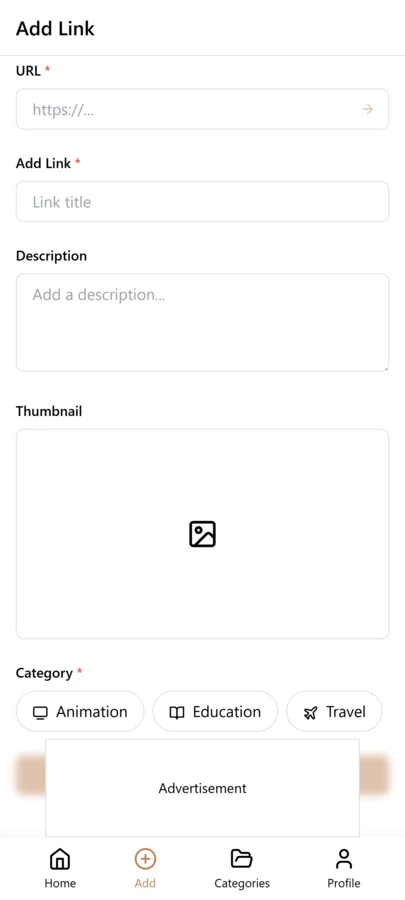
- Open LinkVault and tap the + (Add Link) button
- Paste the course link into the URL field
- Add notes with your progress and context: "Python for Beginners (Udemy) — Module 3/12 — completed loops and conditionals — exercises done — key takeaway: list comprehensions replace for-loop patterns" or "Digital Marketing Course (Coursera) — Module 7/10 — finished SEO fundamentals — quiz passed — next: social media module"
- Tag by subject (python, marketing, design), platform (udemy, coursera, youtube), and progress status (in-progress, completed) so you can filter by any dimension
- Save the bookmark — your course link, notes, and tags are now stored together and synced across all your devices
- After each study session, open the entry and update the notes with your new progress — which module you completed, what you learned, what to review next time
Tips for Course Organization
These best practices come from real learning scenarios where a missing note or a lost resource meant a stalled course. Each tip addresses a specific moment — returning after a break, comparing two courses on the same topic, deciding whether to finish a course or abandon it — where having the right information in your notes saves you time and momentum.
- Add progress percentage in notes — "40% complete, Module 5/12" gives you an instant snapshot of where you stand without opening the course platform
- Tag by skill level (beginner, intermediate, advanced) so you can find the right course for your current ability instead of starting something too basic or too advanced
- Use in-progress and completed tags to separate active courses from finished ones — filtering by in-progress shows you exactly what to work on today
- Save supplemental resources with course links — if an instructor mentions a GitHub repo, a cheat sheet, or a companion article, save it as a separate entry tagged with the course name so everything is connected
- Note estimated completion time when you start — "estimated 20 hours, 12 modules" helps you decide whether to commit now or save it for a quieter week
- Add key takeaways after each module — writing a one-line summary of what you learned forces active recall and builds a reference you can search later
- Move completed courses to an archive category so your active list stays focused on what you are currently learning, while finished courses remain searchable for reference
- Note which courses were most valuable — after completing a course, add a rating or a "highly recommend" tag so you can revisit the best ones or recommend them to others
Tracking Progress Across Multiple Courses
Most online learners are not working through one course at a time — they are juggling two or three simultaneously, often across different subjects and platforms. A Python course on Udemy, a marketing specialization on Coursera, and a free YouTube series on data visualization might all be in progress at once. Without a system to track each course independently, progress blurs together. You forget which course you worked on yesterday, which one you have not touched in two weeks, and which one is closest to completion.
The solution is to use your in-progress tag as an active dashboard. Each time you sit down to study, filter by the in-progress tag and you see every course you are currently working through, with notes showing exactly where you left off in each one. This makes it easy to pick the right course for the time you have — if you have twenty minutes, you might choose the course closest to completion to build momentum, or if you have a full evening, you might start a new module on the course you have not touched in a week.
For learners who want tighter control, add a last-studied date to your notes — "Last studied: March 15, Module 5/12" — so you can see at a glance which courses are going stale. If a course has not been touched in three weeks, it needs either a deliberate decision to resume or an honest decision to abandon it. Either way, the date in your notes forces the decision instead of letting the course linger indefinitely in a vague state of intention.
The completed tag serves a different purpose. Over time, your completed courses become a portfolio of what you have learned. When you want to review a concept — say, React hooks from a course you finished six months ago — you filter by completed, search for react, and find the course entry with your notes on which modules covered hooks and what your key takeaways were. This turns your course history into a searchable reference library, not just a list of completion certificates.
Building a Knowledge Base from Course Notes
The biggest mistake online learners make is treating a course as a one-time event — you watch it, you finish it, you move on. But the knowledge you gain from a course is only valuable if you can retrieve it later. Six months after completing a Python course, you will not remember the specific module that explained list comprehensions or the lesson that covered error handling. But if you wrote one-line takeaways after each module, those notes become a searchable knowledge base.
The practice is simple: after each module, add a line to your notes summarizing the key concept in your own words. "Module 4: List comprehensions — [x for x in range(10) if x % 2 == 0] — replaces for-loop with append pattern — much cleaner for filtering." Over a twelve-module course, you accumulate twelve takeaways. Over ten courses, you have a hundred and twenty. These notes are written in your own words, filtered through your own understanding, and searchable by keyword in LinkVault.
The real value shows up when you are working on a project and need to recall a concept. You are writing Python and you cannot remember the syntax for a list comprehension. Instead of Googling it and wading through Stack Overflow, you search your LinkVault notes for "list comprehension" and find your own entry from six months ago, written in language you understand, with the exact syntax and the context of when you learned it. This is faster, more reliable, and more reinforcing than any external search — because it is your own knowledge, organized your way.
Over time, this transforms your learning library from a collection of course links into a personal knowledge base that outlasts any individual course. Courses come and go — platforms shut down, content becomes outdated, your skill level advances beyond what a beginner course covers. But your notes, your takeaways, and your organized references remain. The courses were the input; your searchable knowledge base is the output, and it compounds in value with every course you complete.
Tagging Course Links by Skill and Career Path
Organizing courses by subject is a good start, but tagging by skill and career path transforms your course library into a deliberate curriculum. Skill tags describe the specific capability a course builds — python, react, data-analysis, copywriting — while career path tags describe the destination — become-fullstack-dev, learn-data-science, switch-to-product-management. When you tag each course with both, you can filter by career path to see your complete learning plan for that goal, and filter by skill to see all courses that contribute to a specific capability.
The power of this dual-tagging system shows up when you are deciding what to learn next. If your career path tag is become-fullstack-dev, you filter by that tag and see every course you have saved toward that goal, along with your progress notes on each. You can immediately see which skills you have covered and which have gaps — if you have five frontend courses but zero database courses, your next course should address that gap. Without skill tags, these gaps are invisible because your courses are organized by source or subject rather than by the capability they build.
Over time, your career path tags become a personal learning roadmap that evolves with your goals. When your career direction shifts, you create a new career path tag and start tagging relevant courses. The old courses remain under the previous tag, so you retain a record of your learning journey even as your objectives change.
Handling Courses Across Multiple Platforms
Online learning is fragmented across platforms — Coursera, Udemy, edX, YouTube, Khan Academy, Pluralsight, and dozens of smaller providers. Each platform has its own organizational system, its own progress tracking, and its own way of structuring courses. When you learn across multiple platforms, your course history is scattered and impossible to review as a whole. A LinkVault course library solves this by becoming the single index across all platforms.
The approach is to tag each course with the platform name — coursera, udemy, youtube — so you can filter by platform when you need to access a course on its original site. But the primary organization should be by subject and skill, not by platform, because the knowledge you gain is platform-independent. A Python course on Coursera and a Python course on YouTube both contribute to the same skill, and they should appear together when you filter by the python tag.
When a platform restructures its content or changes its URL scheme, your LinkVault notes preserve the course details — title, instructor, key modules, your takeaways — even if the original link breaks. This is especially valuable for free YouTube courses, where channels are sometimes deleted or videos are made private. Your notes ensure the knowledge you extracted survives independent of the platform.
Monthly Learning Review Habit
A course library without regular review becomes a list of good intentions that never translate into completed learning. A monthly learning review of twenty minutes keeps your course library aligned with your actual learning goals and helps you maintain momentum.
Start by filtering for courses tagged in-progress. For each, read your progress notes and make a deliberate decision: continue, pause, or abandon. If you have not touched a course in three weeks, either commit to resuming it this month or abandon it honestly. Keeping a course in in-progress limbo for months creates guilt without progress. Next, review your completed courses from the past month and archive them, keeping only the notes that contain reusable knowledge.
Review your career path tags and check for gaps. If your become-fullstack-dev path has no database course, search your saved courses for a database course you have not started, or note that you need to find one. Finally, prune your to-try list — if you saved courses six months ago that you still have not started, they may no longer align with your current goals. Delete or archive them to keep your active library focused on courses you will actually take.
Common Course Link Saving Mistakes
- Saving only the course homepage instead of individual lesson links — when a course has fifty lessons, saving the homepage means you have to navigate to the specific lesson every time, so save direct links to lessons you want to revisit
- No progress notes — without notes like "Module 5/12 completed, key concept: async/await error handling," you cannot resume where you left off without re-watching completed modules
- No skill tags — tagging only by subject means you cannot see which courses contribute to a specific career goal, leaving your learning plan unstructured
- Keeping abandoned courses in your active list — courses you stopped watching months ago create guilt and clutter, so move them to an archive tag or delete them honestly
- Not noting which lessons were most valuable — when you finish a twelve-module course, noting which three modules contained the key insights lets you quickly revisit them later without re-watching the entire course
Building a Learning Path from Saved Course Links
A collection of saved course links becomes a true learning path when you sequence them deliberately. Instead of taking courses randomly as you discover them, you map out a curriculum that builds skills in a logical order, with each course providing the foundation for the next. Your LinkVault notes and tags become the structure for this curriculum.
Start by filtering to your career path tag and reviewing all courses you have saved for that goal. Organize them into a sequence in your notes — "1. Python Basics (Coursera), 2. Data Structures (YouTube), 3. Web APIs (Udemy), 4. Full-Stack Project (edX)" — so you have a clear order to follow. Note prerequisites in your tags or notes: if a course requires basic Python, tag it with prerequisite-python so you know not to start it until you have completed a Python fundamentals course.
As you progress through your learning path, update your notes with connections between courses. When course 3 builds on a concept from course 1, note that in both entries — "applies async/await patterns from Python Basics Module 7" — so when you revisit either course, you see how they connect. Over time, your learning path becomes not just a sequence of courses but a connected body of knowledge where each course reinforces and builds on the others.
Frequently Asked Questions
Can I organize courses by subject?
Yes. Use categories for broad subjects like Programming, Marketing, or Design, and tags for specific topics within each subject. This lets you filter to all programming courses, then narrow further to python or javascript, so you always find the right course for what you are working on.
How do I track which lessons I completed?
Update notes after each session with progress like "Module 5/10 completed, exercises done, next: Module 6 on error handling." Add a progress percentage if you want a quick snapshot. The key is to update immediately after each session while the details are fresh, not later when you have forgotten which exercises you finished.
Can I save YouTube tutorial series?
Yes. Save the playlist link or individual video links with notes about the series and your progress. For a ten-video series, note which videos you have watched and which are remaining, such as "Videos 1-4 watched, starting video 5 on APIs." YouTube has no built-in progress tracking, so your LinkVault notes become the only reliable way to resume a tutorial series where you left off.
How do I handle free versus paid courses?
Tag them differently — use a free tag for free courses and a paid tag for courses you purchased. This helps you prioritize: if you have paid courses sitting unfinished, those represent a financial investment and should take priority over free courses you can watch anytime. You can also note the price you paid and whether it was worth it after completing, which helps you make better purchasing decisions in the future.
Should I organize courses by career goals?
Yes, this is a powerful approach. Create tags for career goals like become-fullstack-dev, learn-data-science, or switch-to-marketing. Tag each course with the relevant goal so you can filter to see your complete learning path for that objective. This ensures you are not taking random courses but building a deliberate curriculum that moves you toward a specific career outcome.
What do I do when a course platform shuts down?
If a platform shuts down, your LinkVault notes become the only record of what you learned. Before a platform closes — or whenever you complete a course — save your key takeaways in the notes field so they survive independent of the platform. If the course link becomes dead, mark it as "platform closed" in your notes but keep the entry for its notes value. Your knowledge base persists even when the courses themselves disappear.
How do I save course links when the platform requires login to view lessons?
Save the course URL with a note about the login requirement, such as "requires Coursera enrollment to view full lessons." Capture any publicly available preview content, lesson titles, and syllabus details in your notes so you know what the course covers even without logging in. When you are enrolled, save direct links to individual lesson pages so you can jump straight to the content you need. If your enrollment lapses, your notes preserve the key takeaways from lessons you already completed.