How to Save Instagram & TikTok Links (2026 Guide)
Written by LinkVault Team
Social media moves fast. You scroll past a recipe, a workout routine, or a business tip, tap the bookmark icon, and promise yourself you will come back to it. Weeks later, your saved folder is a bottomless pile of unorganized clips with no labels, no notes, and no search. You saved it because it mattered in the moment, but the platform gave you no way to label why it mattered — so now it is just another entry in an endless scroll of forgotten good intentions. LinkVault gives you a better way to capture and categorize every Instagram and TikTok link so nothing gets lost in the scroll. In this Q&A guide, we answer the most common questions about saving and organizing social media content with LinkVault, from choosing the right tags to building a content library that compounds in value over time.
Why do Instagram saves pile up?
Instagram's built-in save feature is convenient in the moment but practically useless for retrieval. Every post you save drops into a single chronological list with no labels, no notes, and no search. After a few weeks of tapping the bookmark icon, you are left with hundreds of posts stacked on top of each other. You remember saving a great pasta recipe, but finding it means scrolling past memes, outfit ideas, and random reels. The problem is not that you saved too much — it is that the platform gives you no tools to sort what you saved. The save feature was designed for the platform's benefit, not yours: it keeps you engaged with the app, but it does not help you actually return to the content you cared about. LinkVault solves this by letting you pull any Instagram link out of that pile and file it under a real category with tags and notes, so your saves become searchable instead of buried. The difference is between hoarding and curating — Instagram lets you hoard, linkvault lets you curate.
How do I organize TikTok links by topic?
TikTok links are even harder to track because the app favors rapid-fire discovery. You watch dozens of videos in a single session, and the ones worth keeping blur together. With LinkVault, you can create dedicated collections for each topic you care about — cooking, fitness, marketing, home projects, or anything else. When you save a TikTok URL, assign it to the matching collection and add a tag or two. A single link can live in multiple contexts because tags are flexible, not rigid folders. For example, a TikTok about high-protein breakfasts can be tagged both food and fitness. This way, whether you browse your fitness collection or search your food tag, the video surfaces exactly where you expect it.
The key insight is that TikTok's algorithm surfaces content by topic across creators, so your saving system should mirror that structure. When you watch a cooking TikTok, you do not care which creator made it — you care that it is a thirty-minute dinner idea. Organizing by topic in linkvault matches how you discovered the content in the first place, which makes retrieval feel natural. You search the same way the algorithm fed you: by interest, not by person.
What does organized social content look like in LinkVault?
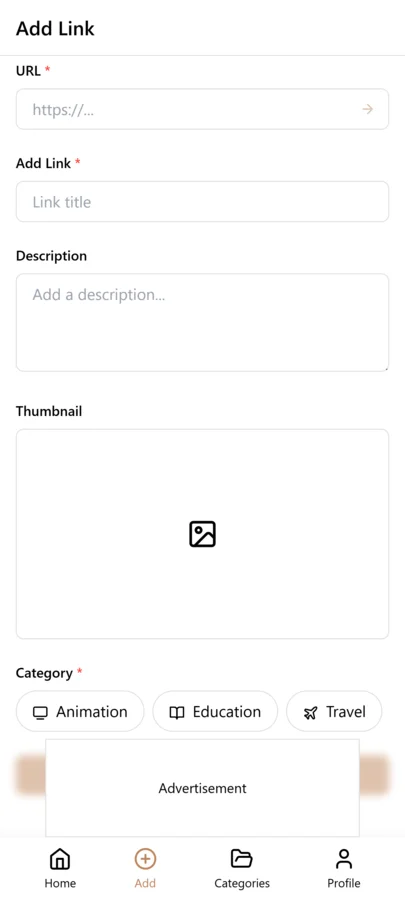
Once you file a few links, your LinkVault dashboard turns a chaotic save pile into a clean, browsable library. Each saved post shows its category, tags, and notes at a glance, making it easy to revisit content without digging through endless feeds. The visual difference is immediate: instead of a wall of unlabeled thumbnails, you see a structured list where every entry tells you what it is, why you saved it, and where it belongs.
Can I add notes to saved social media posts?
Yes, and this is where LinkVault pulls ahead of native save features. Every saved link includes a notes field, so you can record why the post mattered the moment you save it. Write down the recipe adjustments you wanted to try, the timestamp of a specific exercise in a workout video, or the name of a product someone mentioned. Notes turn a bare URL into a real memory aid. Instead of reopening a TikTok and scrubbing through it to remember what caught your eye, you read your own annotation and know instantly. Notes are fully searchable in linkvault, so typing a keyword from your note pulls up the matching link without remembering the creator username or exact caption.
A practical example: you save a TikTok about a shoulder mobility routine, and the creator mentions at the 2:15 mark that you should use a resistance band for the third exercise. Without a note, you will forget that detail and have to rewatch the entire video to find it. With a note saying "mobility routine, use band for exercise 3 at 2:15 mark," you have the actionable detail right there in your linkvault entry. The note is what transforms a passive save into an active reference.
How do I find a saved video later?
Retrieval is the whole point of saving something, yet it is where most bookmark systems fail. LinkVault gives you several paths back to any saved video. You can search by keyword across titles, notes, and tags. You can filter by collection to browse everything you filed under a topic. You can sort by date saved to revisit recent additions, or reverse the sort to surface older links you have not looked at in a while. Because every link carries metadata — category, tags, notes, and timestamp — your saved Instagram and TikTok posts behave like a personal, searchable database rather than a disordered feed. Even months later, a quick search for core workout or sourdough brings the exact video back in seconds.
The retrieval advantage compounds over time. In the first month, you might have twenty saved links and could probably find any of them by scrolling. By month six, you have two hundred, and scrolling is no longer viable — but search is. The same query that took seconds at twenty links still takes seconds at two hundred because linkvault indexes everything the moment you save it. This is the structural difference between a system that scales and one that collapses under its own weight.
What tags work best for fitness, food, and business content?
Good tags are short, consistent, and specific enough to be useful without being so narrow that you create dozens of one-off labels. For fitness content, tags like strength, mobility, cardio, and recovery cover most workout videos. For food, tags such as dinner, meal-prep, dessert, and quick let you filter by meal type or cooking effort. For business content, tags like marketing, productivity, finance, and pitching keep strategy videos sorted by discipline. The key is deciding on your tag vocabulary early and reusing the same terms. In LinkVault, reusing existing tags is friction-free — the app suggests tags you have already created, which keeps your linkvault library consistent and your searches sharp over time.
A common mistake is over-tagging — assigning five or six tags to a single link in an attempt to cover every possible future search. This dilutes your tag filters because every tag returns too many results. A better approach is two to three tags per link, chosen to reflect the most likely ways you would search for that content. If you save a high-protein breakfast recipe video, the tags food and meal-prep are enough. You do not also need protein, breakfast, healthy, and quick — those are redundant with the note field and the category, and they clutter your tag list with near-duplicates.
How do I save from the share sheet on mobile?
Saving a link on mobile should take seconds, not a copy-paste detour into another app. On both iOS and Android, LinkVault integrates with the native share sheet. When you are watching an Instagram reel or TikTok you want to keep, tap the share icon, choose LinkVault from the share menu, and the link is captured instantly. You can assign a category and tags right from the share extension before you save, or skip it and organize later — LinkVault holds the link in an inbox until you file it. This means you never leave the social app to hunt for a bookmark button. The linkvault mobile workflow is built for speed, so capturing a post mid-scroll feels natural and never breaks your browsing rhythm.
The inbox-then-file workflow is important for social media specifically because the whole point of scrolling is momentum. If saving a link requires you to stop, switch apps, choose a category, type tags, and write a note, you will skip saving most of the time — it is too much friction for a split-second decision. LinkVault's share sheet capture removes that friction entirely. You tap share, tap LinkVault, and you are back to scrolling in under two seconds. The link sits safely in your linkvault inbox until you have a quiet moment to categorize and tag it, which keeps your saving habit sustainable without slowing down your feed.
Building a Content Library Over Time
The real power of organizing social media links in linkvault is not in any single save — it is in the compounding effect of consistent saving over weeks and months. When you first start, you might save five or ten links and wonder whether the system is worth the effort. But social media content is ephemeral by nature: creators delete posts, platforms change algorithms, and the algorithm that surfaced a great video today may never show it to you again. Every link you save to linkvault is a piece of content you have permanently rescued from the feed.
After three months of consistent saving, something shifts. You stop re-searching TikTok for that productivity tip you saw last month because you know it is in your linkvault library, tagged and noted. You stop screenshotting recipes because the link with your modifications is already saved. You stop sending yourself Instagram posts in DMs because linkvault is faster. The library becomes your personal archive of the best content the algorithm ever fed you, curated by your own judgment and organized for your own retrieval. That is a fundamentally different relationship with social media: instead of being a passive consumer who forgets everything, you become an active collector who retains what matters. The library does not just save links — it saves the knowledge and inspiration those links carried.
Saving from Different Devices
Social media consumption happens across devices — you scroll Instagram on your phone during a commute, watch TikTok on a tablet in the evening, and occasionally browse on a desktop. Your link-saving system needs to work seamlessly across all of them. On mobile, the share sheet workflow described above handles capture in seconds. On desktop, the LinkVault browser extension lets you save a link with a single click while watching Instagram or TikTok in your browser. Every link saved from any device syncs instantly to your unified linkvault library, so the TikTok you saved on your phone this morning is right there when you open linkvault on your laptop tonight.
This cross-device bookmark manager sync is what makes linkvault practical for social media in a way browser bookmarks never were. Browser bookmarks are trapped in the browser you created them in — the Instagram link you bookmarked in Chrome on your desktop is invisible when you are scrolling on your phone. LinkVault eliminates that fragmentation entirely. One library, every device, full sync. You save from wherever you are scrolling, and you retrieve from wherever you are working. The device becomes irrelevant; the library is always the same.
Handling Deleted Content and Dead Links
Instagram and TikTok content is some of the most ephemeral media on the internet. Creators delete posts regularly — sometimes because a brand deal expires, sometimes because a video underperformed, and sometimes simply because they are reorganizing their grid. Accounts get suspended, hacked, or taken private overnight. TikTok videos can be region-locked or pulled for copyright claims. When you rely on a saved link alone, you are gambling that the content will still be there when you return, and on fast-moving social platforms, that gamble frequently fails. The practical defense is to treat your LinkVault note as the primary artifact and the link as the secondary one. When you save a recipe video, do not just save the URL — write the ingredients and the key steps into the note field. When you save a workout routine, describe the exercises, sets, and reps. When you save a business tip, capture the core principle in a sentence or two. This way, if the original post vanishes, you still have the substance. Over time, dead links will accumulate in any social media library, so periodic maintenance matters. Set aside ten minutes every couple of months to click through your older saved links and check which ones still load. For links that have gone dead, decide whether the note alone is sufficient — often it is — or whether you should search for a replacement video covering the same topic. Removing truly broken links that carry no useful note keeps your library clean and trustworthy, so that when you search it, every result is something you can actually use.
Using LinkVault for Content Creation and Inspiration
If you create content — whether that means writing a blog, recording a podcast, building a presentation, or managing a brand's social media — Instagram and TikTok are goldmines of inspiration that disappear almost as fast as they surface. A trending format on TikTok today might be everywhere for a week and then vanish from the algorithm entirely. A creator's unique editing style might inspire your next video, but if you did not save the reference, you will never find it again among the thousands of clips the algorithm showed you since. LinkVault turns that ephemeral stream into a durable inspiration library. Create a collection called content-inspiration or reference-videos and save every clip that catches your eye the moment you see it. Tag by format — tutorial, voiceover, talking-head, trend-jack — and by topic so you can filter on both dimensions. Add a note describing what specifically grabbed you: the pacing, the hook, the visual transition, the way the creator structured the call to action. These notes are what make the library actionable. Six months later, when you are planning a new video series and need a reference for how to structure a thirty-second tutorial, you search your content-inspiration collection, filter by tutorial, and immediately have curated examples with your own annotations explaining why each one was worth studying. This is fundamentally different from scrolling TikTok hoping to stumble on inspiration again. You are searching your own curated, annotated archive of the best content you have ever seen, organized by the exact dimensions you care about. For anyone who creates content regularly, this kind of reference library is not a luxury — it is a competitive advantage that compounds with every link you save.
Privacy and Sharing Considerations
Saving a social media link to LinkVault is a private act — your library is visible only to you, which is a significant privacy advantage over platform-native features like Instagram likes or TikTok favorites, both of which are visible to others. But privacy considerations extend beyond who can see your saved links. First, consider the content itself. If you save a post from a private Instagram account you follow, that link is tied to your logged-in session on the platform. It works for you, but if you ever share the link with someone who does not follow that account, they will not be able to see the post. The link is still useful as a personal reference, but it is not shareable content. Second, consider what you write in your notes. Because notes are searchable and persistent, avoid pasting sensitive personal information into them — things like real names, addresses, or financial details that you would not want stored in a third-party tool. Notes should capture the substance of the content, not your personal data. Third, if you do want to share a saved link or a collection with a collaborator, LinkVault lets you share specific entries without exposing your entire library. This is useful for content teams who want to exchange reference videos, or for friends planning an event who want to share saved TikTok decor ideas. The key principle is that sharing is opt-in and granular — you choose what to share and with whom, and your private saves remain private by default. Understanding these boundaries helps you use LinkVault confidently for both personal and collaborative work without accidentally exposing content you meant to keep to yourself.
Frequently Asked Questions
Is LinkVault free to use?
LinkVault offers a free tier for saving and organizing social media links, with premium features for power users who need advanced search filters and unlimited collections. The free tier is enough to get started and build a meaningful content library before deciding whether to upgrade.
Can I save links from platforms besides Instagram and TikTok?
Yes. LinkVault works with any URL, so you can capture links from YouTube, X, Reddit, blog posts, and anywhere else on the web using the same categories and tags. This means your social media content lives alongside your other saved links in one unified, searchable library rather than being scattered across platform-specific save folders.
What happens if the original post gets deleted?
LinkVault stores the URL and your metadata, but if the creator deletes the post the link will no longer load. Your notes and tags stay intact, which is exactly why adding notes to saved social posts is worth the extra few seconds — the note preserves the key information even when the original content disappears. For especially valuable content, paste the core details directly into the note field so you have a permanent record regardless of what happens to the original post.
Can I save links from private accounts?
You can save the URL of any post you can access, including posts from private accounts you follow. However, if the account is private and you are not logged in, the link will not load for anyone else who might try to open it. The link is still valuable to you as a personal reference within linkvault, complete with your notes and tags. Just be aware that private content is tied to your logged-in session on the platform, so the link works for you but not for someone you might share it with.
How do I organize content by creator instead of by topic?
While organizing by topic is the most practical approach for most users, you can also tag links by creator name if you want to find everything from a specific account. For example, tag links with the creator handle like fitness-with-sara or cooking-with-mike. Then filtering by that tag shows you every link you have saved from that creator. This works well for creators whose content you consistently find valuable and want to reference as a body of work rather than by individual topic.
What is the best way to handle content across multiple social platforms?
Create a platform tag — instagram, tiktok, youtube, twitter — for every link you save, in addition to your topic tags. This lets you filter by platform when you want to revisit content from a specific app, or filter by topic when you want all content about a subject regardless of where you found it. The combination of platform tags and topic tags gives you two independent ways to slice your library, so you can browse by either dimension depending on what you need at the moment.