How to Save LinkedIn Posts & Articles Easily (2026 Guide)
Written by LinkVault Team
LinkedIn is full of valuable career advice, industry insights, and networking opportunities. But LinkedIn's native save feature becomes cluttered and impossible to search effectively, and the usual problems follow: saved posts pile up without organization, no way to categorize by topic or importance, no way to add notes or context, no tags for filtering by industry or skill, difficult to find specific advice later, and job postings get lost among saved items.
This guide shows how to save LinkedIn content with proper organization.
Why LinkedIn Saves Become Messy
LinkedIn's save feature is a single stream with no categories, tags, or notes. Everything mixes together making retrieval difficult.
Best Way to Save LinkedIn Content
Use an organized system:
- Copy links to valuable posts and articles
- Save with context explaining key insights
- Categorize by purpose (Career, Learning, Networking)
- Tag by industry, skill, or job function
- Search later without scrolling through saves
Step-by-Step: Save LinkedIn Content Using LinkVault
Follow these steps:
- Find a valuable LinkedIn post or article
- Click the three dots () on the post
- Select "Copy link to post"
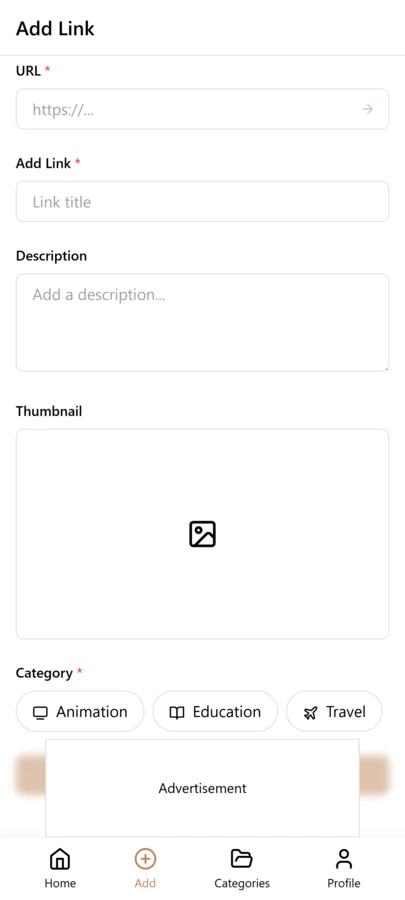
- Open LinkVault
- Tap + (Add Link)
- Paste the LinkedIn link
- Add notes: "Salary negotiation tips - key: research market rates" or "Leadership advice from VP at Tech Co"
- Tag by topic (career-advice, leadership, tech, marketing)
- Save
Tips for LinkedIn Content Organization
Best practices:
- Summarize key insights in your notes
- Tag by career stage or industry
- Save profiles of interesting people with context notes
- Track job postings separately from content
- Use "action" tag for posts requiring follow-up
- Review saved career advice regularly
Saving LinkedIn Articles vs Posts vs Comments
LinkedIn produces three distinct types of content, and each deserves a slightly different approach when you save it. Understanding the difference helps you organize your vault so that a year from now you can tell at a glance whether a saved link is a long-form article you want to re-read, a short post with a quick tip you want to apply, or a comment thread with a nugget of insight buried inside a larger discussion.
LinkedIn articles are long-form pieces published through LinkedIn's publishing platform. They tend to be structured, with headings and a clear argument, and they often contain frameworks, case studies, or detailed advice that remains relevant long after the publish date. When you save an article, your notes should capture the core framework or argument in a sentence or two, along with a tag for the topic. Articles are the most likely content type you will revisit months later, so treat them as reference material and tag them accordingly — for example, reference plus the subject area like leadership or product-management.
LinkedIn posts are shorter updates that appear in the feed. They range from a single tip to a multi-paragraph story. Posts are valuable for actionable advice and real-time insights, but they are also the most ephemeral — they scroll away quickly and can be hard to find again through LinkedIn search. When saving a post, summarize the specific takeaway in your notes rather than relying on the post text, because posts can be edited or deleted by the author. Use an action tag if the post prompted you to do something, or a topic tag if it is advice you want to recall later.
LinkedIn comments are the most overlooked content type. A comment thread under a post or article often contains the richest insights — a practitioner sharing real experience, a counterargument that reframes the original post, or a resource recommendation that the original author missed. To save a comment, copy the link to the parent post and use your notes to capture the specific comment and who wrote it. Tag it with the topic and add a comment-insight tag so you can filter for discussion-based wisdom separately from original posts and articles.
Building a Professional Knowledge Base From LinkedIn
LinkedIn is not just a networking platform — it is one of the largest sources of professional knowledge on the internet. Industry leaders, hiring managers, and experienced practitioners share advice daily that you would normally pay hundreds of dollars for in a course or consultation. The problem is that this knowledge is scattered across thousands of posts, articles, and comment threads, and LinkedIn gives you no tools to organize it into a coherent library. By systematically capturing LinkedIn content into LinkVault, you can build a personal knowledge base that compounds in value over time and becomes a career asset rather than a forgotten feed scroll.
Start by defining the knowledge domains that matter to your career. A product manager might define domains like product-strategy, user-research, stakeholder-management, and career-growth. A software engineer might choose system-design, devops, testing, and team-collaboration. These domain tags become the backbone of your knowledge base. Every LinkedIn link you save gets at least one domain tag so that over time, each domain accumulates a curated collection of the best insights you have encountered.
The key discipline is capturing at the moment of discovery. When you are scrolling LinkedIn during your morning routine and a VP of Engineering shares a framework for handling technical debt, do not tell yourself you will remember it. Open LinkVault, paste the link, write a two-line note summarizing the framework, tag it with your relevant domain, and move on. This takes under thirty seconds and ensures the insight is preserved. Over six months of consistent capturing, you will accumulate dozens of saved links per domain, each annotated with your own takeaways.
The payoff comes when you face a real challenge at work. Instead of searching LinkedIn and hoping the right post surfaces, you search your vault. You filter by the relevant domain tag, type a keyword from the problem, and instantly see every piece of advice you have saved on the topic — complete with your notes on why each one mattered. This is the difference between passively consuming LinkedIn content and actively building a career-long knowledge base from it.
Common LinkedIn Link Saving Mistakes and How to Fix Them
Even with a good tool, certain habits undermine your LinkedIn knowledge base. These are the most common mistakes people make when saving LinkedIn links, along with practical fixes you can apply immediately. Recognizing these patterns early saves you from building a vault that is just as disorganized and unsearchable as LinkedIn's native save feature.
- Saving links without any notes — a URL alone tells you nothing months later. Fix: always add at least one sentence summarizing the key insight or why you saved it. If you cannot write a one-line note, the content probably is not worth saving.
- Using inconsistent tags — tagging one post leadership and another management for the same topic means neither appears in the same search. Fix: define a set of 10 to 15 core tags and reuse them consistently. Write them down somewhere visible until they become second nature.
- Saving everything in the feed — not every LinkedIn post is worth preserving. Fix: apply a quality filter. Save only posts that contain actionable advice, a useful framework, or a perspective you have not seen elsewhere. Let the rest scroll past.
- Mixing job postings with content — job links buried among advice posts become invisible when you need them. Fix: use a dedicated job-posting tag and category so application-related links stay separate from knowledge content.
- Relying on LinkedIn native saves as a backup — LinkedIn saves are a single unsearchable list that can be lost if your account is restricted. Fix: treat LinkVault as your primary archive and export periodically so your knowledge base is fully in your control.
- Never reviewing or pruning — a vault that grows without curation becomes just another cluttered list. Fix: spend ten minutes each month reviewing saved LinkedIn links, archiving ones you have fully absorbed, and promoting high-value items to a favorites collection for quick access.
Frequently Asked Questions
Can I save job postings from LinkedIn?
Yes. Copy the job posting link and save with application status and notes.
What about saving LinkedIn profiles?
Yes. Save profile links with notes about why they're relevant (potential mentor, recruiter, interesting work).
Can I organize content by industry?
Yes. Use tags for industries and job functions to filter content easily.
How do I save LinkedIn content before it gets deleted or edited?
LinkedIn posts and articles can be edited or removed by their authors at any time, so always capture the key insights in your notes at the moment you save the link. Write a summary detailed enough to be useful even if the original content disappears. Your notes become a permanent record of the value you found, while the link lets you revisit the full post if it is still available. This self-sufficient note habit ensures your knowledge base survives content changes on the platform.
Is it better to save LinkedIn content by topic or by author?
Do both. Tag by topic so you can filter all saved content about a subject regardless of who wrote it, and include the author name in your notes for creators whose work you consistently value. This dual approach lets you search by topic when you are solving a specific problem and search by author when you want to revisit everything a particular thought leader has shared. Over time, you will notice which authors provide the most reliable, actionable advice and can prioritize saving their content.