How to Save Links from Any App Easily (2026 Guide)
Written by LinkVault Team
Content lives everywhere — and it is getting more fragmented every year. You discover valuable articles in Twitter threads, tutorials in YouTube comments, tools shared in Slack channels, research in Reddit posts, recipes in WhatsApp groups, and product recommendations in newsletter emails. Browser bookmarks only capture what you find in a browser window, which is an increasingly small fraction of everything worth saving. If you use a browser bookmark manager as your primary capture tool, you are systematically losing most of the valuable content you encounter each day.
The problem gets worse because every app has its own native save feature. Twitter has bookmarks. Reddit has a saved posts list. YouTube has Watch Later and playlists. Slack has saved messages. Email clients have star or flag features. None of these systems communicate with each other, none of them let you add notes or tags, and none of them have a search that covers all your sources simultaneously. What you end up with is six or eight separate "saved content" silos that are collectively impossible to search, impossible to organize, and guaranteed to lose things.
Common universal capture problems:
Browser bookmarks only work in browsers. Can't save from social media apps. Email links get lost in inbox. Messenger links disappear in chat history. No way to organize non-browser content. Each app has its own "save" feature.
This guide shows how to solve the universal capture problem with a single workflow that works in every app and produces one unified, searchable library.
Why Universal Capture Matters More Every Year
The average person uses twelve to fifteen apps every day. Of those, maybe two or three are browsers. The rest are social apps, video platforms, communication tools, news readers, and messaging apps — all of which surface valuable content that you cannot capture with browser bookmarks. Consider the last ten interesting things you encountered online: how many were in a browser tab versus in a social feed, a YouTube app, a work Slack channel, or a WhatsApp message? For most people, the answer is less than half were in a browser.
Universal capture is not a nice-to-have optimization for organized people. It is the foundational requirement for anyone who wants to actually use the content they find. A system that only captures browser links is incomplete by design, and an incomplete capture system trains you to stop trusting your own library. You know some of the things you want are in there, but you have no confidence they all are — so you default to re-Googling instead of searching your library. The fix is a single capture workflow that works identically in every app: see something worth keeping, tap Share, add a quick note and tags, save. One library, everything in it, fully searchable.
The Universal Capture Method
This workflow works in any app that has a Share button or a Copy Link option — which is the vast majority of apps on both iOS and Android. The design principle is that the workflow must be fast enough to use in a distracted moment without breaking your flow. Adding a note by voice and selecting two tags from a suggestion list should take no more than fifteen seconds. Anything longer and you will start skipping the notes, which makes links significantly harder to retrieve later.
- Encounter valuable content in any app — Twitter, Reddit, YouTube, Slack, email, WhatsApp, or any other app
- Tap the Share button (the box-with-arrow icon on iOS or the Share Sheet icon on Android) or long-press the link and tap Copy Link
- Open LinkVault from your Home Screen — add it to your dock or Home Screen first for one-tap access
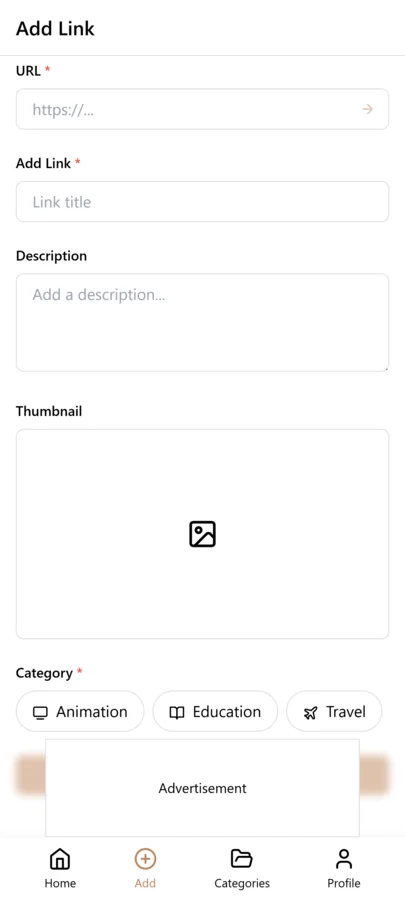
- Tap + to add a new link and paste the URL into the link field
- Add a quick note using voice dictation: "Why this matters" or "What I want to remember" in one sentence — tap the microphone on your keyboard and speak naturally
- Tap two or three tags from the suggestion list — do not type new tags on mobile, stick to your existing vocabulary
- Select a category from your short list
- Tap Save and return to the original app — total elapsed time should be under fifteen seconds
- Weekly on desktop: filter by recent saves and add richer notes, fix tags, or organize anything captured in a hurry
Apps Where Universal Capture Works
The universal capture workflow works in every app that supports the system Share Sheet on iOS or Android, plus any app where you can long-press a URL to copy it. Here is a breakdown by category. If your app is not listed, look for a Share icon (box with arrow or three connected dots) or long-press any link — if either of those options appear, the workflow works. The only apps where you truly cannot use this workflow are those that show content without exposing the URL at all, which is rare.
- Browsers: Chrome, Safari, Firefox, Edge, Opera, Brave — tap the Share icon in the toolbar or address bar
- Social media: Twitter, Reddit, LinkedIn, Instagram, Pinterest, TikTok — tap Share under any post and then Copy Link
- Video: YouTube, Vimeo, Twitch — tap Share below the video and then Copy Link
- Work communication: Slack, Microsoft Teams, Discord, Notion — tap the three-dot menu on a message with a link and choose Copy Link
- Messaging: WhatsApp, Telegram, iMessage, Signal — long-press a link in a message to copy it
- Email: Gmail, Outlook, Apple Mail, Spark — tap Share or Copy Link on any linked text or attachment
- News and reading: Feedly, Flipboard, Apple News, Pocket, Substack — use the Share icon within the article view
- Productivity: Airtable, Trello, Asana, Notion — right-click or long-press record URLs to copy them
- Shopping: Amazon, eBay, Etsy, any product page — tap Share or copy from the address bar
- Maps and locations: Google Maps, Apple Maps — tap Share on any location to get a shareable URL
Tips for Universal Capture
These tips come from users who save from ten or more different apps every week and maintain clean, searchable libraries without it feeling like work. The common thread is treating mobile capture as a quick deposit into an inbox — just enough context to be findable — and doing the actual organization in a weekly desktop session where the keyboard and screen size make it fast. The goal is zero friction at capture time and zero regret at retrieval time.
- Always note the source context: "via Twitter thread on performance optimization" or "recommended in the design Slack" — the source often helps you remember why it mattered
- Add content type and topic as your two mandatory tags: tutorial + react or recipe + dinner or reference + css — this combination gives you the most flexible filtering options
- Use voice dictation every time on mobile: four seconds of speech gives you a better note than twenty seconds of touch-typing on a small keyboard
- Create a Home Screen shortcut so LinkVault is always one tap away — switching to a different app and hunting for the icon adds friction that compounds into habit-breaking
- Capture immediately, organize later: the moment of discovery is the worst time for deep organization, and you do not need it — a quick note and two tags is enough to find the link again
- Trust that everything is searchable: resist the urge to browse by category — on mobile, searching by keyword is faster than any browsing approach
- Do a fifteen-minute desktop review every week: filter by "saved this week," add richer notes to links that only have voice transcriptions, fix any tag inconsistencies, and delete anything that turned out to not be useful after all
- Treat the source app as irrelevant: the same content found in Slack or found in a browser or found in Twitter all goes to the same LinkVault library — the source is just a note, not a separate silo
- Export and delete from native save features: if you have Twitter bookmarks or Reddit saved posts, export them as links and import into LinkVault, then clear the native lists — consolidation is what makes the library trustworthy
Tagging for a Multi-Source Library
When every link goes into the same library regardless of which app it came from, tags become the primary way to make sense of the collection. Without tags, you have a flat list of links from twelve different apps with no way to filter by source, topic, or project. The tagging strategy for a universal capture library should include three dimensions. Source tags identify where the link was captured from: twitter, youtube, slack, email, browser. Topic tags identify what the link is about: design, research, personal-finance, learning. Action tags identify what you want to do with it: to-read, to-evaluate, to-share, reference.
The source tag is the most overlooked but the most valuable for maintaining quality. When you filter by a source tag, you can see patterns in where your most useful links come from. If Twitter produces thirty saved links per week but you only ever reference two of them, that tells you to be more selective when saving from Twitter. If Slack links consistently turn out to be the most useful, that validates saving from work channels. Source tags also help during cleanup — you can filter by a specific source and bulk-delete old links that never got referenced. The combination of source, topic, and action tags means every link is findable from three independent angles, which is what makes a multi-source library actually navigable instead of overwhelming.
Handling Batch Saves Without Overwhelm
Sometimes you find yourself with a batch of links to save at once — a long Twitter thread with ten embedded URLs, a Slack channel dump, a YouTube playlist with twenty videos, or a research session where you opened fifteen tabs. Batch saving is where most people abandon their tagging discipline because doing it properly for twenty links feels insurmountable. The solution is a two-phase approach: rapid capture first, enrichment later. In the capture phase, save every link to LinkVault with a single shared tag — batch-todo — and no other metadata. The goal is speed: get the URLs into your library before the tabs close or the thread scrolls away.
In the enrichment phase, which you schedule for later that day or the next morning, filter by batch-todo and process each link properly. Add topic tags, write a note, assign it to the right category, and remove the batch-todo tag. This two-phase approach prevents the two common failure modes: either you save everything with no metadata and the links become unfindable, or you try to tag each link perfectly in the moment and give up after three because it takes too long. Rapid capture with deferred enrichment is sustainable because it separates the urgency of saving from the thoughtfulness of organizing. Most batches take five minutes to capture and fifteen minutes to enrich — and the enrichment can happen when you are at your desk with time to think, not when you are on your phone in a hurry.
Weekly Cleanup Routine for Universal Capture
Universal capture means links flow into your library from many sources at a high rate. Without a regular cleanup routine, the library degrades quickly into a dump. The weekly cleanup takes fifteen to twenty minutes and follows a simple three-step process. First, filter by saved this week and scan for links that are clearly not worth keeping — duplicates, links you saved reflexively but that are not relevant, links whose titles do not match what you expected. Delete these without hesitation. Second, find links that have no tags or notes — these are the ones you saved in a hurry. Add at least one tag and a brief note to each.
Third, check for links that belong in a different category. Universal capture often means links land in a default inbox category because you did not stop to choose the right one in the moment. Move these to their proper categories so your library stays organized by topic, not by capture chronology. The weekly cleanup is the single most important habit for maintaining a universal capture system. Skip it for two weeks and the backlog becomes intimidating. Skip it for a month and you will start to lose trust in your library, defaulting to re-Googling instead of searching your own saved content. Fifteen minutes per week is the price of a library you actually trust and use.
Migrating from Native Save Features
Most apps have their own built-in save or bookmark feature — Twitter bookmarks, Reddit saved posts, YouTube Watch Later, Instagram saves, browser bookmarks. Each of these is a silo with its own interface, its own search, and its own limitations. Migrating from these native features to a single LinkVault library is what makes your saved content actually findable. The migration process is straightforward but requires commitment. Start with the silo that frustrates you the most — usually Twitter bookmarks or YouTube Watch Later, since both are notoriously disorganized.
Export the saved links from the native feature as URLs. For Twitter, use a bookmark export tool or copy links manually from your bookmarks list. For Reddit, use the saved posts export. For YouTube, copy playlist links or individual video URLs. Import each batch into LinkVault with a source tag identifying the original silo — twitter-native, youtube-native, reddit-native. Once imported, process them with the same two-phase approach used for batch saves: rapid capture first, enrichment later. After the migration is complete and you have verified everything is in LinkVault, clear the native save list. This prevents future fragmentation — if you save something in Twitter, it goes to LinkVault, not to Twitter bookmarks. The goal is one library, one search, one source of truth.
Common Universal Capture Mistakes and How to Fix Them
Universal capture is powerful but the freedom to save from anywhere also creates new ways to accumulate clutter. The mistakes below are the ones that most commonly undermine a multi-source library, and each fix is a small discipline that keeps the system healthy. Audit yourself during your weekly cleanup by checking whether you fell into any of these patterns.
- Saving reflexively without intent: Every save should have a reason. If you cannot articulate why you are saving a link in one sentence, you do not need it — let it go.
- Never processing batch saves: The batch-todo tag is useless if you never go back and enrich those links. Schedule a daily or weekly enrichment session and treat it as non-negotiable.
- Using different tags for the same concept: Inconsistent tagging makes filtering unreliable. Pick one tag per concept and stick with it — use design, not sometimes design and sometimes ux.
- Letting the default inbox category grow forever: Links saved without a category choice accumulate in your inbox. During weekly cleanup, move every uncategorized link to its proper home.
- Saving the same link from two different apps: Universal capture means duplicates are inevitable. Search before you save — if the URL is already in your library, do not save it again.
Building a Universal Capture Habit That Sticks
The technical workflow for universal capture is simple — share sheet, copy-paste, done. The hard part is building the habit so that saving to LinkVault becomes your default action instead of using each app's native save feature. Habit formation requires reducing friction and creating triggers. Reduce friction by making LinkVault accessible from everywhere: pin the app to your home screen, install the browser extension or bookmarklet, and configure share sheet shortcuts on mobile. The fewer taps between seeing a link and saving it to LinkVault, the more likely you are to do it consistently.
Create triggers by tying the save action to existing habits. Every time you finish reading an article, save it to LinkVault before closing the tab. Every time you watch a YouTube video worth revisiting, share it to LinkVault before the next video autoplays. Every time you close a Slack channel, scan for any links worth keeping and save them. These small triggers embed the save action into your existing digital routines so it does not feel like a separate task. The habit typically takes two to three weeks to solidify. During that period, be vigilant about catching yourself when you use a native save feature instead of LinkVault — each time you catch yourself, save the link to LinkVault as well, and clear the native save. Within a month, saving to LinkVault becomes automatic, and the fragmentation across app-native silos ends for good.
Frequently Asked Questions
Do I need separate apps for different content sources?
No — and using separate apps for different sources is exactly what creates the fragmentation problem this guide solves. LinkVault is designed to be the single destination for every link you save, regardless of where you found it. A link from Twitter, a link from YouTube, and a link from a browser all go to the same library, get the same notes and tags treatment, and are all searchable together. The source app is just context you add in your note — not a separate organizational silo.
What if an app does not have a share or copy link button?
Most apps surface the URL somewhere even if a dedicated Share button is not visible. On iOS, long-pressing most links reveals a Copy Link option. On Android, long-pressing a link in a WebView also typically shows Copy Link. If the app shows content inside a native view with no URL exposed at all (some streaming apps, some gated platforms), you can often find the equivalent web URL by searching for the same content in a browser. You can also save the app deep link — even if it only works with the app installed, you still have the notes and tags, and you can update the URL later if needed.
Can I organize content from different sources together?
Yes — and this is one of the most powerful aspects of a unified library. A tutorial you found on Twitter, a documentation page you found in Chrome, and a YouTube video linked in Slack can all carry the tags javascript and react-hooks. When you filter by those tags, all three appear together regardless of their source. This cross-source organization is impossible in any native save feature because Twitter bookmarks can only show Twitter content, YouTube Watch Later can only show YouTube content, and so on. A unified library with consistent tagging solves all of this.
How do I handle batch saving when I find multiple useful links at once?
Use the capture-now, organize-later approach. Save each link as quickly as possible — paste URL, dictate a brief note, tap two tag suggestions, save — and do not worry about doing it perfectly. Speed matters more than accuracy at batch capture time. Later in your weekly review, open the links you saved in that session and update any notes that were too brief or tags that were slightly off. Trying to fully organize each link at the moment of saving is the fastest way to abandon the habit.
How do I keep the library clean when I save from so many sources?
A weekly review is the only sustainable answer. Spend fifteen minutes every week filtering by "saved this week" and doing three things: delete any link that turned out to not be useful after all (you saved it in the moment, but now that you are looking at it, it is clearly not valuable), add richer notes to any link you captured in a hurry, and fix any tag inconsistencies. This routine prevents the library from becoming a pile. Fifteen minutes per week beats a four-hour cleanup every six months, and it keeps the library trustworthy enough that you actually search it instead of defaulting to re-Googling.
What is the best way to handle links from apps that do not have a share sheet or copy link option?
For apps without a share sheet or copy link feature, use the screenshot-plus-note method. Take a screenshot of the content, then create a text note in LinkVault with the app name, the date, and a description of what the content was — for example, "Instagram Reel from @fitnesscoach about single-leg Romanian deadlift form, saved 2026-03-15." If the app has a web version, open it in a browser and copy the URL from there. For apps like TikTok that make link sharing difficult, look for the copy link option in the share menu — it is often hidden behind a secondary menu. As a last resort, search for the same content on a platform that does support link sharing — the same YouTube video, the same article on a different site — and save that link instead. The goal is to get a retrievable reference into your library, even if it is not a perfect link to the original source.
Should I save links immediately when I find them or wait until I have read or watched the content first?
Save immediately, then decide later. The capture-then-evaluate workflow is more reliable than read-then-save because you often encounter links in contexts where you cannot consume them fully — a YouTube video you find while commuting, an article a colleague shares in a meeting, a Reddit thread you spot while doing something else. If you wait until you have consumed the content to save it, you will lose links because the moment passes — the tweet scrolls away, the Slack message gets buried, the browser tab gets closed. Save the link immediately with a to-review tag and a brief note about why it caught your attention. Later, during your weekly review, filter by to-review and decide for each link: read it now, schedule it for later, or delete it if it no longer seems interesting. This approach separates the urgency of capturing from the thoughtfulness of evaluating, and it ensures you never lose a link because you hesitated.