How to Save Links Online: Complete Guide (2026)
Written by LinkVault Team
How to save links online: the best method is a dedicated bookmark manager like LinkVault, which lets you capture any URL from any device, tag it, organize it into collections, and find it later with full-text search. Browser bookmarks, read-later apps, and notes tools all work — but a purpose-built link vault gives you one searchable home for everything you save, regardless of browser, phone, or computer. This guide covers every method of saving links online, compares them honestly, and walks you through a universal workflow you can start using today.
If you've ever lost a tab, emailed yourself a link "for later," or couldn't find an article you saved — you already know the problem. There's a better way, and it works everywhere.
The Real Cost of Scattered Links
Most people don't have a link-saving problem — they have a link-finding problem. You save dozens of URLs a week: a recipe, a research paper, a product you might buy, a YouTube tutorial. The saving part is easy. The problem is where you save them.
Here's what happens: you bookmark an article in Chrome on your laptop, send a product link to yourself in Slack, screenshot a tweet with a URL, and leave three tabs open on your phone. Two weeks later, you need that recipe. You check Chrome — but you were on Safari that day. You scroll Slack — too many messages. You search your photos — nothing. You give up and Google it from scratch.
This fragmentation wastes time and erodes trust in your own system. The fix isn't a better memory — it's a single, dedicated home for every link, accessible from every device. That's what LinkVault is built for.
Every Link-Saving Method, Compared
Before diving into each method, here's a side-by-side comparison of the six main ways people save links online.
| Method | Best For | Search | Cross-Device | Organization | Verdict |
|---|---|---|---|---|---|
| Browser bookmarks | Sites you visit daily | Titles only | Same browser only | Folders | Fine for basics |
| Read-later apps | Articles to read once | Shallow | Yes | Lists/tags | Not for long-term |
| Notes apps | Links tied to projects | Yes | Yes | Flexible | Links get buried |
| Social bookmarks | Tagged collections | Yes | Yes | Tags/folders | Dated UX |
| LinkVault | Everything, long-term | Full-text | Every device | Tags + smart filters | Best all-around |
| DMs-to-self / email | One-off urgent links | Painful | Yes | None | Avoid long-term |
Every Way to Save Links Online — Ranked Best to Worst
These are the six mainstream methods, ranked by how well they handle long-term link management.
- Dedicated bookmark manager (LinkVault, Raindrop.io, Pinboard): Purpose-built for saving, tagging, searching, and organizing links. LinkVault adds full-text search, smart collections, and a clipper that works on every browser and mobile device. Best for anyone saving more than a handful of links per week.
- Read-later apps (Pocket, Instapaper, Matter): Excellent for articles you genuinely intend to read. They strip formatting and give a clean reading view. But they're not designed for long-term reference — links pile up untagged and search is shallow. Use alongside a link vault, not instead of one.
- Notes apps (Notion, Obsidian, Apple Notes): Great when a link is part of a larger note or project. But links buried in a 3,000-word page are hard to surface later. Use these for project-scoped links; use LinkVault for everything else.
- Browser bookmarks (Chrome, Firefox, Safari, Edge): Fast and built-in, but locked to one browser. Export them and import into linkvault so they're searchable everywhere and survive browser switches.
- Social media saves (Twitter Bookmarks, Reddit Saved): Convenient in the moment, but platforms can delete content or hide saves behind algorithmic feeds. They're volatile — export anything you care about.
- DMs-to-self, email, screenshots: The least organized methods. Searching Slack for a link you sent yourself months ago is painful. Screenshots of URLs are unclickable. Move these to a real link manager.
The Universal 5-Step Link-Saving Workflow
This workflow works whether you use LinkVault, a read-later app, or a notes tool. Build one consistent habit instead of saving links wherever you happen to be.
- Capture immediately — never tell yourself you'll save it later. The moment you find a link worth keeping, save it. On desktop, use the browser extension. On mobile, use the share sheet. The rule: if it's worth remembering, save it right now.
- Add context at capture time — a tag or a one-line note. Don't just dump the URL. One tag that says why you saved it ("recipe," "competitor-research," "weekend-project") takes two seconds and is the difference between finding a link and losing it forever.
- Let smart collections sort for you — in linkvault, collections can auto-group links by domain or keyword, so you don't have to file everything manually.
- Search, don't scroll — when you need a link, search by keyword, tag, domain, or your own note. Full-text search means you find links by what you remember about them, not by where you filed them.
- Prune monthly — review links you haven't touched. Archive or delete the stale ones. A vault stays useful when it contains links you'd actually open again.
Why a Dedicated Link Vault Beats Everything Else
Here's the insight most guides miss: browser bookmarks, read-later apps, and notes tools are each optimized for a single moment — quick access, reading, or note-taking. None are optimized for the full lifecycle of a link: capture, context, storage, retrieval, and cleanup.
A dedicated tool like LinkVault is built for that entire lifecycle. When you save a link, it pulls the page title, description, and a preview automatically — so you recognize it later without opening it. It lets you tag, note, and file in seconds. When you need it back, you search across every field: title, URL, notes, tags, and domain. That full-text retrieval is what separates a real link vault from a folder of URLs.
The linkvault approach also solves the device problem. Chrome bookmarks alternative live in Chrome. Safari bookmarks live in Safari. Phone tabs live on your phone. LinkVault lives everywhere — web, extension, iOS, Android — and syncs instantly. Save a link at your desk, find it in the store on your phone.
Finally, dedicated link management gives you permanence. Social platforms delete content. Browser profiles get wiped. Your linkvault is a durable, searchable archive you control.
How to Save a Link with LinkVault in 90 Seconds
Here is how to save any link in under two minutes using LinkVault.
- Open LinkVault in your browser and sign in — no installation needed, works on any device.
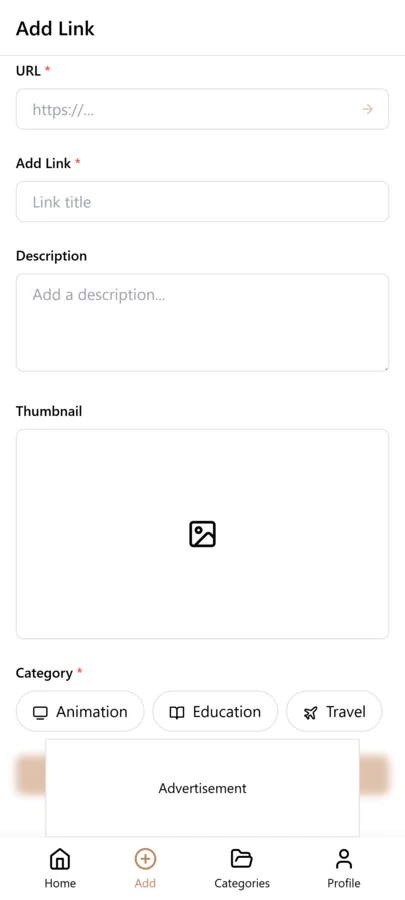
- Click the + (Add Link) button — paste any URL and LinkVault grabs the title, description, and preview image automatically.
- Add a tag and pick a category (optional) — one descriptive tag, one category. Skip if you're in a hurry; smart collections sort later.
- Save — the link is stored, synced, and searchable across every signed-in device.
- Find it later — type a keyword or tag and the link appears instantly. No folders to navigate.
Pro Tips to Get More Out of Every Link
Small habits compound. These tips keep your vault lean and useful over time.
- Use a consistent tagging vocabulary — pick 10 to 15 core tags (research, inspiration, tools, reading, personal) and reuse them. Avoid one-off tags you'll never search for.
- Do a weekly sweep — spend five minutes importing stray links from browser, email, and DMs into LinkVault. Keep everything in one place.
- Add a one-line note for non-obvious links — "the one with the half-sourdough method" turns a forgettable URL into something searchable by memory.
- Use smart collections — linkvault auto-groups by domain or keyword, so links file themselves.
- Don't save everything — if a link isn't worth a tag, it probably isn't worth saving. A curated vault is a useful vault.
How to Save and Share Interesting Links
When you find something useful online, saving and sharing it should take seconds. With LinkVault you can save any link with a title, note, and category in one tap, share individual links or entire collections via export, use the share button on mobile to save directly from any browser or app, and export your saved links as HTML, CSV, or JSON to share with others. The linkvault sharing system is designed to make collaboration effortless — create public or private collections for team sharing, or export a category as an HTML bookmark file for browser import.
How to Organize Useful Links by Category
Organizing links by category stops your library from becoming a chaotic pile. A recommended starting structure includes Work (client resources, vendor contacts, project tools), Learning (courses, tutorials, research papers), Travel (hotel links, maps, itineraries), Personal (recipes, fitness guides, entertainment), Finance (invoice tools, tax guides, banking portals), and Shopping (wishlists, product comparison pages). The linkvault category system is flexible — rename, merge, or create new ones as your needs evolve.
How to Find Saved Links Later
The biggest problem with most saving systems is retrieval. LinkVault solves this with full-text search across titles, notes, and tags, category filtering to narrow results instantly, tag search for cross-category topics, favorites for frequently visited links, and sort by newest, oldest, or most recently accessed. Search is the core feature that makes linkvault different from a simple folder system — you find links by what you remember about them, not by where you filed them.
Frequently Asked Questions
What is the best way to save links online?
A dedicated bookmark manager like LinkVault. It lets you save any URL from any device, add tags and notes, and find it later with full-text search. Browser bookmarks work for a few everyday sites but are locked to one browser. A link vault gives you one permanent, cross-device home for everything.
Can I save links from my phone and find them on my computer?
Yes. LinkVault syncs across every device. Save from any mobile browser or app using the share sheet, and links appear instantly on your desktop.
How do I import my existing browser bookmarks?
Export your bookmarks as an HTML file from Chrome, Firefox, or Safari, then import the file into LinkVault. All folders, titles, and URLs transfer and become searchable.
Is a read-later app like Pocket a replacement for a bookmark manager?
No. Read-later apps are optimized for reading articles once — they are poor at long-term organization and search. Use them alongside a link vault: read in Pocket, store permanently in linkvault.
Are my saved links safe if I switch browsers or devices?
Yes. Your links live in your LinkVault account, not in a specific browser or device. Switch from Chrome to Firefox, from Windows to Mac, or from an old phone to a new one — your links stay exactly where you left them, fully searchable.
Can I add notes to each saved link?
Yes. Each link in LinkVault supports personal notes for context and reminders. Notes are also indexed for full-text search.