How to Save Medium Articles & Blog Posts Easily (2026 Guide)
Written by LinkVault Team
You read a brilliant Medium article about startup growth strategies, think to yourself that you will come back to it when you are working on your own launch, and then never find it again. Medium's save-for-later feature is a single chronological list with no categories, no tags, no notes, and no search. Your saved articles pile up in reverse-chronological order, and the one you actually need is buried under thirty others you saved in the meantime. You end up re-searching Medium or Google, hoping to find the same article, often without success.
The problem is not that Medium's save feature is broken — it works exactly as designed for casual reading. The problem is that it was never intended to be a reference library. When you save an article because it contains a specific technique you want to apply later, or an argument that changes how you think about a problem, or a framework you want to revisit, you need more than a link in a list. You need context: why you saved it, what the key takeaway was, which project it relates to, and whether it is a must-read now or a reference for later.
This guide shows you how to build a real reading library from Medium articles — one that captures not just the link but the reason you saved it, organized by topic and priority, searchable by any keyword, and accessible across all your devices. Instead of a pile of undifferentiated links, you get a curated knowledge base where every saved article has a purpose and can be found in seconds.
Why Reading Lists Fail as a Reference System
Medium's save-for-later feature is designed for bookmark-and-return reading, not for building a reference library. When you click the bookmark icon, Medium adds the article to a single list shown in reverse-chronological order. There are no folders, no categories, no tags, and no way to add notes. The list grows indefinitely, and the only way to find a specific article is to scroll through everything you have ever saved, visually scanning titles and thumbnails. For a handful of articles this works fine. For fifty or a hundred saved articles, it becomes effectively unusable as a retrieval system.
The deeper problem is the absence of context. When you save an article, Medium records the link and the title, but not why you saved it. Three months later, you see the title in your list and think: did I save this because of the growth framework, or the case study, or the pricing analysis? Without notes, you have to re-open the article and re-read it just to remember why it was relevant. This friction means most saved articles are never revisited — they sit in the list, accumulating, until the list becomes so long that you give up on it entirely.
The third problem is priority blindness. Some articles you save because they are must-reads for a current project. Others you save because they looked interesting and you might want to read them someday. Medium treats all saved articles identically — there is no way to mark an article as urgent, as a reference for a specific project, or as low-priority background reading. When everything is in one undifferentiated list, nothing stands out, and the articles that actually matter get the same visibility as the ones you will never open again.
What a Long-Form Reading Library Needs to Do
- Save article links with summary notes capturing the key takeaway — "Startup growth: viral coefficient must exceed 1.0 for sustainable organic growth; focus on reducing friction in the sharing loop" is worth more than the title alone
- Categorize by topic or field (startup, marketing, engineering, design, personal-development) so you can browse articles by subject area instead of scrolling one list
- Tag by priority as well as topic — must-read for articles relevant to active projects, reference for articles you will return to repeatedly, and someday for lower-priority reading
- Add the author name in notes for writers whose work you consistently value, so you can search by author across all saved articles
- Search across all saved articles by any keyword in the title or your notes, so you can find every article about a topic regardless of when you saved it
- Sync across devices so articles you save on your phone during your commute are available on your laptop when you sit down to work
Step-by-Step: Saving Articles Using LinkVault
The capture process takes about thirty seconds per article and pays off every time you need to find a saved piece. The critical habit is to save and annotate at the moment you read — not later, when you have forgotten the key points.
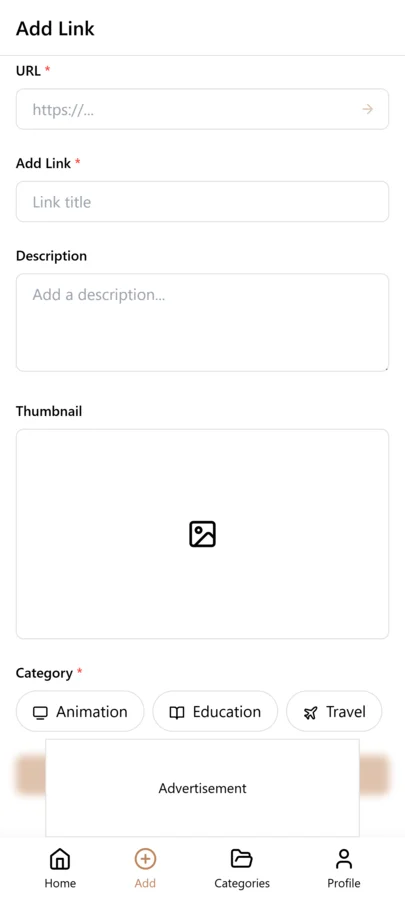
- When you find a valuable article, copy the URL from the browser address bar
- Open LinkVault and tap the + (Add Link) button
- Paste the article URL into the link field
- Add notes with the key takeaway: "Startup growth strategies — focus: viral coefficient must exceed 1.0 for sustainable organic growth. Key framework: reduce friction in sharing loop, increase incentive per share. Apply to our referral program redesign" or "Python async programming — key: event loop patterns. Use asyncio.gather for concurrent I/O, not sequential awaits. Critical for our API scraper performance"
- Tag by topic (startup, engineering, marketing, design) and by priority (must-read, reference, someday)
- If the article is by an author you follow, add their name to the notes so you can search by author later
- After reading, update your notes with additional takeaways and change the priority tag if needed
- Save — your annotated article is now categorized, searchable, and synced across all your devices
Building a Reading Library That Compounds Over Time
The real value of a structured reading library emerges over months as your saved articles accumulate into a curated knowledge base organized around the topics you care about. A single article about viral growth is useful in the moment, but ten articles about startup growth saved over six months — each with your notes on the key framework and how it applies to your work — form a comprehensive reference on the topic that no single article provides. When you sit down to design a referral program, you search your vault for the startup tag, filter to must-read and reference, and find a curated collection of the best thinking you have encountered on the subject, each annotated with your takeaways.
The practice is to be consistent with your topic tags so articles accumulate usefully. If you tag one article startup and another growth and a third go-to-market, they will never appear together in a search. Pick a consistent set of topic tags — startup, engineering, marketing, design, product, personal-development — and use them religiously. Over time, each tag becomes a mini-library of the best articles you have read on that subject, searchable by any keyword in your notes, ready to inform your work at a moment's notice.
Regular review keeps the library sharp. Once a month, spend fifteen minutes scanning your saved articles. Remove ones you have read and internalized — their value has been extracted. Promote someday articles to must-read if your priorities have shifted. Archive reference articles that are no longer relevant to your current work. This curation ensures that when you search, the results are current and relevant, not cluttered with outdated pieces you no longer need.
Choosing the Right Tags for Long-Form Articles
A reading library is only as useful as its tagging system. When you save an article in LinkVault, the tags you apply become the primary way you find that article again months later, so a consistent tagging strategy matters far more than tagging speed. The most effective approach is to use three distinct categories of tags. Topic tags describe the subject matter, such as startup, engineering, or marketing. Priority tags tell you how urgent or valuable the article is, such as must-read, reference, or someday. Format tags describe the shape of the content, such as case-study, how-to, or opinion. When you combine these three layers, a single article might carry the tags engineering, reference, and how-to, which immediately tells you what it is, how important it is, and what form it takes.
The cost of inconsistent tagging shows up the first time you try to retrieve something specific. Imagine you saved a brilliant piece on pricing strategy six months ago, but you tagged it business one day and sales the next, and you tagged a different pricing article with monetization. When you search for everything on pricing, neither article surfaces, and you either re-save a duplicate or assume the idea was never captured at all. This is how a reading library quietly degrades into a graveyard. The fix is to settle on a fixed vocabulary of roughly 15 to 20 tags total and reuse them religiously. Write the list down, keep it visible while you save new articles, and resist the urge to invent a new tag for every article that feels slightly different.
A practical way to enforce consistency is to treat your tag list like a controlled vocabulary rather than a free-for-all. In LinkVault, when you start typing a tag, pick an existing one whenever possible instead of creating a close variant. If you genuinely need a new tag, add it to your master list and commit to using it going forward. Over time, you will find that a small, well-chosen set of tags covers nearly every long-form article you encounter, and retrieval becomes fast and predictable rather than a guessing game.
Tracking Reading Progress Without a Dedicated App
You do not need a separate reading tracker or a complex progress bar to know where you are in your reading queue. LinkVault tags are enough to track the full lifecycle of an article if you apply them with discipline. The simplest system uses three status tags: unread for articles you have saved but not opened, reading for articles you have started but not finished, and finished for articles you have completed. Optionally, you can add abandoned for pieces you decided not to finish, which keeps your active queue honest and prevents half-read articles from lingering forever in the reading state.
The workflow is straightforward and takes only a few seconds at each stage. When you first save an article, apply the unread tag. The moment you open it and start reading, change the tag to reading and jot a one-line note about where you stopped or what the article is about, so you can pick it back up without rereading the opening. When you finish, swap the tag to finished and add a short summary note capturing the key takeaway or a quote you want to remember. If you realize halfway through that the article is not worth your time, tag it abandoned and move on without guilt. The goal is to keep the unread list meaningful so that when you have 20 minutes to read, you can filter to unread and immediately find something worth your attention.
This approach works because it piggybacks on a tool you are already using to save articles, so there is no second app to maintain or sync. It also gives you a clear picture of your reading habits over time. If your reading list keeps growing but your finished list barely moves, that is a signal to either read more or save less. If you have dozens of articles stuck in the reading state, a quick review can help you decide whether to push through or abandon them, which keeps your library honest and your queue focused on articles you will actually read.
Building a Monthly Reading Review Habit
A reading library compounds in value only if you maintain it, and the most sustainable way to maintain it is a monthly review session. Set aside 30 to 45 minutes on the last Sunday of each month, or whatever cadence fits your schedule, and treat it as a recurring calendar event so it does not get crowded out. The purpose of the session is not to read articles but to clean up the library, surface forgotten gems, and make sure your tags and notes still reflect reality. Without this routine, even a well-organized library slowly drifts into clutter, and the retrieval system you carefully built starts to feel like a junk drawer.
A good review routine follows a specific sequence. Start by filtering for articles tagged finished from the past month and archive the ones you will not need again, keeping only those with notes worth revisiting. Next, look at your someday list and promote one or two standout pieces to must-read, so your highest-priority queue stays fresh and reflects your current interests rather than what excited you six months ago. Then scan the unread list for stale entries, anything saved more than two months ago that you still have not opened, and make a deliberate decision: either commit to reading it this month or remove it. Finally, check for duplicate articles, since it is easy to save the same popular piece twice over several months, and merge or delete the extras.
The review is also the right time to check your tag vocabulary. If you notice you have been using two nearly identical tags, consolidate them. If a tag has not been used in months and no longer fits your reading habits, retire it. Over a few cycles, this maintenance keeps the library lean and trustworthy. The result is a collection where every unread article is something you genuinely intend to read, every must-read is genuinely urgent, and every note is worth the seconds you spent writing it. That kind of discipline is what turns a folder of saved links into a knowledge system that actually pays off.
Organizing Articles by Author and Publication
When you read long-form content regularly, you start to notice that certain writers consistently produce work worth saving. A programmer might find that one particular engineering blogger publishes essays that change how they think about system design, while a founder might realize that a specific venture capitalist writes the only fundraising advice that actually holds up. Organizing your LinkVault library by author and publication lets you capitalize on those patterns instead of losing them. The simplest method is to include the author's name and the publication name in the notes field of every saved article, written in a consistent format so they are searchable. For example, a note might start with the line Author: Patrick McKenzie, Publication: Kalzumeus, followed by your actual summary.
The benefit of this habit shows up the moment you want to go deeper on a topic or a writer. If you read an essay that reshaped your thinking on pricing, you can search your library for that author's name and instantly see every other article of theirs you have saved, along with the notes you wrote at the time. This turns a single good article into a curated collection of a writer's best work, assembled organically over months or years. It also helps you spot when a publication has shifted in quality or focus, because you can see at a glance how many of their recent pieces you have saved versus how many you skipped.
To build on this, keep a short running list of authors whose work you want to follow actively. When you do your monthly review, check whether any of those authors have published something new and save it before it slips off your radar. Over time, this creates a personal canon of writers you trust, and your library becomes more than a collection of individual articles, it becomes a reflection of the thinkers who have shaped your perspective. That is a far more valuable asset than a flat list of links, and it costs almost nothing extra to maintain as long as you add the author and publication to every save.
Handling Paywalled and Member-Only Content
Paywalled articles are the trickiest category in any reading library because your access to the full text is temporary. You might be a Medium member today and can read everything, but if your membership lapses, or the article moves behind a harder paywall, the saved link still works but the content behind it may be gone or truncated. This is why the single most important habit for paywalled content is to capture the key points in your LinkVault notes while you still have access, not after the fact. The link alone is not enough, because a link to a page you can no longer read is just a broken promise.
When you finish reading a paywalled article, take two or three minutes to write a note that preserves the core argument, not just a vague impression. A useful structure is to record the main thesis in one sentence, list the two or three supporting points or examples the author used, and note any specific data, framework, or quote you want to reference later. You do not need to reproduce the article, and you should not copy large passages, but a faithful summary in your own words captures the value in a way that survives even if you lose access entirely. If the article includes a distinctive framework or a numbered list, sketch that out in the note so the structure is recoverable without the original.
When you can no longer access the full article, your notes become the article. This is where the discipline of writing notes while you have access pays off, because a well-written summary is often enough to recall the argument, apply the idea, or decide whether to seek out the original again through another route. Treat every paywalled save as a one-time opportunity to extract and record the value, and your library will stay useful regardless of what happens to your memberships or the publication's access model over time.
Common Reading Library Mistakes and How to Fix Them
Most reading libraries fail in predictable ways, and recognizing these patterns early saves you from rebuilding your system from scratch every year. The first and most common mistake is saving everything and reading nothing. It feels productive to clip every interesting headline into LinkVault, but if your unread list grows faster than your finished list, the library becomes a source of guilt rather than value. The fix is to apply a higher bar before saving: ask whether you would realistically read this within the next two weeks. If not, skip it or tag it someday and revisit it during your monthly review rather than letting it inflate your active queue.
The next cluster of mistakes involves metadata. Inconsistent tags make articles unfindable, as discussed earlier, so standardize on a fixed vocabulary. Missing notes are just as damaging, because an article with no note is a link you will have to re-read to remember why you saved it, which defeats the purpose of a retrieval system. Get in the habit of writing at least one sentence per save. A related problem is duplicate articles, which accumulate silently when you save the same popular essay months apart under slightly different titles. Your monthly review should include a quick duplicate check, and consistent tagging makes duplicates easier to spot. The last common mistake is treating the library as a hoarding system instead of a retrieval system, where the goal becomes collecting rather than using. If you cannot remember the last time you searched your library to find something you had saved, the system is not earning its keep.
The unifying fix for all of these is a lightweight review routine and a few simple rules applied consistently. Tag from a fixed list, write a note on every save, prune duplicates and stale entries monthly, and save only what you intend to read. None of these habits takes much time individually, but together they keep your LinkVault library lean, searchable, and genuinely useful, which is the difference between a collection that grows forever and one that actually helps you think and work better over time.
Frequently Asked Questions
How is this different from Medium bookmarks?
Medium's save feature is a single chronological list with no categories, tags, notes, or search. It works for casual bookmark-and-return reading but breaks down as a reference library once you have more than a handful of saved articles. LinkVault adds organization through categories and tags, context through notes, prioritization through priority tags, and retrieval through keyword search. It also works across all platforms — not just Medium — so your reading library from Medium, blogs, news sites, and documentation all live in one searchable place instead of being scattered across platform-specific save features.
Can I save paywalled articles?
When you save a Medium article, you save the link and can add notes. If you have a Medium membership, you can re-read the full article anytime. If you do not, you may hit the paywall on re-visit. The solution is to capture the key points in your notes while you have access, so your saved reference remains useful even if you cannot re-read the full article later. Write notes detailed enough to remind you of the core argument and framework — you may not be able to access the original, but your notes preserve the knowledge that made the article worth saving.
What if I never finish my reading list?
Review weekly and archive low-priority items. Focus on quality over quantity — a curated library of thirty articles you will actually revisit is more valuable than a pile of three hundred you will never open. Use priority tags to distinguish must-read articles from someday articles, and be honest about which saved articles you are unlikely to ever read. Regular review keeps your library focused and ensures that when you search, the results are relevant and current rather than cluttered with articles you saved months ago and have no intention of reading.
Can I save articles from other platforms in the same library?
Yes. LinkVault is platform-agnostic — you can save links from Medium, personal blogs, news sites, documentation, Substack newsletters, and any other web source. All saved articles go into the same searchable library with the same tagging system. This means your reading library is not fragmented across platform-specific save features but consolidated in one place where you can search across everything by keyword and filter by topic tag regardless of where the article was published.
Should I save the full text of articles or just the link?
Save the link and add your own notes rather than trying to copy the full article text. Your notes should capture the key takeaway, the framework or argument, and how it applies to your work — not a reproduction of the article. This approach is more useful because your notes are in your own words and focused on what matters to you, and it avoids potential copyright issues from copying full article content. The link lets you re-read the original if needed, while your notes provide the extracted value in a searchable, quickly scannable format.
How do I handle articles from Medium publications versus individual authors?
Both are worth saving, but they serve slightly different purposes in your library. A Medium publication is a curated outlet that may feature many writers, so it is useful for discovering high-quality work on a recurring basis, while an individual author's pieces give you a deeper sense of one person's thinking over time. In LinkVault, include both the publication name and the author name in your notes so you can search by either dimension later. If you find yourself returning to a specific publication, add it to a short list of sources to check during your monthly review, and if a particular author stands out, build a curated collection of their work by searching your library for their name. This dual structure lets you track both the breadth of a publication and the depth of a single writer without needing separate libraries or complex organization.
How do I track articles I have already read versus ones I still need to read?
Use priority tags to distinguish between the two. Tag unread articles as must-read or someday depending on urgency. When you finish reading an article, update the tag to reference if it contains information you will return to, or remove it from your vault if it was a one-time read whose value has been extracted. This keeps your vault focused on content you will actually revisit rather than accumulating everything you ever saved. Regular monthly review of your saved articles helps keep the unread queue manageable and the reference library current.