How to Save News Articles for Later Easily (2026 Guide)
Written by LinkVault Team
You read an article about a new regulatory framework that could affect your industry, think it is interesting, and move on. Three months later, a colleague asks whether you have seen any analysis on how the new regulation impacts small businesses. You remember reading something, but you cannot remember where. You search Google, but the article is now behind a paywall, the URL has changed, or it has been buried under newer coverage. The specific analysis your colleague needed is lost — not because it was not published, but because you had no system to capture and retrieve it when it mattered.
News articles are some of the most valuable and most ephemeral content on the internet. They contain reporting, analysis, and data that you may need to reference weeks, months, or even years later — for work, for research, for personal decisions, or for conversations. But news sites are designed for continuous consumption, not for long-term retrieval. Articles get buried in archives, URLs change during site redesigns, paywalls block access after a few free views, and search engines prioritize recent content over older pieces. The article you read today may be effectively unfindable in six months, even though the information in it remains relevant.
This guide shows you how to build a personal news reference system that captures articles with context notes explaining why they matter, tags for topic and source, and search that works across everything you have saved. Instead of relying on browser bookmarks that mix news with every other link, or hoping Google will surface the same article again, you create a curated archive of the news that matters to you — findable in seconds, years later, even if the original article has disappeared.
Why News Articles Are Hard to Retrieve Later
News sites are optimized for the present moment. The homepage shows today's stories, the search bar prioritizes recent articles, and older content gets pushed into archives that are difficult to navigate. When you read an article that matters, the site has no incentive to help you find it again months later — they want you reading new content, not revisiting old pieces. This creates a structural problem: the articles most worth saving are often the hardest to find again through the platform itself.
Several specific factors make news retrieval difficult. First, paywalls: many news sites allow a few free articles per month, then block access. If you saved a link but did not capture the key points, you may not be able to re-read the article when you need it. Second, URL changes: news sites periodically restructure their URLs during redesigns, breaking saved links. Third, archive purges: some sites remove older articles entirely, especially if they were opinion pieces or blog posts rather than hard news. Fourth, search degradation: Google prioritizes recent content, so an article from two years ago may not appear in search results even if you search for its exact title. Fifth, source confusion: you may remember reading an article about a topic but not which publication it was from, making it hard to search the right site.
The result is that valuable reporting and analysis effectively disappears from your reach over time. You know you read something relevant, but you cannot find it again. For professionals who need to reference reporting in their work — lawyers tracking legal developments, analysts monitoring industry trends, researchers building literature reviews, business owners following regulatory changes — this loss is not just frustrating but costly. The information existed, you consumed it, but without a capture system, it is gone.
What a News Reference System Needs to Do
- Save articles with context notes explaining why they matter — "New SEC filing requirements for private companies — affects our Q3 compliance review" beats a bare link that tells you nothing three months later
- Tag by topic (regulation, industry, finance, technology) so you can filter to all articles about a specific subject area when you need to review what you have collected
- Tag by source publication so you can find all articles from a specific outlet — useful when you trust certain sources for specific topics or when you need to cite a publication
- Capture the key points in your notes so the article remains useful even if the original becomes paywalled, moves, or is deleted — your notes should be self-sufficient
- Organize by purpose — reference, research, work, personal — so you can filter to articles relevant to a specific project or decision you are working on
- Search across all saved articles by keyword so you can find every article you saved about a topic regardless of when you saved it or where it was published
Step-by-Step: Saving News Articles Using LinkVault
Building your news reference system takes a few minutes of setup, then seconds per article as you read. The critical habit is to save and annotate at the moment you recognize an article is worth keeping — not later, when you have forgotten the key points or why it mattered.
- Create categories that match your needs: Industry News, Regulation and Policy, Research and Analysis, and Personal Interest
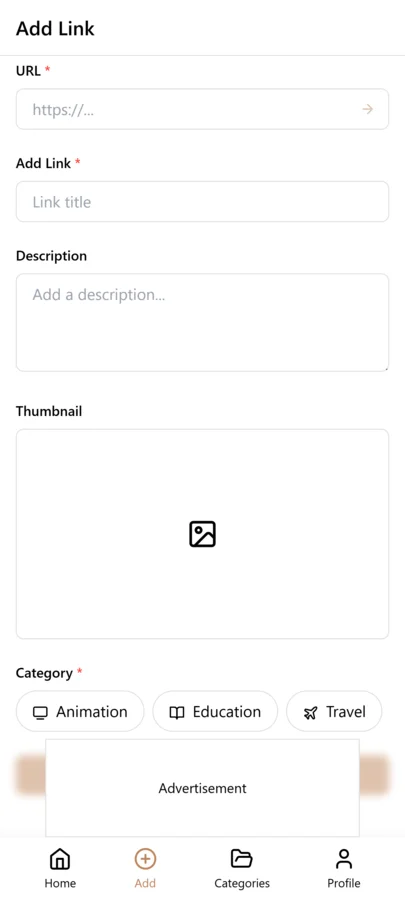
- When you find a valuable news article, copy the URL from the address bar
- Open LinkVault and tap the + (Add Link) button
- Paste the article URL into the link field
- Add notes with the key points and context: "SEC proposes new disclosure requirements for private companies — key changes: expanded financial reporting, earlier filing deadlines. Relevant to our compliance review — check with legal team before Q3" or "Analysis of semiconductor supply chain bottlenecks — author argues geographic concentration in Taiwan creates systemic risk"
- Tag by topic (regulation, finance, technology, supply-chain) and by source publication (wsj, reuters, bloomberg, ars-technica) so you can filter by either dimension
- If the article is relevant to a specific project or decision, tag with the project name so you can find it when working on that project
- Save — your annotated article is now searchable, synced across devices, and ready to find instantly, even if the original is later paywalled or removed
Building a News Knowledge Base Over Time
The real value of a news reference system emerges over months and years as your saved articles accumulate into a knowledge base. A single article about a regulatory change is useful in the moment, but ten articles about regulatory changes in your industry over a year form a comprehensive picture of how regulation is evolving — patterns that are invisible when you read articles one at a time become clear when you can review them together. This is the compounding benefit of systematic saving: your archive becomes more valuable than any individual article because it reveals trends and patterns that no single piece of reporting captures.
The practice is to tag articles by the broader topic or trend they relate to, not just the immediate subject. An article about a specific company's earnings report might be tagged with the company name, but also with the trend it illustrates — AI-monetization, supply-chain-recovery, or consumer-spending-shift. Over time, each trend tag accumulates articles from different sources and dates, and reviewing them together gives you a multi-source, longitudinal view of how that trend is developing. When you need to brief a team, write a report, or make a decision informed by industry trends, you search your vault by trend tag and find a curated, multi-source collection of the reporting that shaped your understanding.
This approach turns passive news consumption into active knowledge building. Instead of reading articles and forgetting them, every article you save becomes a building block in a structured knowledge base that grows more valuable over time. The effort per article is minimal — thirty seconds to save and annotate — but the cumulative result is a personal research archive that would take weeks to assemble from scratch if you tried to gather the same information later through search.
Handling Paywalled and Disappearing Articles
The most valuable news sources often have the most aggressive paywalls — the Wall Street Journal, the Financial Times, Bloomberg, and specialized industry publications limit free access to a few articles per month. This creates a specific problem for a news reference system: you may save an article today while you have access, but when you need to reference it in three months, you may have exhausted your free views and cannot re-read it. The solution is to capture enough in your notes that the saved article is useful even without access to the full text.
When saving a paywalled article, write notes that capture the key facts, arguments, and data points — not just a vague summary. Instead of "good article on semiconductor supply chains," write "WSJ analysis: TSMC produces 54% of global semiconductors by value; concentration creates systemic risk; proposed US subsidies aim to reduce dependency to 40% by 2030; author cites three specific bottleneck events in 2024-2025." This level of detail means your saved reference remains useful even if you can never access the original article again. You lose the ability to re-read the full piece, but you retain the information that made it worth saving.
For articles that may disappear entirely — opinion pieces, blog posts, smaller publication pieces that may be pruned — the same principle applies but with even more urgency. Capture the key points, the author, the publication date, and any specific data or quotes you might need to reference. If you later find the link is dead, your notes preserve the knowledge and you can add a note like "original article removed — key points preserved in notes" so you know the link is no longer reliable but the information is retained in your vault.
Building a Topic-Based News Archive
A chronological list of saved news articles is useful for retrieval, but a topic-based archive is what turns your news vault into a research tool. The idea is to group articles by the themes they cover, not by when you saved them. When a colleague asks what you know about semiconductor supply chains, you should be able to filter by a single tag and see every article you have saved on that topic across all sources and all time periods. This requires consistent topic tagging at save time — every article about AI regulation gets the ai-regulation tag, every article about housing markets gets the housing tag, regardless of whether it came from the WSJ, Reuters, or a niche blog.
The power of a topic-based archive reveals itself over months. When you save your first article about a new topic — say, climate disclosure rules — it is just one link. But after six months of consistent tagging, you have a curated collection of ten or fifteen articles on that topic, each with notes capturing the key data points and arguments. This collection is more valuable than any single Google search because it represents your curated filter — you already decided these articles were worth keeping. When you need to understand a topic for a project, a meeting, or a decision, filtering by the topic tag gives you your own personal research briefing in seconds. The archive compounds in value because each new article you add strengthens the existing collection rather than disappearing into a chronological stream.
Breaking News vs Analysis: Different Saving Strategies
Not all news articles serve the same purpose, and treating them identically in your vault leads to clutter. Breaking news articles — event reports, announcement coverage, earnings releases — are valuable for a short window and then become stale. Analysis pieces — trend explainers, opinion columns, investigative reports — retain their value for months or years because the reasoning and context outlast the specific event. Your saving strategy should differentiate between these two types.
For breaking news, save the link with a date-stamped note and a breaking-news tag. These entries are useful for tracking what happened and when, but they should be reviewed monthly and deleted once the information has been superseded or internalized. For analysis pieces, save with a topic tag and an analysis tag, and write more detailed notes capturing the author's argument, key data points, and your own assessment of the analysis quality. Analysis pieces should be reviewed quarterly and kept as long as the argument remains relevant — some analysis articles from two years ago are still the best explainer on a topic. By separating breaking news from analysis at save time, you keep your vault from filling with stale event reports while preserving the evergreen analysis that gives your news archive its long-term value.
Monthly News Review Habit
A news reference archive without regular review becomes a graveyard of old links. The monthly news review takes twenty minutes and serves three purposes. First, filter by saved this month and scan for articles you saved but never actually read — these are links that caught your eye in the moment but turned out not to be worth your time. Delete them without guilt. Second, review your breaking-news tagged items from the previous month and delete any that have been superseded by newer coverage or that you have fully internalized. Breaking news has a short half-life, and keeping stale event reports dilutes your search results.
Third, pick two or three topic tags and review everything under them. Update notes with any follow-up developments, add cross-references to newer articles on the same topic, and retire tags that are no longer relevant to your work or interests. The monthly review is also the time to promote articles from to-read to read after you have consumed them, and to delete to-read items that have been sitting unread for more than two weeks — if you have not read it in two weeks, you probably will not. This curation discipline keeps your news archive lean and trustworthy. When you search for an article, you know the results are curated, current, and relevant — not a dump of everything you ever found interesting.
Common News Saving Mistakes and How to Fix Them
Saving news articles seems straightforward, but certain habits consistently erode the quality of a news reference archive over time. The mistakes below are the most common reasons news libraries become unusable, and each fix is a small discipline change that takes only a few extra seconds per article. Review this list during your monthly news review as a self-audit.
- Saving without a note: A URL with no note is unsearchable by content. Always write at least one sentence capturing the key point or why the article mattered before you save.
- Saving the social media link instead of the article URL: Twitter and Reddit posts get deleted. Always copy the original article URL, not the social media post that shared it.
- Tagging by source publication only: Tags like wsj and reuters tell you where the article came from but not what it is about. Always add at least one topic tag so you can filter by subject.
- Keeping every article you ever found interesting: A vault with five hundred articles you never reference is worse than a vault with fifty you actually use. Delete aggressively during monthly reviews.
- Not differentiating breaking news from analysis: Breaking news goes stale in weeks. Tag it differently and review it more frequently so stale event reports do not clutter your evergreen analysis collection.
Sharing News References with Colleagues
News articles are often most valuable when shared. A competitor analysis piece, a regulatory update, or an industry trend report that you saved for your own reference is likely relevant to your team as well. LinkVault makes sharing straightforward — tag articles with your project or team name, and colleagues in a shared workspace can search and find them. The key is to add a shareable note that gives your colleagues context without requiring them to read the full article. Instead of just saving the link, write a note like "WSJ analysis of new EU AI Act compliance requirements — key takeaway: companies with over 250 employees must document all AI training data sources by Q3 2026 — relevant to our compliance roadmap."
For teams that are not on a shared workspace, you can still share curated news digests. Filter your library by a topic tag, export the results with notes, and send the list via email or Slack. This is far more useful than forwarding individual articles because the export carries your annotations — your colleagues get your summary and assessment, not just a raw link. For recurring topics, consider a monthly news digest where you filter by a project tag, select the three to five most important articles from that month, and share them with a brief summary of why each matters. This positions you as the person who keeps the team informed on critical developments, and it turns your personal news habit into a team-wide intelligence resource. The shift from saving news for yourself to sharing curated references with colleagues is what transforms individual reading into organizational knowledge.
Frequently Asked Questions
How do I handle paywalled news articles?
When you save a paywalled article, capture the key facts, arguments, and data points in your notes — not just a vague summary. Write notes detailed enough that the saved reference remains useful even if you can never access the full article again. For example, instead of "good article on semiconductor supply chains," note "WSJ analysis: TSMC produces 54% of global semiconductors by value; concentration creates systemic risk; proposed US subsidies aim to reduce dependency to 40% by 2030." This way, when you need the information months later and your free views are exhausted, your notes contain the substance rather than just a link you cannot open.
What if the original article gets deleted or the URL changes?
Always write notes that are self-sufficient — they should contain enough information to be useful even if the original link breaks. Capture the key points, the author, the publication date, and any specific data or quotes you might need to reference. If you later find the link is dead, add a note like "original article removed — key points preserved in notes" so you know the link is no longer reliable but the information is retained in your vault. This practice ensures your news reference system retains its value over time regardless of what happens to the original sources.
Should I save news articles from social media links?
Yes, but save the original article URL rather than the social media post link. When someone shares a news article on Twitter, LinkedIn, or Reddit, copy the actual article URL from the share rather than saving the social media post link. Social media posts can be deleted, and the discussion around the article is separate from the article itself. If the social discussion is also valuable, save it separately with its own notes — the article and the discussion are different types of content that serve different purposes in your reference system.
How do I organize articles by topic across different sources?
Use topic tags that are consistent across all sources. Tag every article about regulation with regulation, every article about technology with technology, and so on, regardless of whether it came from the WSJ, Reuters, or a niche blog. This lets you filter to all articles about a topic across all sources, which is more useful than organizing by source alone. Additionally, tag by source publication (wsj, reuters, bloomberg) so you can filter to a specific outlet when needed — for example, when you want to review everything you saved from a source you trust for a particular topic.
How is this different from using my browser bookmarks or a read-later app?
Browser bookmarks mix news articles with every other bookmark you have, offer no way to add context notes, and become unmanageable over time. Read-later apps are designed for consuming content once, not for building a searchable reference archive — they typically do not support tagging, categorization, or keyword search across saved items. LinkVault gives you categories to organize by purpose, tags to filter by topic and source, notes to capture why each article mattered, and search that works across everything you have saved. The difference is retrieval: when you need to find an article you read months ago, you search and find it in seconds instead of scrolling through browser folders or re-searching the web and hoping it surfaces.
How often should I review my saved news articles?
Review quarterly for most news content, as articles about trends and analysis remain relevant longer than daily news. Remove articles that have become outdated or that you have already internalized — your vault should contain content you will actually reference again, not everything you ever found interesting. For time-sensitive content like regulatory deadlines or earnings reports, review monthly during active periods. The goal is a curated reference archive, not a comprehensive log of everything you read. Regular review keeps your vault focused and ensures that when you search, the results are relevant and current rather than cluttered with outdated pieces.
Should I save news articles from social media links or find the original source URL first?
Always find and save the original article URL, not the social media link that shared it. Social media posts are ephemeral — Twitter posts get deleted, Reddit threads get locked, LinkedIn posts scroll into oblivion. The original article URL on the publication website is far more stable and is the canonical source you want to reference. When you see an interesting article shared on social media, click through to the actual article, copy the publication URL, and save that to LinkVault with a note about where you found it — "discovered via Twitter, shared by @analyst handle" — so you preserve the discovery context without relying on the social media link. If the article is behind a paywall and you can only access it through a social media preview, save the original URL anyway and note in your save that it was paywalled — you can always search for the same article through a different access method later. The original URL is always the better reference because it is what you would share with a colleague or cite in a document.