How to Save Restaurant & Café Links Easily (2026 Guide)
Written by LinkVault Team
A friend tells you about an incredible Thai place in your neighborhood. You save it mentally. Two months later, you are craving Thai food, and you cannot remember the name. You text your friend, but they do not respond right away. You scroll through Google Maps saved places, but there are 200 of them with no labels. You search your Instagram saved posts, but they are buried under dozens of other saves. You give up and order from the same delivery app you always use.
This is the restaurant recommendation trap. Food lovers collect recommendations from friends, social media, food blogs, and review sites, but the sources are scattered across a dozen apps with no organization, no context, and no way to filter by what matters right now — cuisine, neighborhood, occasion, or price range. Google Maps saves are a list of pins with no notes. Instagram saves are a wall of images with no tags. Text messages scroll away. The result is that you forget most of the recommendations you receive and end up going to the same handful of places over and over.
The solution is a restaurant vault: one organized place where every recommendation lives with notes about what to order, who recommended it, what the vibe is, and whether it is a date-night spot or a casual lunch place. This guide shows you how to build that vault in LinkVault, step by step, so the next time you are hungry and looking for a specific type of place, the answer is one search away.
What Food Lovers Need
A restaurant organization system must solve the specific problems that make recommendations disappear. Each feature below addresses a real failure point — forgetting what to order, not remembering who recommended a place, being unable to filter by occasion when you need a date-night spot, or losing track of which places you have already tried versus which are still on your list.
- Save with notes about dishes and atmosphere — the single most valuable detail, because a restaurant name alone does not tell you what to order or what the vibe is
- Organize by location and cuisine type so you can filter to "Italian in West Village" when that is what you are craving
- Tag by occasion and price range — date-night, casual, budget, mid-range, splurge — so you can match the place to the moment
- Track recommendations from friends — note who recommended it and what they said, because their endorsement is part of the value
- Quick search when planning meals — type "sushi" into search and instantly see every sushi place you have saved with notes and tags
- Mark visited vs to-try places so you can separate your wishlist from your tried-and-tested favorites
- Add neighborhood tags for easy filtering when you are walking around a specific area looking for a nearby option
Step-by-Step: Restaurant Vault Setup in LinkVault
Setting up your restaurant vault takes about five minutes, and each new recommendation takes under thirty seconds to save. The key is to capture the link and the context together in one action — the restaurant name, the recommendation source, the dishes to try, and the occasion tags — so you never have to reconstruct any of it later.
- Create categories that match how you think about dining: To Try, Favorites, Date Night, Casual Dining
- When you find a restaurant recommendation — from a friend, Instagram, a food blog, or a review site — copy the Google Maps share link or the restaurant website link
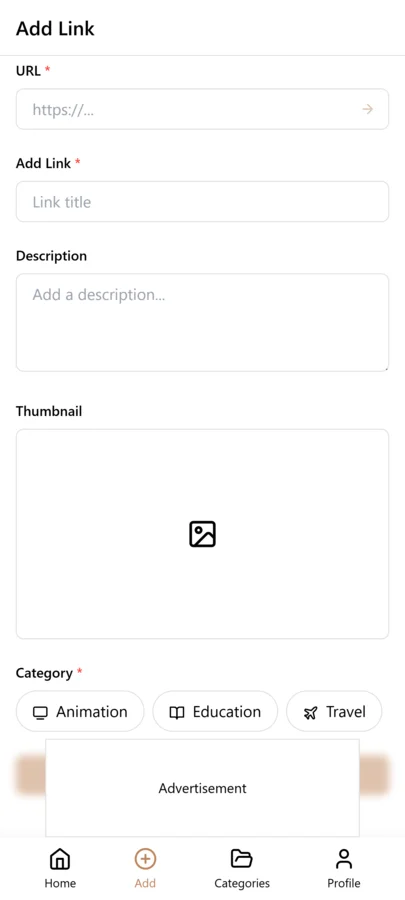
- Open LinkVault and tap the + (Add Link) button
- Paste the restaurant link into the URL field
- Add notes with everything you want to remember: "Italian spot in West Village — Sarah recommended the carbonara and the burrata — cozy atmosphere, good for date night — no reservations, expect a wait on weekends" or "Coffee shop downtown — great wifi and natural light — try the pour-over — open early at 7AM"
- Tag by cuisine (italian, thai, sushi), location (west-village, downtown), and occasion (date-night, casual, brunch) so you can filter by any of these dimensions later
- Save the bookmark — your restaurant link, notes, and tags are now stored together and searchable across all your devices
Tips for Restaurant Organization
These best practices come from real dining scenarios where a missing detail meant a missed opportunity — a great restaurant forgotten, a date night spent at a mediocre place, a dietary restriction overlooked. Each tip solves a specific moment where organization makes the difference between a great meal and a forgettable one.
- Always note recommended dishes — a restaurant is only as good as what you order, and knowing to get the carbonara instead of the pizza at an Italian place can make or break the experience
- Tag by cuisine type and location so you can filter to exactly what you want — "thai + east-side" gives you every Thai place on the east side you have saved
- Use date-night or casual tags for occasions so you do not accidentally take a date to a loud casual spot or show up overdressed at a hole-in-the-wall
- Add who recommended it in notes — the person who vouched for it is part of the story, and if you trust their taste in Thai food but not in Italian, that context helps you prioritize
- Note price range (budget, mid-range, splurge) so you can match the restaurant to your budget for the night without opening the menu to check
- Mark visited after going and add your own review — note what you ordered, what was great, what to skip, and whether you would return, turning your vault into a personal food journal over time
- Create neighborhood tags for easy filtering — when you are walking around a specific area and want somewhere nearby, filtering by neighborhood is faster than scrolling through your entire list
- Note dietary restrictions and accommodations — gluten-free options, vegan menu, nut allergies — so you can filter to places that work for your group without calling ahead
Building a City-by-City Restaurant Guide
If you travel frequently or split time between multiple cities, a flat list of restaurant recommendations quickly becomes unmanageable. A Thai place in your home city is irrelevant when you are looking for dinner in a city you are visiting, and a great café in a vacation destination does not help you on a Tuesday at home. The solution is to organize your restaurant vault by city, using city tags to segment your library.
For your home city, create neighborhood-level tags — west-village, downtown, east-side — so you can filter by area when you are looking for somewhere nearby. For travel destinations, use city-level tags — porto, mexico-city, kyoto — and add everything you find before or during your trip. When you arrive in a new city, you filter by that city tag and immediately have a curated list of every recommendation you collected, with notes about dishes, sources, and occasion tags. This is far more useful than scrolling through a generic travel list or searching Google Maps with no context.
The real power shows up on return visits. If you visit London once a year for business, your london tag accumulates over time. On your third trip, you filter by london and see not only the places you saved before the trip but also the places you visited and reviewed on previous trips. Your notes from last year — "great pub near the office, try the fish and chips, avoid the steak" — are still there, turning your vault into a personal food guide that gets better with every visit. Without this system, you would start from scratch each time, relying on generic review sites instead of your own accumulated experience.
For food lovers who travel, this city-by-city approach transforms your restaurant vault from a single list into a portable food guide that you carry everywhere. It is like having a personal Michelin guide built from your own tastes and your trusted friends recommendations, organized by city and searchable by cuisine, occasion, and price range.
Tracking Visited Restaurants and Building Your Personal Food Journal
Saving restaurant recommendations is only half the system. The other half is recording your experiences after you visit. Without this step, your vault is a wishlist that never becomes a knowledge base — you know which places you wanted to try, but you have no record of which ones lived up to the hype and which ones disappointed.
The practice is simple: after each restaurant visit, open the LinkVault entry and add a visited tag. Then update the notes field with your own review. Note what you ordered, what was excellent, what was forgettable, and whether you would return. A note like "Visited March 2026 — ordered the carbonara (incredible) and the burrata (good but not great) — atmosphere was cozy and romantic, perfect for date night — would definitely return, next time try the cacio e pepe" turns a recommendation into a permanent record of your experience.
Over months and years, this creates a personal food journal that compounds in value. You can filter by the visited tag to see everywhere you have been, search your notes for a dish name to find where you had the best version of it, or filter by favorites to build a go-to list for your home city. When friends ask for restaurant recommendations — which happens constantly if you are known as a food person — you can search your vault and send them curated suggestions with your personal reviews attached, instead of trying to recall names from memory.
The visited tag also creates a natural lifecycle in your vault. New recommendations go into the To Try category. After you visit, they move to Favorites if they were great, or get archived if they were not. This keeps your active list focused on places you are excited to try, while your visited entries become a growing archive of dining experiences that you can reference forever. A vault with fifty visited entries and reviews is genuinely more useful than any review site, because every entry is filtered through your own taste and written in your own words.
Tagging Restaurant Links by Cuisine, Occasion, and Price Range
Three-dimensional tagging is what makes a restaurant vault truly useful for decision-making. Cuisine tags (italian, thai, sushi, mexican) tell you what type of food. Occasion tags (date-night, casual, brunch, business-lunch, family) tell you the appropriate setting. Price-range tags (budget, mid-range, splurge) tell you the cost level. When you combine all three, you can filter to exactly what you need in the moment.
The power shows up when you are making a specific decision. It is Friday night and you want a mid-range Italian place for a date. You filter by italian, date-night, and mid-range, and instantly see every Italian restaurant you have saved that fits the occasion and budget — each with notes about what to order and who recommended it. Without occasion and price tags, you would have to scroll through your entire Italian list and mentally evaluate each one for appropriateness.
Keep your tag vocabulary small and consistent. Five to seven cuisine tags, four to five occasion tags, and three price-range tags cover nearly every dining situation. Resist the urge to create hyper-specific tags like thai-northern or italian-regional unless you are a serious food enthusiast who needs that level of granularity. For most people, a clean set of consistent tags is more useful than a sprawling taxonomy that is hard to maintain.
Monthly Restaurant Review Habit
A restaurant vault without regular review becomes a static list of places you never visit. A monthly review of fifteen minutes keeps your vault current, helps you discover forgotten gems, and ensures your to-try list stays focused on places you will actually visit.
Start by reviewing restaurants you visited in the past month. Add a visited tag and update the notes with your own review — what you ordered, what was excellent, what to skip, and whether you would return. Move standout places to a Favorites category so they are easy to find when you want a reliable recommendation. Next, review your to-try list and delete places that have been sitting there for months without visiting — if you have not gone in six months, you probably will not, and a lean to-try list is more motivating than a long one.
Check for closed restaurants periodically. Restaurants close without much notice, and keeping entries for closed places wastes time when you try to visit. Do a quick scan of your to-try list every few months and delete any that have closed. For favorites that closed, note them as closed but keep the entry for nostalgia and for the notes about what made them great.
Saving Restaurant Recommendations from Friends and Social Media
Restaurant recommendations come from many sources — friends, Instagram, TikTok, food blogs, review sites — and each source provides different context. A friend who knows your taste is more trustworthy than a random Instagram post, and tracking the source helps you evaluate recommendations when deciding where to go.
When you save a recommendation, note the source in your notes. "Sarah recommended — she lives in the West Village and knows Italian food" is more useful than a bare link. For social media recommendations, note the account and why you trusted them — "Found via @nycfoodie on Instagram — their carbonara recommendation at another spot was excellent." Over time, you build a mental map of which sources consistently recommend places you enjoy, and you can prioritize those sources when planning meals.
For friend recommendations, add the friend tag as well so you can filter to all places a specific friend recommended. When that friend visits from out of town, you filter by their name tag and take them to places they recommended to you — a thoughtful gesture that shows you valued their suggestions. This social layer transforms your restaurant vault from a personal list into a shared dining culture between you and your network.
Common Restaurant Link Saving Mistakes
- Saving only the restaurant name instead of the Google Maps link — a name without a link means you have to search for the restaurant every time, so always copy the Google Maps share link or website URL
- No cuisine tag — without a cuisine tag you cannot filter by what you are craving, which is the most common way people search for restaurants, so always tag with at least one cuisine type
- No neighborhood tag — when you are walking around a specific area looking for nearby options, neighborhood tags let you filter to places on your current street, so tag by neighborhood for your home city
- Keeping restaurants that have closed — closed restaurants clutter your search results and lead to wasted trips, so delete closed places promptly or mark them with a closed tag
- Not noting what dish was recommended — a restaurant is only as good as what you order, so always note the specific dish someone recommended so you do not order the wrong thing and have a disappointing experience
Building a Shareable Restaurant Guide for Friends and Visitors
When friends visit your city or ask for restaurant recommendations, your LinkVault vault becomes a shareable guide that is more personal and curated than any review site. Instead of typing out recommendations from memory, you filter your vault and share a curated list with your own reviews attached.
The approach is to build occasion-based collections that you can share on demand. If a friend asks for date-night recommendations, you filter by date-night and your home city, and share the filtered list with your notes about atmosphere, dishes, and price. If a colleague visiting from out of town needs lunch spots near the office, you filter by business-lunch and the office neighborhood tag.
For recurring requests — like friends who visit your city regularly — create a shared collection tagged with the friend name or visitor tag. Add your best recommendations with detailed notes, and when they ask "where should I eat?", you share the collection and they have a personal guidebook from someone whose taste they trust. This is more valuable than sending a list of names because each entry comes with your context: what to order, what the vibe is, and why you recommend it.
Frequently Asked Questions
Can I save Google Maps links?
Yes. Copy the share link from Google Maps and save with notes about the restaurant. The Google Maps link is often the best option because it includes the address, hours, and directions — all accessible directly from your LinkVault entry.
How do I organize restaurants by neighborhood?
Use tags for neighborhoods or cities so you can filter by location when planning. For your home city, use neighborhood-level tags like west-village or downtown. For travel destinations, use city-level tags like porto or kyoto. This lets you filter to nearby options when you are walking around a specific area.
Should I keep places I already visited?
Yes. Move to a Favorites category and add notes about your experience for future visits. Add a visited tag and record what you ordered, what was great, and whether you would return. Over time, your visited entries become a personal food journal that is more useful than any review site.
Can I save restaurant menus separately?
Yes. If a restaurant has an online menu, save the menu link as a separate LinkVault entry and tag it with the restaurant name and a menu tag. In the notes, highlight the dishes you want to try or the ones a friend recommended. This way, when you are deciding where to eat, you can pull up the menu instantly without searching for it on the restaurant website.
How do I handle chain restaurants versus local spots?
Tag chain restaurants with a chain tag and local spots with a local tag. Most food lovers prioritize local spots but occasionally need a reliable chain for convenience. By tagging both, you can filter to local-only when you want a unique experience, or include chains when you just need somewhere dependable nearby. In your notes, mention which specific location you visited, since chain quality can vary by location.
How do I organize restaurants for dietary restrictions?
Use dietary tags such as gluten-free, vegan, vegetarian, or nut-free-friendly. When you save a restaurant, note in the notes field whether they accommodated your dietary needs and which dishes worked. When planning a meal with friends who have restrictions, filter by the relevant tag to instantly see which saved restaurants can accommodate everyone, instead of calling each place to ask.
How do I save restaurant links when traveling internationally with different map apps?
Save the restaurant name and full address in your notes so you can search for it in any map app. Save the Google Maps URL as your primary link since Google Maps works globally. If the country has a preferred local map app — like Naver Maps in Korea or Apple Maps in some regions — note the local app name in your notes. Tag by city and country so you can filter to restaurants in each destination, and note any language considerations like "menu in Japanese only, ask for English menu."