How to Save Threads & Social Discussions Easily (2026 Guide)
Written by LinkVault Team
The best answers to your problems often live in social discussions — a Reddit thread where three engineers debate the merits of different caching strategies, a Hacker News comment section where someone shares their production experience with a specific database, a forum post where a developer explains how they solved the exact deployment problem you are facing right now. These discussions are goldmines of practical, battle-tested knowledge that you cannot find in official documentation or blog posts. But social platforms are designed for continuous consumption, not for saving and retrieving specific discussions later. The feed keeps moving, algorithms prioritize new content, and the valuable thread you found on Tuesday is gone by Friday.
The result is a familiar cycle. You find a Reddit thread that perfectly answers a question you have been struggling with. You think to yourself, I will remember this. You do not save it anywhere because Reddit's save feature is just another undifferentiated list. Two weeks later, you encounter the same problem again — maybe at work, maybe on a side project — and you remember that there was a great thread about this. You search Reddit, but the thread does not come up because Reddit's search is notoriously poor. You try Google with site:reddit.com, but you cannot remember the exact title. The knowledge is lost, and you are back to square one.
This guide shows you how to break that cycle by building a personal solution library from social discussions. Instead of relying on platform save features that bury content in unsearchable lists, you capture valuable threads and discussions into LinkVault with context notes explaining the problem they solve, tags for the topic and platform, and search that actually works. The next time you face the same problem, you search your own vault and find the exact discussion that helped you before — complete with your notes on why it was useful and how you applied it.
Why Social Discussions Are Valuable and Hard to Keep
Social discussions contain a type of knowledge that is almost impossible to find elsewhere: real-world experience from practitioners who have faced the same problems you are facing and are willing to share what worked, what did not, and why. A Stack Overflow answer gives you the officially correct solution, but a Reddit thread gives you the practical reality — the trade-offs, the gotchas, the edge cases that only emerge in production. A documentation page tells you how a tool is supposed to work, but a Hacker News discussion tells you how it actually performs under load, what breaks, and what the maintainers are planning to fix.
But social platforms are fundamentally hostile to long-term content retention. Reddit threads get archived and become read-only, meaning you cannot comment or interact but more importantly, they can be difficult to find through Reddit's own search. Forum posts get buried as new threads push old ones off the first page. Social platforms like Twitter and Threads reorganize content algorithmically, meaning a discussion you found yesterday may not appear in the same search today. Links break when platforms restructure their URLs or when content is deleted. And even if the content survives, platform save features are universally poor — Reddit's saved posts are a single unsearchable list, Hacker News has no native save feature at all, and forum bookmarks are buried in browser bookmark folders that nobody organizes.
The compounding loss is significant. Over a year of active social media use, you might encounter dozens of discussions that are directly relevant to your work or interests. Without a capture system, almost all of them are lost within weeks. The few you remember vaguely are impossible to find again because you cannot recall the exact title, the author, or the platform where you saw them. A year later, you are solving the same problems from scratch, re-discovering solutions that the social community already provided, simply because you had no way to retain and retrieve that knowledge.
Types of Social Discussions Worth Saving
Not every social discussion is worth saving, and part of building an effective solution library is developing the judgment to recognize which ones will matter later. The most valuable discussions tend to fall into a few categories that recur across platforms — recognizing these patterns helps you save the right content and skip the rest, keeping your vault focused and useful rather than cluttered with discussions you will never revisit.
How to Capture and Organize Social Discussions
- Problem-and-solution threads where someone asks a specific technical or practical question and the community provides detailed, tested answers — these are the most valuable because they directly address real problems with real solutions
- Experience reports where a practitioner shares what they learned from a specific project, tool, or approach — these provide real-world context that official documentation cannot, including performance characteristics, edge cases, and lessons learned
- Comparison discussions where community members debate the merits of different tools, frameworks, or approaches — these help you make technology decisions by surfacing trade-offs and real-world experiences that comparison articles often miss
- Resource collections where someone compiles a list of tools, links, or references on a specific topic — these save you hours of research by curating the best resources in one place
- Predictions and analysis from experienced practitioners about where a technology or industry is heading — these help you make forward-looking decisions about what to learn, adopt, or invest time in
Step-by-Step: Saving Social Discussions Using LinkVault
The capture habit takes less than thirty seconds per discussion and pays off over months and years. The key is to capture at the moment you recognize a discussion is valuable — not later, when you have forgotten which thread it was or why it mattered.
- Create categories that match your content types: Technical Solutions, Tool Comparisons, Industry Insights, and Resource Collections
- When you find a valuable discussion, copy the thread URL from the address bar or the share button
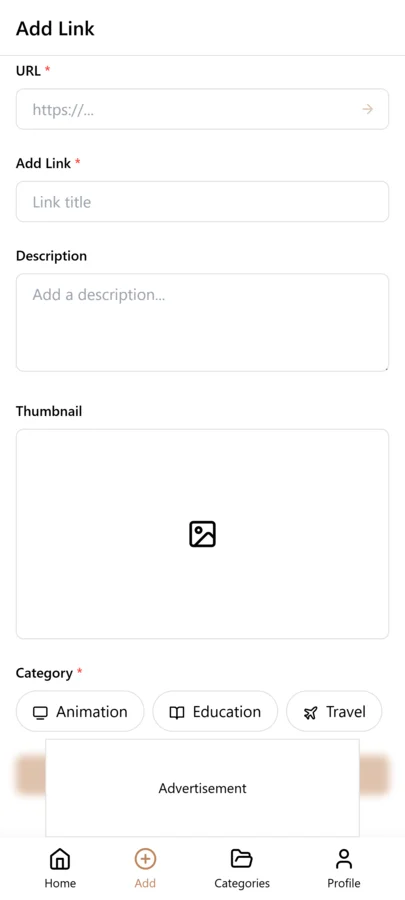
- Open LinkVault and tap the + (Add Link) button
- Paste the discussion URL into the link field
- Add notes with the problem or topic and the key takeaway: "Reddit thread on Redis vs Memcached for session storage — consensus: Redis for persistence and data structures, Memcached for pure speed and simplicity. Key insight: use Redis if you need session persistence across restarts"
- Tag by topic (caching, databases, deployment) and by platform (reddit, hackernews, forum) so you can filter by either dimension
- If the discussion solved a specific problem, tag it with the problem name so you can find it when you encounter the same problem again
- Save — your annotated discussion is now searchable, synced across devices, and ready to find instantly when you need it
Building a Personal Solution Library from Discussions
The true value of saving social discussions emerges when you build a connected library over time rather than treating each saved thread as a standalone item. When you save a Reddit thread about caching strategies in January, a Hacker News discussion about database scaling in March, and a forum post about CDN configuration in June, these are not three isolated bookmarks — they are complementary pieces of a performance engineering knowledge base. The caching thread gives you application-level strategies, the scaling discussion gives you database-level approaches, and the CDN post gives you edge-level optimization. Together, they form a comprehensive guide to performance that no single source provides.
The practice is to tag discussions by problem domain in addition to topic. If you are building web applications, tag relevant discussions with web-performance, web-security, or web-architecture. Over time, each domain tag accumulates a collection of discussions from different platforms, authors, and perspectives. When you encounter a problem in that domain, you filter by tag and see every discussion you have saved on related topics — a curated knowledge base built from the best community insights you encountered, organized around the exact problems you are trying to solve.
The compounding benefit is that your solution library becomes more valuable than any single source because it is curated for your specific needs. General-purpose resources like documentation and tutorials cover common cases, but social discussions cover the edge cases, the unusual configurations, and the real-world trade-offs that generic resources cannot. After a year of active capturing, your solution library might contain fifty discussions tagged web-performance covering caching strategies, database optimization, CDN configuration, image optimization, and lazy loading — each with your notes on the key insight and how it applies to your work. When a performance issue arises, you do not search the web and hope for good results — you search your own vault and find a year of accumulated community wisdom, ready to apply.
Preserving Discussions Before They Disappear
Social media content is ephemeral by nature. Reddit threads get archived after six months, meaning they become read-only and can be harder to find through search. Forum posts get pruned by moderators or lost when forums migrate platforms. Social platforms like Twitter and Threads allow authors to delete posts, which can remove entire discussion threads. Even when content survives, platform redesigns can break old URLs, making saved links useless. The solution is to capture the key information in your notes at the moment you save the discussion, so your vault retains value even if the original content disappears.
The practice is to write notes that are self-sufficient — they should contain enough information to be useful even if the original link breaks. Instead of just saving a link with the note "good caching discussion," write "Reddit r/webdev discussion on Redis vs Memcached: Redis preferred for session storage due to persistence and data structure support. Memcached better for pure caching due to speed and simplicity. User u/cache_expert shared production benchmark: Redis 12k ops/sec, Memcached 18k ops/sec for simple gets. Link to benchmark blog in comment." If the thread is later archived or deleted, your notes still contain the key insights, the benchmark numbers, and the context you need. You may lose the ability to revisit the full discussion, but you retain the knowledge that made it valuable in the first place.
For especially valuable discussions, consider noting the key commenters and their main points. If u/database_guru consistently provides excellent advice on database design, noting their username lets you search for their contributions across multiple saved threads. Over time, you build a mental map of which community members provide the most reliable, detailed, and practical advice, and you can prioritize saving their contributions when you encounter them in new discussions.
Tagging Social Discussions for Cross-Platform Retrieval
The key to retrieving social discussions across platforms is consistent tagging that goes beyond the platform name. Most people tag saved discussions with just the platform — twitter, reddit, discord — which tells you where the discussion happened but not what it was about. The result is that when you need a discussion about caching strategies, you cannot filter by topic because no topic tag was applied. The fix is to use two layers of tags: platform tags (twitter, reddit, discord, slack) and topic tags (caching, authentication, database-design, performance).
Topic tags are what make your solution library searchable by problem rather than by source. When you save a Reddit thread about Redis caching, tag it with both reddit and caching. When you save a Twitter thread about CDN configuration, tag it with both twitter and caching. Later, when you have a caching problem, you filter by the caching tag and see discussions from both platforms in one view — along with your notes on the key insight from each. This cross-platform retrieval is impossible on the original platforms, where your saves are siloed and unsearchable.
Over time, your topic tags become a personal taxonomy of the problems you encounter. You might accumulate twenty discussions tagged authentication across Twitter, Reddit, and Stack Overflow, each with notes on the specific approach discussed. When you need to design an auth system, you filter by the authentication tag and review your curated collection of community wisdom, organized around the exact problem you are solving.
Weekly Discussion Review Habit
Saved discussions accumulate quickly, and without regular review your vault becomes a graveyard of links you never revisit. A weekly review of fifteen minutes keeps your discussion library sharp and current. The review is not about reading every discussion — it is about curation, organization, and cleanup.
Start by filtering for discussions saved in the past week. Read your own notes on each one to refresh your memory of why you saved it. If a discussion turned out to be less valuable than you expected, delete it without hesitation — a lean library of high-quality discussions is more useful than a large library of mediocre ones. Next, review your topic tags for consistency. If you tagged one discussion caching and another cache-strategies, consolidate them into a single tag so both discussions appear in the same filtered view.
Monthly, do a deeper review. Look for discussions where the original link may have expired or been deleted — if the link is dead but your notes are self-sufficient, add a note like "original thread deleted — key points preserved in notes" so you know the link is no longer reliable but the information is retained. Retire topic tags that have not been used in months, and merge tags that have drifted into near-duplicates. This maintenance keeps your discussion library lean, searchable, and trustworthy.
Common Social Discussion Saving Mistakes
- Saving the social media link instead of the original source — Twitter and Reddit posts often link to articles or resources, and saving the post URL means you lose access if the post is deleted, so always save the original article URL alongside the social link
- No context notes — a bare link to a Reddit thread tells you nothing about why it was valuable six months later, so always write at least one sentence capturing the key insight before saving
- No topic tags — tagging only with the platform name means you can never filter by subject, which is the primary way you will search for discussions later
- Saving too many low-value discussions — not every thread that gets upvoted is worth keeping, so apply a quality filter and save only discussions that contain insights you cannot easily find elsewhere
- Not capturing screenshots of disappearing content — for Instagram stories, Snapchat, or ephemeral posts, screenshot the key content and save it as a text note with the key points, because the original will be gone within 24 hours
Sharing Valuable Discussions with Your Team or Network
When you curate high-quality social discussions, they become valuable not just to you but to your team and network. Instead of forwarding individual links in chat messages where they get lost, build curated discussion collections in LinkVault that you can share on demand.
The approach is to create topic-based collections using tags. If you have fifteen discussions tagged web-performance, you can export or share that filtered collection with your team when your company is working on a performance optimization project. Each entry comes with your notes explaining why the discussion was valuable, which gives your colleagues context without requiring them to read every full thread.
For recurring topics — like onboarding new developers, where you want to share community wisdom about common pitfalls — create a tag like onboarding-resources and save the best discussions you encounter. When a new team member joins, you share the filtered collection and they get a curated set of community insights that would take them months to discover on their own. This turns your personal curation work into a team asset that compounds in value over time.
Frequently Asked Questions
Can I save Twitter/X threads?
Yes. Copy the thread link from the share menu and save it in LinkVault with notes summarizing the key insight and tags for the topic. Because Twitter/X bookmarks are a single unsearchable list with no organization, saving threads into LinkVault with context notes makes them findable by keyword search and filterable by topic tag — something the platform itself cannot do. Be aware that Twitter/X threads can be deleted by the author, so always capture the key points in your notes at the moment you save, so your vault retains value even if the original thread is later removed.
What about Instagram carousel posts with tips?
Yes. Copy the post link and save it with notes about the key advice. Instagram saves are organized only by the visual grid with no search, no tags, and no notes, so finding a specific carousel you saved months ago requires scrolling through your entire collection visually. By saving the link into LinkVault with a text summary of the tips and topic tags, you can find it instantly by searching for any keyword from the advice, even if the post itself is later deleted or the algorithm stops surfacing it in your saves.
How do I find threads by topic later?
Use tags for topics and search by keyword or tag to filter threads. The advantage over platform saves is that LinkVault lets you combine tags and keyword search — you can filter to all threads tagged caching and then search within those for a specific term like Redis. This two-level retrieval is impossible on any social platform, where saves are either a single list or organized by vague collections. Over time, your tags become a personal taxonomy of the problems you care about, and finding any saved discussion takes seconds instead of the minutes or hours it takes to re-find content on the original platform.
How is this different from just using Reddit saves or browser bookmarks?
Reddit saves are a single unsearchable list with no categories, tags, or notes — finding a specific saved thread requires scrolling through everything. Browser bookmarks mix social discussions with every other bookmark you have and offer no way to add context notes. LinkVault gives you categories to organize by topic, tags to filter by problem domain and platform, notes to capture why each discussion was valuable, and search that works across all your saved content. The difference is retrieval: when you need a solution, you search and find it in seconds instead of scrolling for hours or re-searching the web and hoping to find the same thread again.
How do I avoid saving too many discussions and cluttering my vault?
Develop judgment about which discussions are worth saving by asking: Will I need this knowledge again? Is this insight available elsewhere in an easier-to-find format? Does this discussion contain information I cannot easily reproduce? Save discussions that solve specific problems you are likely to encounter again, provide real-world experience not found in documentation, or compare tools and approaches in ways that help you make decisions. Skip discussions that are time-sensitive news, opinion pieces without actionable insights, or content that is easily found through a simple web search. Quality over quantity keeps your vault useful.
Can I use this system for Discord and Slack discussions?
Yes. Most Discord and Slack servers allow you to copy message links for specific messages. Copy the link to a valuable message or thread and save it in LinkVault with notes summarizing the key insight. Be aware that Discord and Slack message links only work for members of the same server, and content can be deleted by server admins. This makes self-sufficient notes even more important — capture the key information in your notes at the moment you save, because the original message may not be accessible later. Tag by server name so you can filter to discussions from specific communities.
How do I save discussions from platforms that do not have a share sheet or export option?
When a platform does not offer a share link, screenshot the key content and save it as a text note in LinkVault with the key points typed out. Include the platform name, the date, and the username of the person who posted the valuable content. This way the knowledge is preserved in your vault even though you cannot link directly to the original. Tag it with the platform name and topic so it is findable alongside your other saved discussions from that platform.