How to Save Telegram Links (2026 Guide)
Written by LinkVault Team
Telegram channels have become one of the richest sources of curated links on the internet. From developer tools and design inspiration to research papers and product launches, channel admins constantly surface resources worth keeping. The problem is that Telegram native history scrolls endlessly, search is limited, and valuable links disappear into a stream of conversation. LinkVault gives you a structured way to extract those links, preserve their context, and build a searchable library that lasts far longer than any channel feed. In this guide, you will learn how to save Telegram links into LinkVault step by step — complete with source notes, topic categorization, and tagging strategies that make everything retrievable later.
Why Telegram Channels Need a Dedicated Saving Workflow
Unlike browser bookmarks or RSS feeds, Telegram links arrive buried inside messages alongside commentary, reactions, and replies. When you find a useful resource in a channel, the link itself is only half the value — the other half is knowing who shared it, which channel it came from, and what the original poster said about it. A simple copy-paste into your browser bookmark bar strips away all of that context. LinkVault solves this by letting you capture both the link and its surrounding metadata in one organized record.
Consider what happened to a developer I know who followed a frontend tools channel. An admin posted a link to a CSS grid debugging extension with a note saying it was the best one they had tried and that it worked with Tailwind out of the box. Three weeks later, that developer needed the extension for a project. He opened Telegram, scrolled for twenty minutes through hundreds of messages about unrelated topics, and never found the original post. The channel had moved on to new tools, and the message was buried so deep that Telegram search could not surface it either. Had he saved it to LinkVault with a source note mentioning the channel and the Tailwind compatibility detail, retrieval would have taken five seconds. That is the gap between a link sitting in a chat feed and a link living in a structured library.
Step-by-Step: Extracting and Saving Telegram Links
Follow these numbered steps to move a resource link from any Telegram channel into your LinkVault library with full context attached.
- Open the Telegram channel containing the resource you want to save and locate the specific message with the link.
- Right-click or long-press the message and select Copy Link, or highlight and copy the URL directly from the message text.
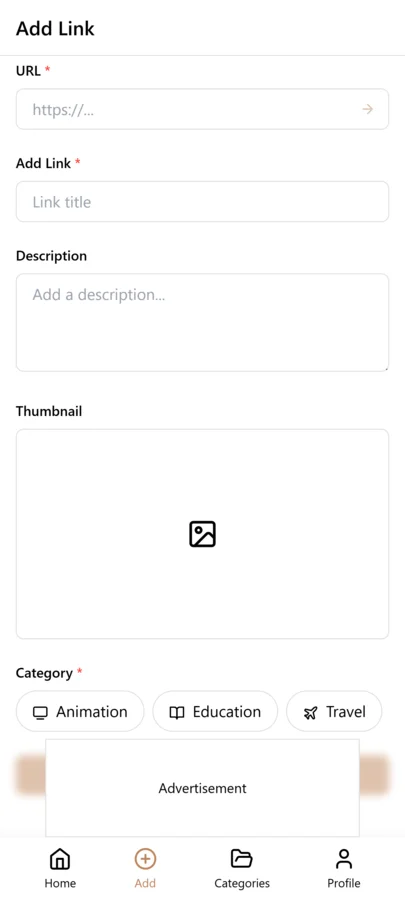
- Launch LinkVault and click the Add Link button to open the save dialog.
- Paste the copied URL into the link field. linkvault will automatically fetch the page title, favicon, and a short description preview.
- Review the auto-filled metadata and edit the title if the original page heading is vague or unclear.
- Add a source note describing which Telegram channel shared the link and who posted it.
- Assign one or more topic tags that reflect the link subject matter, such as ui-design, typography, or color-theory.
- Click Save to store the bookmark in your LinkVault library, where it becomes instantly searchable.
Adding Source Notes That Preserve Channel Context
The source note is what separates a LinkVault entry from a random bookmark. When you save a Telegram link, take a few seconds to record where it came from. Include the channel name or handle, the username of the person who posted it, and a brief snippet of why they recommended it. This practice turns LinkVault into a research journal rather than a dumping ground. Weeks later, when you need to recall why you saved a particular tool, the source note answers that question immediately — without forcing you to scroll back through hundreds of Telegram messages.
The difference is stark when you compare two entries side by side. Without a source note, you see a URL and an auto-generated title like "CSS Grid Debugger — GitHub" — useful, but you have no memory of why it mattered. With a source note, the same entry reads: "Shared by @frontendnews in Frontend Daily — recommended for Tailwind projects, works without config." Now you know not just what the tool is but why you trusted it, who vouched for it, and what context made it relevant to your work. That is the difference between a bookmark you act on and a bookmark you scroll past.
Categorizing Links by Topic for Fast Retrieval
Tagging by topic is what makes your saved Telegram content genuinely searchable. Apply a consistent tagging convention across every link you import so that filtering returns reliable results.
- Use broad category tags for high-level grouping — for example, development, marketing, or research.
- Add specific sub-topic tags that describe the exact subject, such as react-hooks, cold-email, or climate-data.
- Create a telegram tag on every link sourced from a channel so you can isolate Telegram-originated bookmarks in one click.
- Avoid duplicate or overlapping tags by reviewing your existing tag list before creating new ones in linkvault.
Managing Links Across Multiple Telegram Channels
If you follow several Telegram channels, you quickly run into a new challenge: the same resource may surface in multiple channels, and different channels often cover overlapping topics with different perspectives. Without a strategy, your linkvault can fill with duplicate entries and you lose the ability to trace which channel recommended what.
The approach that works is to make the channel identity part of your tagging system. Alongside your topic tags, add a channel tag for each source — for example, frontend-daily, devtools-weekly, or design-inspiration. When you save a link, apply both the topic tag and the channel tag. This lets you answer two distinct questions instantly: "What design resources have I saved?" (filter by the design tag) and "What did Frontend Daily recommend last month?" (filter by the frontend-daily tag). You can also spot duplicates easily — if you search for a URL and see two entries with different channel tags, you know the same resource was shared in two places, and you can merge or delete the redundant one.
Cross-referencing across channels also reveals patterns. You may notice that one channel consistently surfaces tools you end up using, while another posts frequently but rarely delivers something worth saving. Over time, this data helps you decide which channels to keep following and which to mute, making your Telegram consumption more intentional rather than passive.
Handling Deleted Channels and Expired Forwarding Links
Telegram t.me links are not as permanent as they seem. Channels get deleted by their owners, accounts get banned, and forwarding links can expire or break when messages are removed. If your only record of a valuable resource is a Telegram link, you are depending on that channel continuing to exist — and many do not.
This is where your LinkVault source note becomes an insurance policy. If the channel disappears, the link in your entry may stop working, but your note still tells you what the resource was, who shared it, and why it mattered. For especially critical resources, take the extra step of pasting the key content directly into the note field. If a channel posts a configuration snippet, a product comparison, or a step-by-step tutorial, copy that text into your LinkVault note before you close Telegram. This way, even if the channel vanishes overnight, you retain the actual information — not just a dead link.
A practical habit is to treat any Telegram-sourced link as potentially ephemeral. When you save it, ask yourself: if this channel disappeared tomorrow, would I still have what I need? If the answer is no, paste the critical content into the note. If the answer is yes, the source note alone is sufficient. This mindset shift — from trusting Telegram to preserve information to trusting your own library — is what makes your linkvault a durable archive rather than a collection of fragile pointers.
Building a Searchable Library From Telegram Content
Over time, your LinkVault library becomes a permanent archive of the best resources shared across every Telegram channel you follow.
| Feature | Telegram Only | LinkVault Workflow |
|---|---|---|
| Link storage | Buried in chat history | Stored as individual searchable bookmarks |
| Source attribution | Requires manual scrolling | Captured in a dedicated source note field |
| Topic filtering | Not available | Instant filtering by topic tags |
| Cross-channel search | Channel-by-channel only | Unified search across all saved links |
| Long-term retention | Lost if channel is deleted | Permanently preserved in your library |
Building a Weekly Telegram Link Review Routine
Saving links from Telegram channels is only the first half of the workflow. The second half, which most people skip, is going back and actually using what you saved. Without a review routine, your LinkVault library becomes a digital attic — full of things you once thought were important but never look at again. A weekly review takes fifteen minutes and transforms your library from a passive archive into an active working tool. Pick a consistent time, such as Sunday evening or Monday morning, and open LinkVault filtered to your telegram tag. Scroll through the links you saved in the past week and ask yourself three questions for each one: Is this still relevant? Did I act on it? Does it need different tags or a better note?
For links that are still relevant but not yet acted on, add a to-do tag or move them to a more specific category so they surface in the right context later. For links you have already used, consider whether the note needs updating with what you learned. For links that no longer seem relevant, delete them without guilt — a curated library is more valuable than a bloated one. The weekly review also gives you a chance to spot patterns in your saving behavior. If you saved fifteen design links but only one development link, that tells you something about where your attention went this week. If a particular channel contributed ten of your saved links, that channel is earning its place in your feed. Over time, this data helps you prune channels that produce noise and double down on the ones that consistently deliver value. The review itself becomes a feedback loop that makes both your Telegram consumption and your LinkVault library smarter.
Sharing Telegram Resources with Teammates and Collaborators
One of the most overlooked benefits of saving Telegram links to LinkVault is how easily you can share curated resources with a team. Telegram itself is not a great collaboration tool for links — you can forward messages, but the recipient gets the commentary without your tags, notes, or organizational context. When you save links to LinkVault instead, you build a structured library that can be shared selectively and professionally. If your team uses a shared LinkVault workspace, every Telegram link you save with project tags is instantly available to your colleagues. They can search by the same tags, read your source notes, and benefit from the context you captured without you having to forward anything.
For teams that are not on a shared workspace, you can still share curated link lists. Filter your LinkVault library by a specific project tag, export the results, and send the list to your collaborators via email, Slack, or even back through Telegram. The export carries your notes and tags, which gives your teammates far more context than a raw URL ever would. This is especially useful for research teams, design collectives, and developer groups where multiple people follow different Telegram channels and each person acts as a scout for the rest of the team. Rather than everyone following every channel and drowning in duplicates, each person follows a few channels, saves the best links to LinkVault, and the team benefits from a curated union of everyone's findings. This division of labor is what turns Telegram from an individual firehose into a team intelligence system.
Avoiding Common Mistakes When Saving Telegram Links
Telegram channels move fast and the volume of links can be overwhelming, which makes it easy to fall into habits that undermine the long-term usefulness of your LinkVault library. The mistakes below are the ones that most frequently erode the quality of a Telegram-sourced link collection, and each one has a straightforward fix that takes only a few extra seconds per link. The goal is to catch these patterns early, before your library fills with entries that are unsearchable, untraceable, or duplicative. None of these mistakes are catastrophic on their own, but compounded over weeks and months they turn a promising library into an unstructured pile that is barely more useful than scrolling through Telegram itself. Review this list periodically as a self-audit, especially if you have been saving links in a hurry or after a long absence from your review routine.
- Skipping the source note: A link saved without identifying the channel and poster is nearly impossible to trace later. Always record at minimum the channel name and a one-line reason for saving.
- Forgetting the telegram tag: Without a telegram tag, your channel-sourced links blend into the rest of your library and you lose the ability to filter by origin. Apply the telegram tag to every link that comes from a channel.
- Saving links without verifying them: Some Telegram posts share preview links that redirect or expire. Click through to the actual destination before saving so the URL in LinkVault points to the real page.
- Not checking for duplicates across channels: If you follow multiple channels covering similar topics, the same resource will appear more than once. Search LinkVault for the URL before saving a new entry to avoid clutter.
- Letting links pile up without review: A library that is never reviewed is a library that is never used. Schedule a weekly review and prune links that turned out to be irrelevant so your active collection stays sharp.
Frequently Asked Questions
Can I save links from private Telegram channels in LinkVault?
Yes. As long as you are a member of the channel and can view the message, you can copy the link and paste it into LinkVault. The source note field lets you record the channel name even if it is private.
Does LinkVault import multiple Telegram links at once?
Currently each link is saved individually through the quick-save dialog, which ensures you capture accurate source notes and tags for every resource. Bulk import from Telegram message exports is on the LinkVault roadmap.
How do I find links I saved from a specific Telegram channel?
Use the search bar in linkvault and filter by your telegram tag, or enter the channel name in the source field to surface every bookmark that originated from that channel.
Can I save Telegram bot links and inline bot results?
Yes. If a bot generates a link you want to keep — for example, a file conversion bot that produces a download URL, or an inline bot that surfaces a search result — copy the resulting URL and save it to LinkVault like any other link. In the source note, mention the bot name and the command you used to generate the link, so you can reproduce the result later if the link expires.
How do I separate work channels from personal interest channels in my library?
Use category separation in LinkVault. Create a Work category for links sourced from professional channels like developer tools or industry news, and a Personal category for links from hobby, entertainment, or lifestyle channels. Combine this with channel-specific tags so you can filter within each category by source. This keeps your professional resource library clean and focused while still preserving the personal links you want to revisit.
How often should I review the Telegram links I have saved to LinkVault?
A weekly review is the sweet spot for most people. Spend fifteen minutes every Sunday evening or Monday morning filtering your library by the telegram tag and checking the links you saved in the past week. Delete irrelevant ones, update notes on links you have used, and re-tag anything that needs better categorization. If a weekly cadence feels too frequent, do it at minimum twice a month. Going longer than that risks letting your library grow stale and disorganized, which makes future reviews more painful and less effective.
What is the best way to share Telegram-sourced links with a team that does not use LinkVault?
Filter your LinkVault library by the relevant project or topic tag, export the filtered list, and send it to your team via whatever channel they already use — email, Slack, or even a Telegram group chat. The export includes your notes and tags, which gives your teammates far more context than forwarding raw messages. If your team starts seeing the value of the curated lists you share, that is a natural on-ramp to getting them onto a shared LinkVault workspace where the curation happens automatically.