How to Save Twitter (X) Links: Solving the Bookmark Mess
Written by LinkVault Team
If you have ever scrolled past a brilliant Twitter thread, tapped the bookmark icon, and then spent twenty minutes trying to find it a week later, you are not alone. Twitter bookmarks were meant to solve link overload, but for most people they create a second kind of chaos: a flat, unsearchable pile of saves that grows faster than you can manage it. This guide breaks down exactly why saving Twitter (X) links is harder than it should be — and how LinkVault turns that mess into an organized, searchable library you will actually use.
The Problem: Twitter Bookmarks Are Unsearchable
Twitter's built-in bookmark feature is the first place most people turn when they want to hold onto a tweet. The problem is deceptively simple: you cannot search your bookmarks. Type a keyword into the search bar and Twitter searches the entire platform, not your saved items. If you bookmarked a thread about React performance optimization three months ago, the only way to find it again is to scroll manually through every bookmark you have saved since then. For active users, that list can run into the thousands. The result is a collection that technically exists but is practically unusable.
Liking a Tweet Is Not Saving It
Many people use the like button as a makeshift bookmark. It feels quick and natural — tap the heart and move on. But likes were never designed as a save tool. They are public, which means everyone can see what you have liked, and they are buried in a profile tab that is just as unsearchable as bookmarks. Worse, unliking a tweet removes it from your list entirely. Likes are a reaction, not a filing system, and treating them like one is a recipe for lost links.
Threads Disappear Into the Void
Twitter threads are some of the most valuable content on the platform — deep dives, step-by-step tutorials, breaking analysis. But threads are also the hardest content to save and revisit. When you bookmark a thread, you are bookmarking a single tweet, not the full thread. To read the whole thing again you have to click through, and if the author deletes a tweet, goes private, or the thread gets buried under newer posts, pieces of it can vanish without warning. There is no way to capture the complete thread, preserve it, and trust that it will be there when you need it.
No Notes Means No Context
Here is a scenario every heavy bookmarker knows: you save a link, come back to it weeks later, and have no idea why. The tweet is still there, but the reason you thought it mattered is gone. Twitter bookmarks give you no space to add a note, a reminder, or a reason for saving. You are left to reconstruct your own thinking from a bare link, and more often than not you simply close the tab and move on. Without context, a saved link loses most of its value.
No Way to Organize by Topic
Twitter does not let you group bookmarks into folders, collections, or tags. Every saved link sits in one undifferentiated stream, whether it is a coding tutorial, a recipe, a marketing tip, or a meme you found funny at 2 a.m. There is no way to filter by topic, no way to separate work saves from personal ones, and no way to create a focused reading list for a specific project. For anyone who saves more than a handful of links, this lack of organization turns a useful habit into a digital junk drawer.
The Solution: Save Twitter Links with LinkVault
LinkVault was built to solve exactly these problems. Instead of a flat, unsearchable pile, LinkVault gives you a structured library where every saved Twitter link is searchable, taggable, and annotated with the context that makes it useful.
- Open LinkVault in your browser. The linkvault web app works on any device with no installation required.
- Open the tweet or thread you want to save. Tap Share and copy the link.
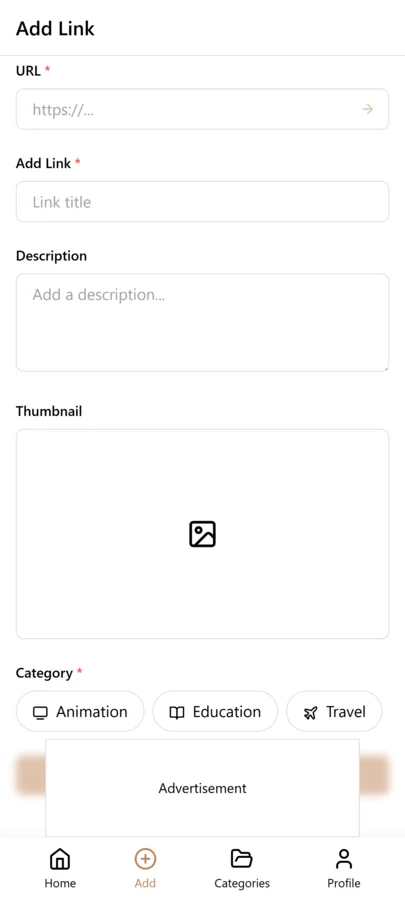
- In LinkVault, click the Add Link button and paste the tweet URL. The title and preview are captured automatically.
- Add a short note explaining why you saved it. A single sentence like "Great thread on React state management" makes the link useful weeks later.
- Tag the link with relevant topics. Use tags like react, frontend, or marketing so you can filter your library in seconds.
- Search anytime. Type a keyword, tag, or phrase from your note into the LinkVault search bar and matching links appear instantly.
Twitter Bookmarks vs LinkVault
Side by side, the difference is clear. Twitter bookmarks give you a private but unstructured pile; LinkVault gives you a private, structured, and searchable library.
| Feature | Twitter Bookmarks | LinkVault |
|---|---|---|
| Search saved links | No | Yes — full-text search across notes and tags |
| Add notes to saves | No | Yes — annotate every link with context |
| Organize by topic | No folders or tags | Tags and collections |
| Capture full threads | Single tweet only | Full thread link with preview |
| Private by default | Bookmarks are private | Your library, fully private |
Saving Twitter Spaces, Videos, and Media Before They Vanish
Twitter is not just text. Spaces, video clips, GIFs, and image threads carry information that text bookmarks cannot preserve. Twitter Spaces, the platform's live audio feature, disappears the moment a session ends unless the host enables recording. Even recorded Spaces can be deleted by the host at any time, taking hours of valuable discussion with them. Video tweets face similar risks: creators delete them, accounts get suspended, and media hosting expires. When you rely on a bookmark alone, you are trusting that the media will still be there when you return — and with Twitter's fast-moving content lifecycle, that trust is often misplaced. The practical approach is to save the link in LinkVault the moment you encounter valuable media, then use the notes field to capture a written summary of what the Space or video covered. For a recorded Space about startup fundraising, note the key timestamps and the main points each speaker made. For an instructional video tweet, write down the steps or the technique being demonstrated so you have the substance even if the media file is later removed. This dual-layer approach — link plus written summary — turns LinkVault into a preservation tool, not just a bookmarking tool. You are not just saving a pointer to content; you are saving the knowledge that content carried, which is what you actually needed in the first place.
Common Mistakes When Saving Twitter Links
Even with the right tool, certain habits undermine your ability to build a useful Twitter link library. These are the mistakes that turn a well-intentioned saving system into another disorganized pile. The first and most damaging is saving without context: you tap save, skip the note field, and weeks later you are staring at a link with no memory of why it mattered. The second is inconsistent tagging — using react one day and reactjs the next creates fragmented tag groups that defeat the purpose of filtering. The third is treating a single tweet bookmark as a full thread, which means you lose everything after the first post if the thread gets deleted. The fourth is procrastinating on organization, letting an untagged inbox pile grow until it becomes just as unmanageable as Twitter's native bookmarks. The fifth is neglecting maintenance: dead links accumulate over time as accounts go private and tweets get deleted, and without periodic cleanup your library fills with broken pointers. Recognizing these patterns is the first step to avoiding them.
- Saving without a note: The most common mistake. You save a link, skip the note field, and weeks later have no idea why it mattered. Always write at least one sentence explaining the value before you close the tab.
- Inconsistent tagging: Using react one day and reactjs the next creates duplicate tags that fragment your library. Pick a tag vocabulary early and stick to it — LinkVault suggests existing tags to help you stay consistent.
- Saving entire threads as a single tweet: When you bookmark the first tweet of a thread, you only capture that one post. Note in LinkVault that the link is a thread, and summarize the key points from the full thread in your note so you have the complete picture.
- Waiting to organize later: The inbox-then-file approach works, but only if you actually file your links. Letting links pile up untagged in your inbox recreates the exact problem LinkVault is meant to solve.
- Ignoring dead links: Over time, some saved tweets will be deleted or accounts will go private. Periodically review your library, update notes with any preserved information, and remove links that no longer load and carry no useful note.
Building a Personal Knowledge Base From Twitter Threads
Twitter threads are uniquely suited to knowledge building because they force authors to structure their thinking into a narrative. A well-written thread on machine learning fundamentals, startup hiring, or personal finance is essentially a mini-essay — and mini-essays are exactly the kind of content worth preserving in a personal knowledge base. The challenge is that threads are scattered across thousands of authors, posted at unpredictable times, and impossible to find again once they fall off your timeline. LinkVault solves the collection problem, but the real value comes from how you use what you collect. Start by creating a collection for each domain you care about — machine-learning, startup-ops, personal-finance — and save every valuable thread you encounter into the matching collection with a descriptive note. Over time, you build a curated reading list that reflects your own interests rather than whatever the algorithm decides to surface. The next step is synthesis. When you have saved ten or fifteen threads on a topic, read through them together. You will notice patterns, contradictions, and gaps that no single thread covers. Write those observations as a note on one of the saved links, or create a new link entry that references the others. This transforms your LinkVault library from a collection of saved links into an active thinking tool — a place where you do not just store knowledge but develop it. The threads become raw material for your own understanding, and the library becomes a reflection of what you have learned, not just what you have seen.
Frequently Asked Questions
Can LinkVault save an entire Twitter thread?
Yes. When you save a thread in LinkVault, the link and preview are captured so you can revisit the full thread without hunting for individual tweets. If a tweet in the thread is later deleted, your saved note and link still give you the context you need.
Is my LinkVault library private?
Yes. Everything you save in linkvault is private to your account. Unlike Twitter likes, which are visible on your profile, your LinkVault saves are never exposed publicly.
Do I need a browser extension to use LinkVault?
No. You can paste a link directly into the linkvault web app. The title and preview are captured automatically. No installation is required.
Can I import my existing Twitter bookmarks?
Yes. LinkVault supports bulk import so you can move your existing bookmarks into a searchable, taggable library and finally make them useful instead of letting them sit forgotten.
What happens if a tweet I saved gets deleted?
If the original tweet is deleted, the link in LinkVault will no longer load the content. However, your saved note, tags, and any summary you wrote remain fully intact. This is exactly why adding a descriptive note at the time of saving is so important — the note preserves the key information even when the original tweet disappears. For especially valuable threads, paste the core points directly into the note field so you have a permanent record regardless of what happens to the original post.
Can I save Twitter links from my phone?
Yes. LinkVault works in any mobile browser, and on iOS and Android you can use the native share sheet to send a tweet link directly to LinkVault without leaving the Twitter app. Tap the share icon on the tweet, select LinkVault from the share menu, and the link is captured instantly with its title and preview. You can add tags and notes right from the share extension or file the link later from your inbox.