How to Save WhatsApp Links: Solving Link Decay in Chats
Written by LinkVault Team
We have all been there. A friend drops a must-read article in a WhatsApp group at 9 PM. You bookmark it mentally, promising to open it in the morning. By morning, forty-seven new messages have buried it completely. You scroll, give up, and ask the group to resend it. Nobody does.
This is link decay — the gradual loss of shared links as conversations move forward — and WhatsApp is arguably its worst offender. The app was built for real-time messaging, not archival reference. LinkVault exists to bridge that gap, giving every WhatsApp link a permanent, searchable home before the chat swallows it.
The WhatsApp Link Decay Problem
WhatsApp processes over 100 billion messages daily, and a meaningful fraction contain links. Yet the platform offers almost no link management tooling. There is no dedicated links folder, no link-specific search filter, and no way to separate a URL from its surrounding message. When you search a keyword, WhatsApp returns every message containing that word, not just the ones with links.
Link decay happens in stages. First, the link scrolls out of view. Then the group quiets and eventually archives. Weeks later, you vaguely recall someone shared something useful, but the trail is cold.
Why Links Disappear in WhatsApp Chats
Several structural factors make WhatsApp link decay so common across both personal and group conversations:
- Endless scrolling: Active groups generate hundreds of messages daily, burying shared links within hours of posting.
- Group archiving: Inactive groups automatically archive, hiding their content from your main chat list and memory.
- No link-specific search: WhatsApp search returns all matching messages, not just those containing URLs.
- Forwarded context loss: When a link is forwarded, the original sender and surrounding conversation often disappear.
- Media compression: Links inside images or status updates can degrade or expire, leaving nothing to click.
Capturing WhatsApp Links in LinkVault
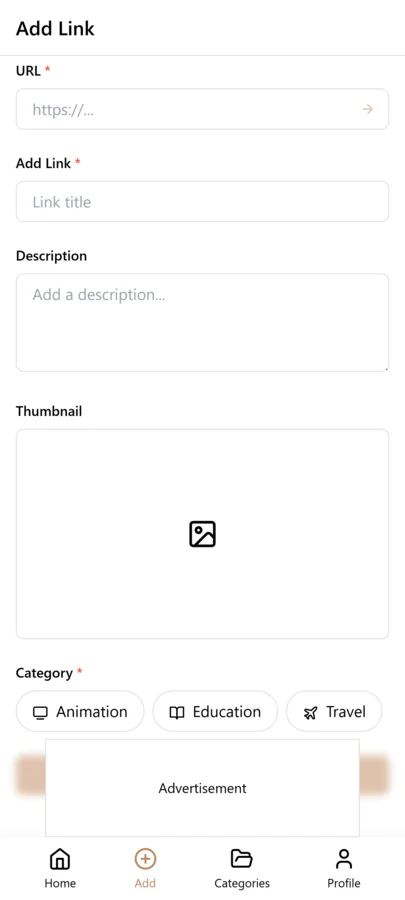
Before a link scrolls out of view, act immediately. The screenshot below shows how a shared WhatsApp link can be captured into LinkVault with its full context intact.
How LinkVault Solves WhatsApp Link Decay
LinkVault reclaims your shared links by giving them a dedicated, organized home outside the chat. Instead of relying on WhatsApp message stream, you save each link to linkvault with metadata that makes it findable forever.
When you save a WhatsApp link to LinkVault, attach a note describing who shared it and why. A travel link from your cousin can be tagged travel and labeled with its group. A work document from a Monday standup can be tagged project-alpha with a note like from Priya, Q2 roadmap draft. Months later, searching Priya roadmap or filtering by project-alpha returns it instantly.
Save WhatsApp Links to LinkVault in Five Steps
The saving process takes only a few seconds per link and ensures every bookmark carries the context you need to find it later:
- Open the WhatsApp chat containing the link you want to preserve.
- Long-press the message with the link, tap share, and select LinkVault, or copy the link into the linkvault app.
- Add a note capturing who shared it and the context, such as from the family cooking group, pressure-cooker ribs recipe.
- Assign tags such as recipes, family, or the WhatsApp group name it came from.
- Tap save. The link now lives permanently in LinkVault, searchable by keyword, tag, note, or date.
Organize by Group, Topic, or Sender
Tagging is where linkvault turns a flat list of bookmarks into a navigable library. Create tags that mirror your WhatsApp groups — bookclub, startup-pitch, school-parents — so every link carries its origin alongside the note you wrote when saving it. Add topic tags that cut across groups, like productivity or gift-ideas, and you can surface every relevant link regardless of which chat it came from. Over time, LinkVault becomes a personal knowledge base built from the conversations that matter most to you.
Manual Chat Scrolling vs LinkVault
The difference between relying on WhatsApp alone and using LinkVault becomes obvious once you compare the two approaches side by side:
| Approach | Time to Find a Link | Context Preserved | Searchability |
|---|---|---|---|
| Manual scrolling | 10+ minutes, often unsuccessful | Original message only | Keyword search across all messages |
| Starred messages | Faster, but unorganized | Original message only | No tags or notes supported |
| LinkVault | Seconds, with tags and notes | Sender, group, topic, and your notes | Full-text, tag, and metadata search |
Saving Links from WhatsApp Web and Desktop
WhatsApp Web and the desktop apps offer a significant advantage over the mobile app when it comes to saving links: you have a full keyboard, a larger screen, and the ability to switch between your browser and LinkVault without fumbling with a phone. When you are working at your computer and a link arrives in a WhatsApp chat, open WhatsApp Web or the desktop app, click on the message containing the link, and copy the URL directly from the text. Then switch to LinkVault in your browser, paste the link, add your note and tags, and save. The whole process takes under ten seconds and is noticeably faster than the mobile workflow because you avoid the share-sheet step entirely.
The desktop workflow also makes batch saving practical. If you have been away from WhatsApp for a few days and return to find several useful links scattered across different chats, you can work through them methodically on the big screen. Open each chat, copy each link, and save them to LinkVault one after another. This is much harder to do on a phone where switching between apps is slower and more error-prone. Another advantage is that WhatsApp Web lets you use your browser find function to locate links within long chats, which is faster than scrolling on mobile. For anyone who receives a significant volume of links through WhatsApp, making the web or desktop app part of your regular workflow will dramatically reduce the number of links you lose to chat scroll.
Building a WhatsApp Group Taxonomy in LinkVault
Most WhatsApp users belong to a mix of group chats: family, work teams, hobby clubs, school parent groups, neighborhood chats, and social circles. Each of these groups generates a different kind of link, and without a tagging system that reflects that structure, your LinkVault library becomes a flat list that is hard to navigate. The solution is to build a group taxonomy — a consistent set of tags that mirrors your WhatsApp group landscape. Start by listing every active WhatsApp group you participate in and assigning each one a short, recognizable tag. Use the group name or a logical abbreviation: bookclub, family-chat, work-eng, school-parents, soccer-team. Apply the corresponding group tag to every link you save from that chat.
Once your group tags are in place, layer on topic tags that cut across groups. A recipe link from the family chat gets both the family-chat tag and a recipes tag. A project document from the work group gets work-eng and a project-specific tag like proj-q3-launch. This dual-tagging system lets you answer two different kinds of questions: what links came from a specific group, and what links relate to a specific topic regardless of origin. Over time, you will also discover which groups are your most valuable link sources. If the bookclub tag has forty saved links and you reference them regularly, that group is earning its place in your attention. If another group has produced only two links you actually saved in six months, you might consider muting it or leaving. Your LinkVault taxonomy becomes not just an organizational tool but a feedback mechanism for your group membership decisions.
Common WhatsApp Link Saving Mistakes and How to Fix Them
Even with a solid saving workflow, certain mistakes crop up repeatedly and undermine the usefulness of your LinkVault library. Recognizing these patterns early helps you correct them before they become entrenched habits that are difficult to undo. The list below covers the most frequent mistakes people make when saving WhatsApp links and the specific adjustments that fix each one. If you notice any of these creeping into your own workflow, do not worry — they are common and every one of them has a simple fix. The goal is not perfection but consistency over time, so that your library stays reliable and searchable no matter how many links you accumulate. Start by identifying which mistake you are most prone to, correct that one first, and then address the others as you encounter them. Within a few weeks of conscious effort, the corrected workflow becomes second nature and your library reflects the care you put into it. The most important thing is to keep saving links even if your tagging is imperfect — a saved link with a mediocre note is still infinitely more useful than a link that scrolled away and is gone forever.
- Saving links without any note: A URL alone rarely tells you why it mattered weeks later. Always add at least a brief note identifying the sender and the context before you tap save.
- Using inconsistent tags across similar links: If you tag some recipe links as recipes and others as cooking or food, filtering becomes unreliable. Pick one convention per topic and stick with it across every link you save.
- Waiting too long to save: The longer you wait after seeing a link in a chat, the more likely the chat will scroll and you will lose track of the message. Save links immediately or at worst during a same-day review.
- Ignoring group tags: Saving links without the group tag means you lose the ability to filter by source. Even if a link seems self-explanatory, add the group tag so it fits into your taxonomy.
- Saving every link indiscriminately: Not every link in a chat is worth keeping. Be selective and save only links you genuinely expect to revisit, otherwise your library fills with clutter that makes useful links harder to find.
Frequently Asked Questions
Can LinkVault automatically capture links from WhatsApp?
No. For privacy and platform limitations, LinkVault does not read your WhatsApp messages directly. You save links manually by sharing or copying them into the linkvault app, which takes seconds per link and keeps you in full control.
What happens if the original WhatsApp chat gets archived or deleted?
Nothing changes in LinkVault. Once a link is saved, it lives in your linkvault library independently of the source chat. You can still search, tag, and open it long after the original conversation has been archived or deleted.
Does LinkVault store the actual content of the linked page?
LinkVault saves the URL along with your notes and tags. It can also capture a snapshot of the page title and description so you have context even if the original site changes or the link eventually breaks over time.
Is it faster to save WhatsApp links on mobile or on desktop?
Desktop is generally faster because you can use a full keyboard, switch between WhatsApp Web or the desktop app and LinkVault in your browser without the friction of mobile app-switching, and copy-paste links directly. On mobile, the share sheet adds a step, and typing notes is slower. However, mobile is better for capturing links on the go when you are not at a computer. The best approach is to capture immediately on whichever device you are using, then refine notes and tags later on desktop if needed.
How do I handle links that appear in WhatsApp status updates?
WhatsApp status links are temporary by design — they disappear after 24 hours, so you need to act quickly. If you see a useful link in a contact status, tap it to open the content, copy the URL from the browser, and save it to LinkVault with a note identifying the contact who posted it. Do not rely on going back to the status later, because it will be gone. Treat status links as strictly time-sensitive and save them the moment you encounter them.
What should I do about duplicate links saved from different WhatsApp groups?
Duplicates are common when you belong to multiple groups where the same link gets shared. When you notice a duplicate in LinkVault, keep the entry with the better note and tags, and delete the other. Alternatively, merge the context by copying any unique information from the duplicate note into the primary entry before removing it. Going forward, do a quick search in LinkVault before saving a link from a new group — if it already exists, you save yourself the cleanup later.