How to Save YouTube Playlists & Tutorials (2026)
Written by LinkVault Team
YouTube is an incredible learning resource, but playlists and tutorials have a habit of disappearing. Creators delete videos, channels get taken down, and algorithm changes bury the content you once found easily. If you have ever gone back to find a tutorial only to discover it is gone, you know the frustration. LinkVault gives you a reliable way to save and organize YouTube playlists so the knowledge you depend on stays accessible. Here are ten types of video content worth keeping in your linkvault.
Why Save YouTube Playlists?
YouTube hosts millions of educational playlists, but the platform was not built for long-term bookmarking. Watch Later fills up fast, and there is no way to add custom tags or notes to saved videos. The playlist you relied on last month might be gone tomorrow — creators delete videos, channels get taken down for copyright strikes, and algorithm changes bury older content so deep that even the search bar cannot find it. I once lost an entire Flask tutorial series because the creator reorganized their channel and unlisted half the videos. The link still existed, but the content behind it had vanished. By storing your favorite playlists in LinkVault, you create a permanent, searchable archive that you control. You can add tags, group related playlists into collections, and write notes about why each playlist matters. This turns a scattered YouTube history into a structured reference library that survives even when the original content does not.
How to Save a YouTube Playlist in LinkVault
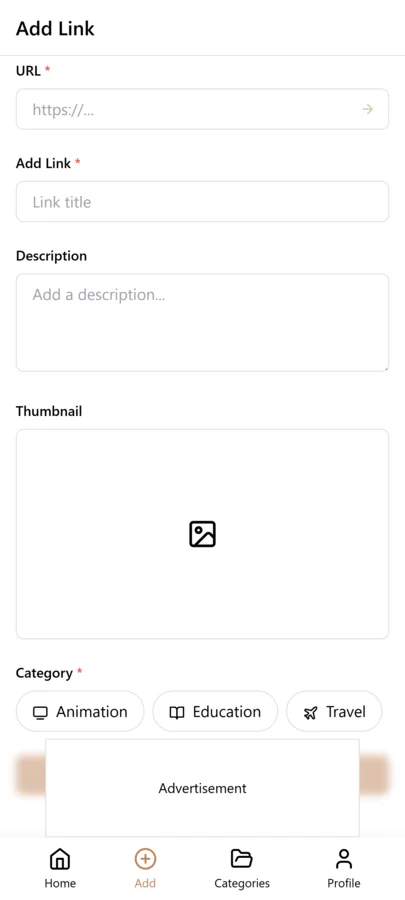
Saving a YouTube playlist in LinkVault takes just a few seconds. Follow these steps to add any playlist to your linkvault:
- Open the YouTube playlist you want to save and copy the URL from your browser address bar.
- In LinkVault, click the Add Link button and paste the playlist URL into the link field.
- Add a descriptive title, assign relevant tags, and select a collection to keep it organized.
- Optional: Add a note describing what the playlist covers and why you are saving it.
- Click Save to add the playlist to your linkvault for quick access anytime.
10 Types of YouTube Content Worth Saving
Not every video deserves a permanent bookmark, but these ten categories consistently deliver long-term value. For each type, here is what to save and how to tag it in LinkVault.
- 1. Coding Tutorials — Save full course playlists covering Python, JavaScript, or SQL. Tag them in LinkVault with the language name and skill level like python, beginner, and web-dev. This keeps programming references organized by technology stack.
- 2. Fitness Routines — Bookmark workout playlists for strength, mobility, or HIIT. Use tags like fitness, home-workout, or yoga in your linkvault. Build a personal exercise library you can return to without scrolling recommendations.
- 3. Exam Prep — Keep curated playlists for standardized tests, certifications, or university courses. Tag them by subject and exam type like GRE, math, or aws-certification. LinkVault separates active study material from reference content.
- 4. Language Learning — Save playlists teaching vocabulary, grammar, and pronunciation. Tags like spanish, vocabulary, and listening-practice help you filter by skill area across multiple languages.
- 5. Business Advice — Bookmark playlists from entrepreneurs and marketing experts. Tag them with business, marketing, or startup plus the creator name. Your linkvault becomes a curated MBA-style resource.
- 6. Cooking — Save recipe and technique playlists from chefs. Use tags like cooking, recipes, baking, or cuisine names like italian or thai. Group these into a cooking collection for meal-planning inspiration.
- 7. DIY and Home Improvement — Keep playlists covering repairs, woodworking, and craft projects. Tag them with diy, home-repair, or specific project types like plumbing. When a pipe leaks, your linkvault has the video ready.
- 8. Music — Save curated playlists for focus, relaxation, or genre discovery. Tags like music, focus, lo-fi, or workout-playlist let you switch contexts fast in LinkVault.
- 9. Documentaries — Bookmark multi-part documentary series on history, science, or nature. Tag them by topic like history, space, or nature. Saving these in linkvault means you always have something substantial to watch.
- 10. Product Reviews — Save roundups and in-depth reviews before making a purchase. Tag them with the product category and brand like laptop, headphones, or sony. LinkVault lets you build a research collection for smarter buying decisions.
Organizing Educational Content by Learning Goal
Most people tag YouTube playlists by topic — python, cooking, fitness. That is a good start, but it misses a critical dimension: where you are in the learning process. A beginner Python playlist and an advanced decorators deep-dive both carry the python tag, but they serve completely different purposes. LinkVault lets you add a second layer of tags that describe your learning goal. Try tags like beginner, intermediate, and advanced to separate skill levels. Add goal-oriented tags like project-ready for tutorials you can follow along with immediately, reference for conceptual videos you revisit when stuck, and skimming for playlists you want to browse but not commit to. This two-dimensional tagging — topic plus learning goal — means a search for python and project-ready surfaces only the playlists you can act on right now, filtering out the conceptual lectures and the beginner content you have already outgrown.
Handling Deleted and Private Videos
YouTube content is fragile. A creator can delete a video, set a playlist to private, or remove an entire channel overnight — and there is no warning, no notification, and no recovery. When you save a playlist link in LinkVault, the URL and your notes persist even if the original video disappears. This is why detailed notes matter so much for YouTube content. If you save a coding tutorial playlist, take thirty seconds to jot down the key concepts each video covers — the algorithm name, the framework version, the specific technique. If the video later vanishes, your note tells you exactly what to search for on another channel or in documentation. For especially irreplaceable content, paste the creator name and a one-line summary of each critical video into the notes field. You are not just saving a link — you are preserving a roadmap back to the knowledge, even if the original source goes dark.
Best Practices for Organizing Saved Playlists
To get the most from your saved playlists, establish a consistent tagging system early. Use lowercase tags, combine broad categories with specific descriptors, and add notes explaining why you saved each link. A tag like python and beginner is more useful six months from now than a vague programming tag that returns fifty unrelated results. Review your linkvault periodically to remove outdated content and merge duplicate playlists — a monthly cleanup of fifteen minutes keeps your library sharp. When a creator uploads new videos to a playlist you have already saved, add the updated link as a separate entry with a version tag so you can distinguish the original from the revised version. Over time, your LinkVault library becomes a personalized knowledge base that is far more useful than the YouTube history or Watch Later list.
Building a YouTube Learning Track with Tags and Notes
A saved playlist is just a starting point. The real value comes from turning a loose collection of videos into a structured learning track you can actually follow from start to finish. In LinkVault, you can do this by combining tags and notes to mark where you are in a subject, what you have finished, and what is coming next. A simple tagging scheme like in-progress, completed, and next-up gives every saved playlist a clear status, so when you open your library you immediately know what to watch instead of scrolling through a wall of unsorted links. Add a short note to each playlist describing what you expect to get out of it, and you turn a bookmark into a plan.
Consider someone learning web development from scratch. They might start with a beginner HTML and CSS playlist, tag it in-progress, and add a note like "covers layout basics, finish before moving to JavaScript." When they complete it, they swap the tag to completed and add a second note summarizing what they learned and which projects they built. Then they pull up a JavaScript fundamentals playlist, tag it next-up so it is ready when they are, and add a beginner JavaScript tag so all related content groups together. As they progress, they add intermediate JavaScript, React basics, and advanced React playlists, each with its own status tag and a note tracking their progress. The result is a visible learning track that moves them from absolute beginner to advanced frontend developer without losing momentum.
To make this work in practice, keep your tag names short and consistent. Resist the urge to invent a new tag for every playlist, because tag sprawl defeats the purpose. A core set of status tags plus a handful of subject tags is usually enough. Update your notes after each playlist rather than at the end of a course, while the material is still fresh, and be specific about what you learned and what you still need to practice. Over time these notes become a personal knowledge base you can revisit when a concept comes up again or when you want to recommend a resource to someone else.
Creating a Weekly Review Routine for Saved Playlists
Saving playlists is easy, which is exactly why most people end up with a library full of links they never revisit. A weekly review routine is the simplest way to keep your saved YouTube content useful instead of letting it decay into digital clutter. Pick a consistent time, such as Sunday evening or the last thirty minutes of your Friday workday, and treat it as a standing appointment rather than something you do when you feel like it. During that window you are not watching videos, you are maintaining your library so the next time you sit down to learn, the right content is ready and the outdated stuff is gone.
A good review covers four things. First, remove playlists you no longer need, including duplicates, content you have already finished and will not revisit, and tutorials that turned out to be low quality. Second, update your notes on playlists you watched during the week, capturing what you learned while it is fresh. Third, reorganize tags, promoting in-progress playlists to completed, moving next-up playlists to in-progress, and retiring tags that only apply to one item. Fourth, scan for broken links or playlists that reference deleted videos, and either replace the source or note that the content is incomplete so you are not surprised later.
Expect this review to take about fifteen minutes once you get into a rhythm. If you find yourself spending longer, your library is probably overdue for a bigger cleanup, or you are saving too much without filtering. A useful rule of thumb is that if a playlist has sat untouched for three weeks without a clear next-up tag, it is probably not a priority and you should either commit to it or remove it. The goal is a library that reflects what you are actually learning right now, not a graveyard of good intentions.
Sharing Educational Playlists with Study Groups and Teams
Learning from YouTube is more effective when you can compare notes, ask questions, and hold each other accountable, and that is where sharing saved playlists comes in. LinkVault lets you share collections of saved playlists with a study group or team, so everyone works from the same set of resources instead of each person finding their own version of the same tutorial. This is especially useful for certification prep, onboarding new team members, or running a book-club style study group where everyone watches the same content and discusses it together.
Imagine a study group of four people preparing for the AWS Certified Solutions Architect Associate exam. One person is responsible for finding the best IAM and security playlists, another handles networking and VPC content, a third covers storage and databases, and the fourth focuses on the exam strategy and sample questions. Each person saves their playlists to LinkVault, tags them with the relevant exam domain, and shares the collection with the group. Because the playlists are tagged consistently, anyone can filter to just the storage content before a study session, or pull up the exam strategy playlist the night before the test. The group can also leave notes on which playlists were most helpful, so when a new member joins later they start with the best resources instead of the first ones the group tried.
To make shared collections work well, agree on a tagging convention before everyone starts saving. A shared collection with inconsistent tags is just as hard to navigate as no tags at all. Assign owners to each subject area so the collection stays curated rather than bloated, and set a recurring check-in where the group reviews what was added, what was finished, and what should be removed. Shared playlists are most valuable when they stay lean and current, not when they become a dumping ground for every video anyone in the group ever bookmarked.
Avoiding Common Mistakes When Saving YouTube Content
Most problems people have with saved YouTube playlists come from a handful of repeatable mistakes, and avoiding them early saves a lot of cleanup later. The first and most common is saving playlists without notes. A playlist titled "JavaScript Tutorial" tells you nothing about why you saved it, what level it is, or whether you have started it. Without a note, every playlist in your library looks the same, and you end up re-watching the first five minutes of a video just to remember what it covers. Taking twenty seconds to add a note at save time is far cheaper than re-evaluating the content later.
The second mistake is using vague or inconsistent tags. Tags like "interesting," "stuff," or "to watch" group everything together and filter nothing. If your tags do not help you narrow down a library of fifty playlists to the three you need right now, they are not doing their job. Pick a small set of specific, reusable tags and stick with them. The third mistake is not reviewing regularly, which lets your library drift until it no longer reflects your current priorities. A short weekly review keeps tags accurate and removes content you have outgrown.
The fourth mistake is saving entire channels instead of specific playlists. Channels are moving targets because creators add new videos constantly, and a channel save often pulls in content far outside what you actually want. Save the specific playlist that matches your goal, and add new playlists from that channel only when they are relevant. The fifth mistake is ignoring playlist descriptions. The description often tells you the prerequisites, the intended audience, and the order to watch the videos, all of which are exactly the context you need when you come back to a playlist weeks later. Capture that information in a note when you save, and your future self will thank you.
Frequently Asked Questions
Can LinkVault save individual YouTube videos, not just playlists?
Yes. LinkVault works with any URL, including single YouTube videos, full playlists, and channels. You can mix individual tutorials and complete playlists in the same collection and tag them identically for unified organization.
Do saved YouTube playlists in LinkVault still work if the original video is deleted?
If a video within a saved playlist is removed from YouTube, that specific video will no longer play, but your LinkVault bookmark, tags, and notes remain intact. This is why adding notes about key content is valuable — you preserve the context even if a video disappears.
How many YouTube playlists can I save in LinkVault?
There is no practical limit. You can save as many playlists and videos as you like, and the linkvault tagging and search features help you keep even large libraries organized and quickly searchable.
Can I save YouTube channels, not just playlists?
Yes. LinkVault works with any YouTube URL, including channel pages. Save a channel link and tag it with the creator name and content type — for example, traversey-media and web-dev. This is useful when you want to follow a creator entire body of work rather than a single playlist, and it gives you a quick way to jump back to their latest content without relying on the YouTube subscription feed.
How do I separate learning content from entertainment?
Use a tag like learning or education for tutorial and course playlists, and entertainment or casual for music, gaming, and recreational content. You can also create separate LinkVault collections for each purpose — one called Learning Library and another called Watch for Fun. This keeps your study material isolated from your leisure viewing, so when you sit down to learn, filtering by the learning tag or opening the Learning Library collection shows only educational content with zero noise.
How do I organize YouTube playlists for multiple courses or subjects at once?
Use a separate subject tag for each course, such as python, aws, or design, and combine each one with a status tag like in-progress, completed, or next-up. This two-layer system lets you filter to a single subject to see where you stand in that course, or filter to in-progress across all subjects to see everything you are actively working on. Add a note to each playlist specifying which course or module it belongs to, so the context is clear even if you are viewing it outside a filtered view. If your subjects are very different, consider grouping them under broader category tags like dev, business, and creative, then using the specific subject tag underneath. This keeps your library navigable even as the number of courses grows.
Can I save YouTube Shorts and live stream links in LinkVault?
Yes, LinkVault can save YouTube Shorts and live stream links the same way it saves standard playlists and videos. For Shorts, save the individual video link and add a note explaining the context, since Shorts rarely have descriptive titles. For live streams, note whether the link points to the scheduled stream or the recording, and add a reminder to update the link once the VOD is available, because scheduled stream links sometimes break after the broadcast ends. Tag Shorts and live content separately from your core learning playlists, since they are usually shorter and better suited to a quick reference collection than a structured learning track. This keeps your main library focused while still preserving the occasional useful Short or stream.