Best Way to Organize Bookmarks by Projects (2026 Guide)
Written by LinkVault Team
Knowledge workers juggle multiple projects simultaneously — client work, internal initiatives, learning goals, and side projects all running in parallel. Without project-based organization, research and resources become scattered across a single flat list of bookmarks, and retrieving the right link at the right time becomes impossible. You end up re-Googling things you already saved, wasting time and breaking your flow. Project-based organization solves this by giving each initiative its own identifiable space within your bookmark library, so you can instantly surface every resource for a specific project with a single filter.
In this guide, the LinkVault team shows you how to set up a project-based bookmark system using categories, tags, and notes. This approach works for client work, internal initiatives, learning goals, and personal projects — any context where you need to gather resources around a specific outcome and retrieve them as a group. By the end, you will have a system that keeps active projects visible, archives completed work cleanly, and makes context-switching between projects nearly effortless.
The common problems are predictable: project resources mixed with everything else, no way to find client-specific research quickly, no clean way to archive completed projects, active projects buried among general bookmarks, difficulty sharing project resources with a team, and lost context when returning to a paused project after weeks away.
This guide shows how to organize bookmarks by projects effectively.
Why Project-Based Organization Matters
When you work on multiple projects at once, your bookmark library quickly becomes a mixed bag of unrelated resources. A competitor analysis link sits next to a recipe, which sits next to an API documentation page, which sits next to a design inspiration gallery. Without project-based organization, finding the links for a specific project means scrolling through everything and hoping you recognize the right titles. This is not just annoying — it actively harms your productivity. Every minute spent hunting for a saved resource is a minute of flow context lost, and the cognitive overhead of maintaining a mental map of where everything lives drains energy you should be spending on the actual work. Project-based organization eliminates this overhead by giving each project a clear, filterable identity in your library. When you need to switch from the client redesign to the product launch, you change one filter and instantly see only the relevant resources — no scrolling, no guessing, no re-searching. This is especially valuable when you return to a paused project after weeks away; instead of trying to remember what you had found, you filter by the project tag and your entire research history is right there.
When to Use Project-Based Organization
Project-based organization is not necessary for everyone. If you only save a few links a week for general reference, broad categories are sufficient. But if any of the following describe your workflow, organizing by project will save you significant time and frustration. Use this approach when your bookmarking needs have a project dimension — a specific outcome, deadline, or scope that groups links together meaningfully.
- You work on multiple clients or initiatives simultaneously and need to keep their resources separated
- Projects have clear start and end dates, making them distinct from ongoing reference material
- You need to share specific project resources with collaborators without exposing your entire library
- Context switching between projects requires quick mental reorientation — you need to see only the relevant links
- Projects are paused and resumed frequently, and you need to pick up where you left off without re-researching
- You need to archive completed work cleanly so it stays accessible without cluttering your active workspace
- You track project phases (research, execution, review) and want to filter by where a link fits in the workflow
- You manage recurring projects like quarterly marketing campaigns and want to connect iterations over time
Project Organization Structure
The most effective project organization uses a three-layer system that combines categories, tags, and notes. Each layer serves a distinct purpose, and together they give you both broad structure and granular filtering. Categories provide the top-level separation between active work, archived work, and shared resources. Tags identify which specific project a link belongs to, and because tags are multi-dimensional, a single link can belong to multiple projects if needed. Notes carry the project context that makes a link meaningful when you return to it weeks later — what phase the project was in, what you were looking for, and what the next step is. This structure lets you filter active projects while keeping completed work accessible, and it scales smoothly from three projects to thirty without becoming harder to manage.
The three layers in detail:
**Categories** are your top-level containers. Keep them stable and broad: Active Projects for ongoing work, Archived for completed initiatives, and Resources for cross-project reference material like style guides, documentation, or tool pages. These rarely change, which means your muscle memory for navigating them stays consistent.
**Tags** identify individual projects. Each project gets a unique, consistently-named tag: client-redesign, product-launch, q1-marketing. Because a link can carry multiple tags, a resource shared between two projects simply gets both tags — no duplication, no choosing one folder over another. When you filter by a project tag, you see every link for that project regardless of which category it lives in.
**Notes** carry the why. When you save a link, add a sentence about what you were doing and what you need from this resource: "Competitor analysis for redesign — focus on their navigation hierarchy" or "API docs for the webhook integration phase." When you return to a paused project, these notes let you reconstruct your thinking instantly without re-reading the entire linked page.
Step-by-Step: Project Vault Setup in LinkVault
Setting up project-based organization in linkvault takes about ten minutes and only needs to be done once. After the initial setup, adding new project links is a matter of seconds. Follow these steps to create your project vault, then use the same workflow for every new link you save. The key is consistency: once your categories and tag naming convention are in place, the system runs on autopilot.
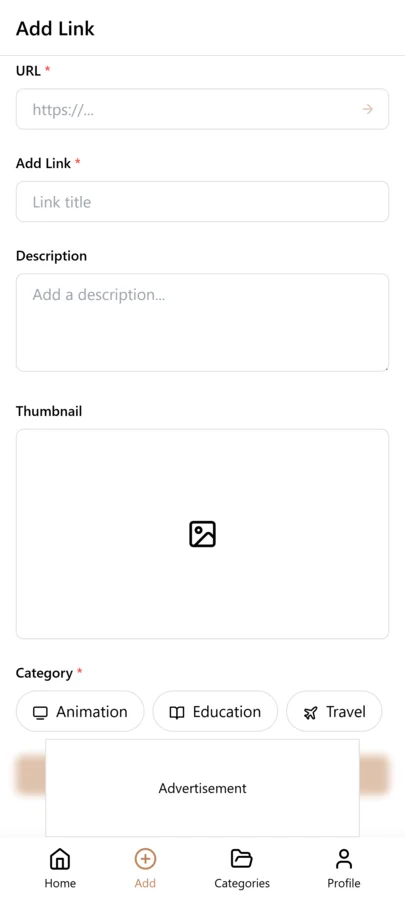
- Create three categories: Active Projects, Archived, and Resources — these are your stable top-level containers
- For each project, create a unique tag using a consistent naming convention: client-redesign, product-launch, q1-marketing
- When you find project-related content while browsing, copy the link from your browser or app
- Open LinkVault
- Tap + (Add Link)
- Paste the link
- Add notes with project context: "Competitor analysis for redesign — focus on navigation" or "API docs for integration phase"
- Tag with the project name and a content type tag: client-redesign, reference
- When the project completes, change its category from Active Projects to Archived — the tags stay so you can still filter by project
- Save
Tips for Project Organization
These best practices come from how the most organized LinkVault users manage project libraries with dozens of active and archived initiatives. They focus on consistency, context preservation, and maintenance — the three things that keep a project system working as it scales. Adopt the ones that fit your workflow and adjust as your needs evolve.
- Use consistent project tag naming: client-projectname format so tags sort alphabetically by client
- Add the project phase in notes (research, execution, review) so you can see where each link fits in the workflow
- Create a project brief as your first bookmark in each new project — a note with goals, scope, and key contacts
- Tag by deliverable type (design, dev, content) in addition to project name so you can filter by what kind of resource it is
- Do a weekly review: update project statuses, archive completed items, and delete links that turned out to be irrelevant
- Share project tags with collaborators so everyone on the team uses the same tag for the same initiative
- Move to Archived when a project completes — never delete, because past project resources often inform future similar work
- Use a status tag like in-progress or blocked on links you need to act on, so your project filter doubles as a task list
- For recurring projects, append the period to the tag: q1-marketing, q2-marketing — this keeps iterations separate but connected
Tagging Project Bookmarks by Phase and Resource Type
Project bookmarks serve different purposes at different stages of a project, and phase tags make this structure visible. A research-phase bookmark is different from an execution-phase bookmark, and being able to filter by phase helps you find the right resources at the right time. Use phase tags like research, planning, execution, and review to mark where in the project lifecycle each resource is most useful.
Resource-type tags add a second dimension. Reference resources (documentation, guides, templates) are consulted throughout the project. Tool resources (apps, services, calculators) are used actively. Deliverable resources (examples, inspiration, benchmarks) inform the output. By tagging each bookmark with both phase and resource type, you can filter to "all research-phase reference resources" or "all execution-phase tools" — precise filtering that helps you find exactly what you need for your current project stage.
Cross-referencing shared resources across projects is where this system shines. When you save a resource that is useful for multiple projects, tag it with all relevant project names plus the phase and resource-type tags. When you start a new project that shares characteristics with a past one, you can filter by the resource-type tag and find resources from the old project that apply to the new one, giving you a head start instead of starting research from scratch.
Monthly Project Review and Archival Habit
Active project libraries need regular maintenance to stay useful, and completed projects need to be archived cleanly so their resources remain findable for future reference. A monthly project review of twenty minutes per active project keeps your bookmarks aligned with the project's current phase and ensures completed projects are properly archived.
For each active project, filter by the project-name tag and review the bookmarks. Check that phase tags are current — a resource tagged research that is now needed during execution should be re-tagged. Delete bookmarks that are no longer relevant to the project's current direction. Add new bookmarks you have saved during the month and ensure they have the correct project and phase tags. If the project has shifted scope, retire tags for aspects that are no longer relevant.
When a project completes, do a thorough archival pass. Move all project bookmarks to an Archive category, add a completed tag, and remove active-status tags. Before archiving, review the bookmarks and note which ones were most valuable — add a note like "key reference for this project" to the most useful entries so that when you start a similar project in the future, you can filter by the old project tag and immediately find the proven resources.
Handling Large and Long-Running Projects
Large projects that run for months or years accumulate hundreds of bookmarks, and without sub-organization, the project tag becomes an overwhelming dump of links. The solution is to break large projects into sub-projects or phases, each with its own tag, while maintaining the parent project tag for holistic filtering.
For a year-long website redesign project, you might use tags like website-redesign-research, website-redesign-design, website-redesign-development, and website-redesign-launch. Each sub-tag covers a phase of the project, and all also carry the parent website-redesign tag so you can filter to the entire project when needed. When you are in the design phase, you filter by website-redesign-design to see only the resources relevant to your current work.
Periodic cleanup is essential for long-running projects. Every two to three months, review the project bookmarks and remove entries that are no longer relevant. Projects evolve, and bookmarks saved early in the project may reflect directions that were later abandoned. Without cleanup, the project tag accumulates stale resources that dilute your search results. A quarterly cleanup of fifteen minutes keeps the project library focused on resources that are actually useful for the current project direction.
Common Project Bookmarking Mistakes
- Mixing personal and project links in the same tag — when your project tag contains personal bookmarks, filtering by project returns irrelevant results, so keep personal and project bookmarks in separate categories or use distinct tag prefixes
- No phase tags — without phase tags, all project bookmarks are jumbled together regardless of when they are useful, so tag each bookmark with the project phase it belongs to for time-based filtering
- Keeping archived projects in active status — completed project bookmarks that still carry active tags clutter your current project filters, so add a completed tag and remove active-status tags when archiving
- Not noting why a resource was saved for a project — a bare link in a project tag tells you nothing about its relevance, so always note how the resource applies to the project and what you used it for
- Duplicating resources across projects — when the same resource is saved twice for different projects, updates and notes get fragmented, so save it once and tag with multiple project names instead
Transitioning from Folder-Based to Project-Based Organization
If you currently organize bookmarks in folders and want to move to project-based tagging, a gradual migration is safer than a complete reorganization. Trying to migrate everything at once is overwhelming and often abandoned partway through, leaving you with a hybrid mess that is worse than either pure system.
Start by picking your two or three most active projects and creating project tags for them. Go through your existing folders and tag any bookmarks related to those projects with the project-name tag. Leave the bookmarks in their existing folders for now — the tags work alongside the folder structure, so you get the benefit of project filtering without disrupting your current organization.
As you get comfortable with project-based filtering, migrate more projects one at a time. For bookmarks that span multiple projects — a general reference that applies to several projects — remove them from project-specific folders and tag them with all relevant project names instead. Over several weeks, you gradually shift from folder-based to tag-based organization without ever losing access to your bookmarks or disrupting your workflow. The end state is a flat structure where tags do all the organization work and folders are no longer needed.
Frequently Asked Questions
How do I organize resources used across multiple projects?
Tag the link with every relevant project tag. Because tags are multi-dimensional in linkvault, a single link can carry client-redesign, product-launch, and shared-resources simultaneously. When you filter by any of those tags, the link appears in the results. This is one of the biggest advantages of tags over folders — a resource that serves two projects does not need to be duplicated or forced into one location. For resources that are truly cross-project and not specific to any initiative, create a Resources category and tag them with a topic tag like design-system or api-reference.
Should I delete archived projects?
No — keep them archived for reference. Completed project libraries often contain useful insights, patterns, and resources that inform future similar projects. When you start a new client redesign, being able to filter back to the previous redesign project and see what competitor analysis you did, what design patterns you explored, and what decisions you made is invaluable. Archived projects take up no mental overhead because they live in a separate category, but they are always one filter away if you need them. Only delete if you are certain the content is outdated or no longer relevant to anything you might do in the future.
How do I handle recurring projects?
Use period-specific tags: q1-marketing, q2-marketing, q3-marketing. This approach keeps each iteration filterable on its own so you can see exactly what you did in a specific quarter, while the shared marketing tag connects them all if you want to see your full marketing history. When a new quarter starts, create the new tag, copy any still-relevant resources from the previous quarter by tagging them with the new tag as well, and start adding new links. The old quarter remains archived but accessible.
What do I do with a paused project?
Leave it in Active Projects but add a paused tag so you can distinguish it from work in progress. When you are ready to resume, filter by the project tag and all your research, notes, and context are right there — the notes you added when saving each link will help you reconstruct where you left off. If the pause is long — several months or more — consider moving it to Archived and moving it back to Active when you resume. This keeps your Active Projects list focused on work you are genuinely doing right now.
Can my team collaborate on project bookmarks?
Yes. The most effective approach is for each team member to maintain their own linkvault library but agree on shared tag naming conventions for common projects. When someone finds a useful resource, they save it with the agreed project tag and share the link in your team channel. Team members can then save it to their own libraries with the same tag. For tighter collaboration, use a shared note or document that lists the canonical project tags so everyone stays consistent, and do a quick tag audit at the start of each new project to make sure everyone is using the same naming.
How do I handle bookmarks for projects that span multiple clients or companies?
Use client-name tags alongside project-name tags so you can filter by either dimension. A bookmark for a website redesign for Client A gets tagged with both client-a and website-redesign. This lets you filter to all bookmarks for a specific client across all their projects, or to all bookmarks for a specific project type across all clients. Keep client-specific resources tagged with the client name, and use notes to note which context each link serves. Never mix confidential client information — use separate categories or private tags for sensitive project resources.
What is the difference between project tags and project categories?
Categories provide broad grouping — all project bookmarks in one category. Tags provide specific filtering within and across categories — individual bookmarks tagged by project name, phase, and resource type. Use categories for the high-level separation between project bookmarks and other types like personal or learning. Use tags for the granular organization within projects that lets you filter to a specific project, phase, or resource type. The two work together: categories for broad buckets, tags for precise retrieval within and across those buckets.